
Blog
Quote to Cash Automation: How to Connect Quote, Contract, Invoice and Cash
nbetters · · 12 min read
Quote to cash automation links quoting, contracts, orders, billing and collections. Learn the steps, where revenue leaks, and how to build it on Dynamics 365.
Quote to cash automation replaces the manual handoffs between a sales quote and the cash that lands in your bank account with one governed workflow. A quote approved in your CRM creates the contract, order, invoice and collection steps without anyone retyping data. For growing firms that already run on Microsoft, the most practical route is usually to build that workflow on Dynamics 365 and Power Platform, because the quote, the approval logic and the billing handoff can share one data model. We are Betters Agency, a small independent Microsoft partner, and this guide covers what the process includes, where revenue leaks, and how to automate it without creating a new mess.
Key Takeaways
- Quote to cash (Q2C) runs from the first configured quote to cash applied and reported. CPQ (configure, price, quote) is only the front part of it.
- Most Q2C failures come from poor data ownership and disconnected systems, not from missing features. Fix the data model and approval rules before you automate anything.
- Automate the handoffs first: quote to contract, contract to order, order to invoice, invoice to collections. Each handoff is where rework and leakage hide.
- Measure the result against your own baseline: days to invoice, days sales outstanding, credit memos and disputed invoices.
- Dynamics 365 with Power Platform is a strong fit for many mid-sized firms, but Salesforce, HubSpot or HighLevel are sometimes the better choice. The comparison is below.
Table of Contents
- What quote to cash automation actually covers
- The stages of a quote to cash workflow
- Where revenue leaks in quote to cash
- How to automate quote to cash, step by step
- Governance and data integrity make or break the build
- How to measure the benefit
- When to choose Dynamics 365, and when not to
- Where we fit
- Perspective
- FAQ
- Sources
What quote to cash automation actually covers
Quote to cash is the end-to-end workflow that connects sales to finance. Salesforce describes it as starting when a salesperson configures a quote and ending only when payment is received and allocated, so the process is not finished when the customer says yes. Automation means software moves the work and the data from one stage to the next, instead of people exporting spreadsheets, forwarding emails and rekeying figures.
OneFlow defines quote to cash automation as digitizing the whole sequence from quote to payment in a single workflow, in place of spreadsheets, email chains and manual entry. That definition is useful because it names the real enemy: the gaps between systems, not any one system.
Quote to cash versus CPQ
CPQ stands for configure, price, quote. It is the tooling that guides product selection, applies pricing and discount rules, and produces a proposal. Maxio explains that CPQ is an embedded part of the quote-to-cash lifecycle with those three capabilities. Quote to cash is the larger chain: contract, order, fulfillment, invoicing, collection and revenue recognition follow the quote.
In practice, CPQ helps you win the deal with a correct price. Quote to cash makes sure that correct price is what gets contracted, invoiced and collected.
One point on payments: if your quotes end in card payments, the processing fees are part of your real margin. Understanding how blended pricing works tells you whether the rate on a quote reflects what each card transaction actually costs you.
The stages of a quote to cash workflow
Stripe’s guide lays out the sequence as product configuration, pricing, quoting, contract creation and negotiation, order management, invoicing, payment collection and revenue recognition. The table below pairs each stage with the manual habit that usually breaks it and what automation changes.
| Stage | Typical manual failure | What automation does |
|---|---|---|
| Configure and price | Reps quote from old price sheets | One governed catalog with discount limits |
| Quote and approval | Approvals chased by email | Rules route exceptions to the right approver |
| Contract | Terms retyped from the quote | Approved quote populates the agreement |
| Order and handoff | Delivery learns of the deal late | Order or project record created on signature |
| Invoice | Billing rekeys scope and rates | Invoice generated from contract and delivery data |
| Collections | Reminders sent when someone remembers | Scheduled follow-ups tied to terms |
| Revenue recognition and reporting | Month-end reconciliation scramble | Data already consistent when finance closes |
Revenue recognition deserves a note for US firms. Vistaar’s RevOps glossary points out that recognition follows ASC 606 under US GAAP, which is why billing data and contract data need to agree before finance closes the books. Your controller or outside accountant should confirm how recognition applies to your contracts.
The unstructured layer
Tekst notes that Q2C automation has to cover emails, PDFs and informal requests as well as structured ERP transactions, because bottlenecks tend to sit in the unstructured part. A customer who replies to a quote by email with a changed scope is a data event. If it never reaches the system of record, the invoice will be wrong later.
Where revenue leaks in quote to cash
Leakage rarely comes from one dramatic failure. It comes from small mismatches that no one owns.
- Pricing drift: the quoted rate differs from the contracted rate, and the invoice uses a third.
- Missed billables: work delivered but never added to an invoice because the handoff from sales to delivery lost the scope.
- Rejected or corrected invoices: the customer disputes a line item, and payment slips by weeks.
- Renewals and change orders: amended terms live in an email thread, not in the billing record.
MGI Research estimates that even a 0.1% error rate from dirty data in quote-to-cash systems leads to at least 1% revenue leakage, and finds that most billing implementations that stumble do so because of poor data management. Zuora describes a related pattern it calls the dirty deal: a rep builds a customized contract in the CRM, then a disconnected billing system rejects it because it cannot process the pricing logic.
The lesson is that automation applied to unclean data produces wrong invoices faster. Sequence matters.
How to automate quote to cash, step by step
Here is the routine we follow, and what each step takes.
1. Map the current process and name an owner for each field
Write down every handoff from the first quote to cash applied, including the ones that happen in email. For each data element (price, term, billing schedule, tax status, customer legal entity) name one system of record and one accountable person. This is where most projects either succeed or quietly fail. Our CRM strategy and architecture work does this before anything is configured, so the data decisions are settled while changing them is still cheap.
2. Standardize the catalog and pricing rules
Zuora recommends a centralized product catalog with pricing rules, discount limits and usage tiers, so that reps cannot invent a price the billing side cannot process. The trade-off is flexibility: tight rules slow down a rep who wants to improvise a custom deal. Decide up front which exceptions are allowed and who approves them.
3. Automate approvals and the quote-to-contract handoff
Alguna’s guide gives a typical example: approval rules that route discounts above a set threshold to a manager, with the approved quote converting automatically into a contract. In a Microsoft environment, this is the kind of logic we build with Power Automate on top of Dynamics 365, so the approval, the audit trail and the resulting record live together.
4. Create the order or project record on signature
The moment a contract is signed, delivery should receive a complete record: scope, rates, milestones and billing terms. For professional services firms, this is the sales-to-project handoff, and we cover it in detail in our guide to CRM sales to project handoff control.
5. Generate invoices from contract and delivery data
Invoices should draw from the contract and from what was actually delivered, not from a spreadsheet rebuilt at month end. Our technical guide to preventing billing leakage walks through the controls, and project billing and reporting automation shows how the pieces connect.
6. Connect collections and reporting
Payment reminders, disputed-invoice flags and cash application status should flow back to the same record the salesperson sees. Power BI dashboards then show days to invoice, aging and win-to-cash timing from one consistent dataset, rather than three exports reconciled by hand.
7. Test with real exceptions before go-live
Run the ugly cases: a mid-term amendment, a partial shipment, a credit note, a customer with two legal entities. A process that works only for the clean path is not automated, it is demonstrated. Our test plan approach shows how we structure this.
Governance and data integrity make or break the build
MGI Research’s finding is worth restating as a design rule: the killer of these projects is data management treated as an afterthought, without clear ownership, budget or established processes. Technology is rarely the cause.
That is why we treat governance and data integrity as part of the build, not a cleanup phase afterward. In practice that means duplicate prevention, controlled access to pricing and billing fields, and traceable exceptions. Our articles on preventing duplicate CRM data and governing access to prevent billing leakage describe the controls in more detail, and our data governance consulting overview explains scope and process.
Celigo advocates a federated model in which IT keeps governance over data while line-of-business users build and manage the automations that affect their own work. That fits Power Platform well, as long as the guardrails are set first. Adoption matters just as much: a workflow that sales reps route around is not automation. We build adoption and enablement into the project, and our approved track record includes onboarding more than 5,000 users.
A note on AI in quote to cash
Copilot and AI features can draft quotes, summarize contract terms or flag anomalies. A Zuora-commissioned Harris Poll reported by ERP.Today found that 41% of finance decision makers cite difficulty integrating AI outputs into finance workflows and 33% point to the inability to audit or explain results. The practical takeaway is to give AI a narrow, auditable job on top of clean data, for example summarizing a contract for review, rather than letting it write to billing records unsupervised.
How to measure the benefit
Set your baseline before the project starts, from your own records. Useful measures include days from signature to first invoice, days sales outstanding, invoice correction rate, quote turnaround time and the number of deals that needed manual repricing.
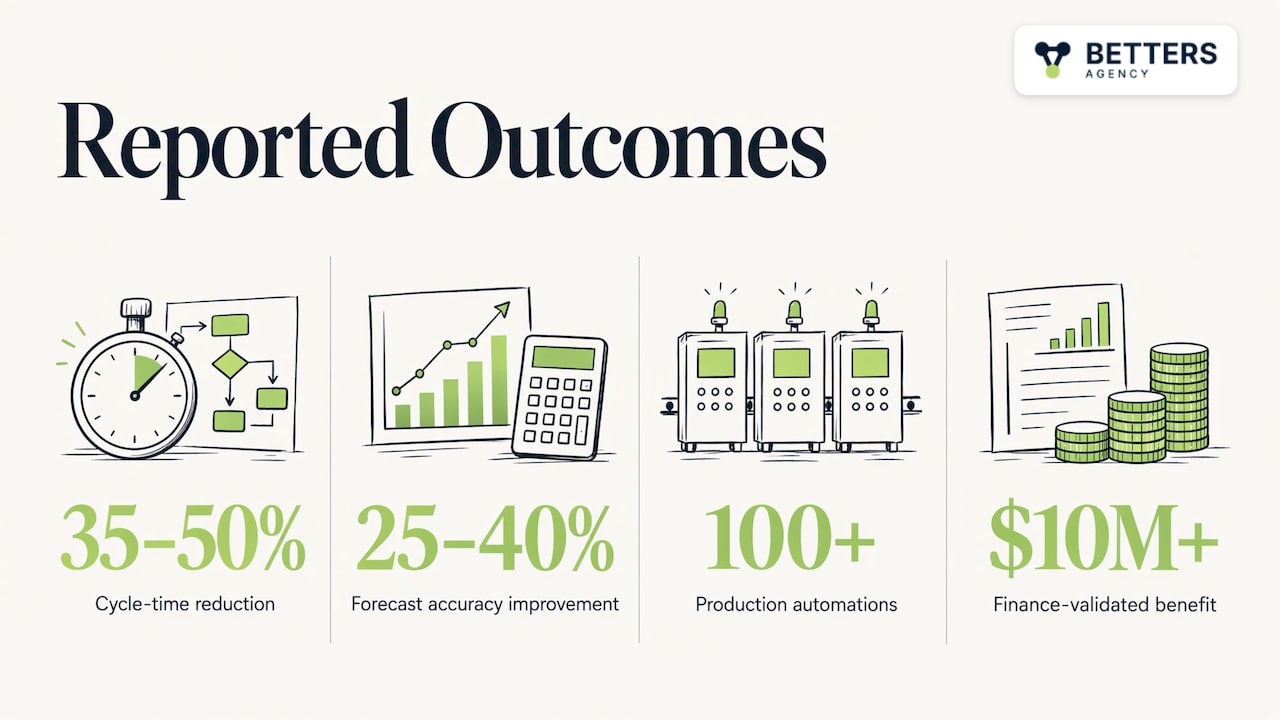
Published research gives a sense of the range. A 2026 peer-reviewed study reports that integrated Q2C implementations reduce cycle times by 35 to 50% and improve forecast accuracy by 25 to 40%. Those are findings across studied implementations, not a promise for any one firm, so use them to frame expectations and your own baseline to judge results. For a sense of the scale we work at, our approved figures are 100+ production automations and $10M+ in finance-validated benefit across engagements.
For more on building the business case, see our project-to-cash leadership decision framework.
When to choose Dynamics 365, and when not to
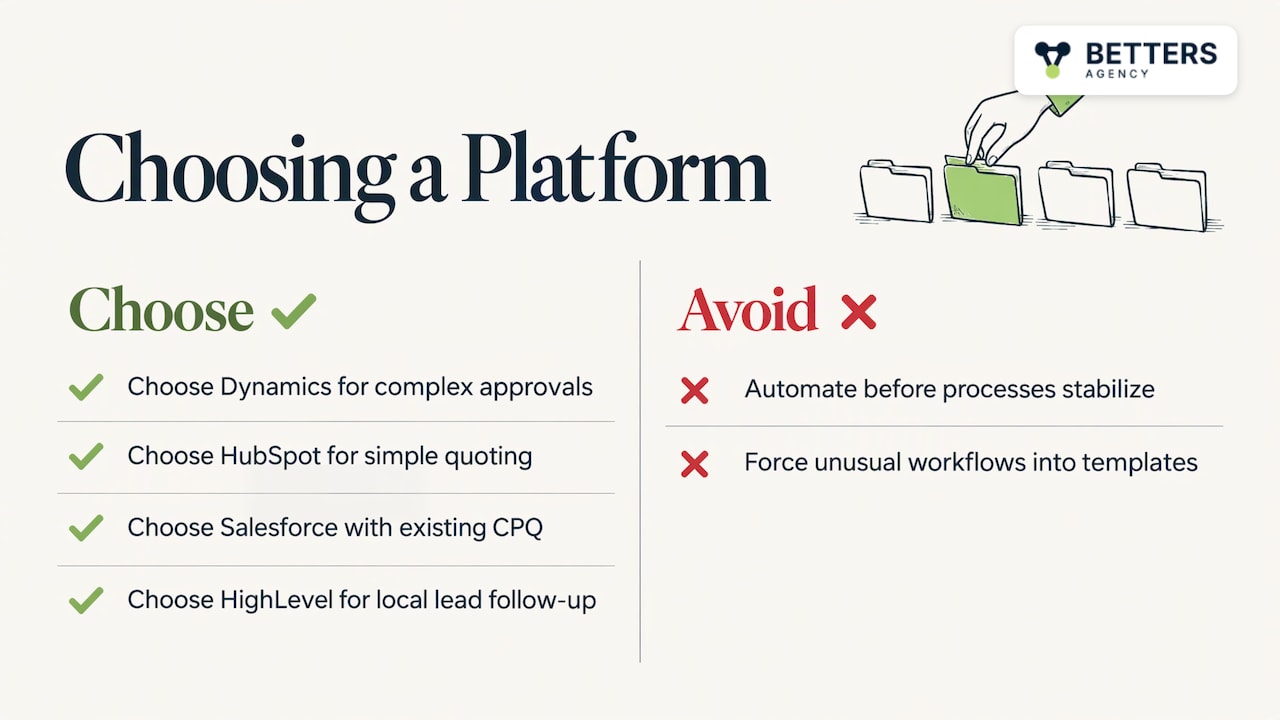
Dynamics 365 with Power Platform suits firms that already use Microsoft 365, need quotes tied to project delivery or complex approvals, and want billing logic that matches how they actually work. It is also flexible when your process is unusual enough that a packaged template would be forced to bend.
The trade-off is that a flexible platform asks for more design decisions up front. If your sales motion is simple, your team is small and you mainly need a fast, low-maintenance CRM with quoting built in, HubSpot is sometimes the better choice. If your organization is heavily invested in Salesforce and its CPQ ecosystem, Salesforce is sometimes the better choice, and for local service businesses that live on lead capture and follow-up automation, HighLevel can be. Our recommendation is wrong in those cases, and we will say so. Our comparison of Dynamics 365 against Salesforce and HubSpot goes through the criteria.
Another case where a platform build is the wrong answer: your process is not yet stable. Automating a process that changes every quarter hardens the wrong thing. Fix the process first, even if on paper.
Where we fit
Betters Agency is a small firm and an independent Microsoft partner. You work directly with the person who builds your system, and we cover Dynamics 365, Power Platform, custom development and integrations, and automation across Power Automate and other tools. For quote to cash, that usually means Dynamics 365 implementation, approval and handoff automation, billing integrations and Power BI reporting, all designed around governance and data integrity.
For firms that want a defined starting point, our published packages start at $1,495 one-off for Dynamics 365 Sales CRM and $2,995 one-off for Dynamics 365 Project Operations, as listed in November 2026 on our packages page.
If you would like to talk through your own quote-to-cash chain, start from the services page and tell us where the handoffs break.
Perspective
We approach quote to cash as a data problem first and a software problem second. Most of the failed projects we hear about were not short on features. They automated a process whose pricing, customer and contract data nobody owned, and the system then produced wrong invoices at speed.
Our view is that the architecture and data decisions come before configuration: which system holds the price, who may override it, what happens on an amendment. Once those are settled, Dynamics 365 and Power Automate can carry a quote through approval, contract, order and invoice with an audit trail, and Power BI can show finance what is happening without a month-end rebuild.
Because we are a small firm, the person who designs the workflow is the person who builds it, which keeps those decisions from being lost between a sales conversation and delivery. The honest limit is that a flexible build takes more thinking than a template. If a simpler tool fits your motion, take it.
Derek
FAQ
How can I automate the quote-to-cash process?
Start by mapping each handoff and assigning one owner and system of record to every key data field. Then automate in order: pricing rules and approvals, quote-to-contract, order or project creation, invoice generation and collections follow-up. Test exceptions such as amendments and credits before go-live.
What is the difference between quote to cash and CPQ?
CPQ covers configuring products, applying pricing rules and producing the quote. Quote to cash includes CPQ and continues through contracts, orders, invoicing, payment collection and revenue recognition. In short, CPQ helps win the deal and quote to cash ensures it is billed and collected correctly.
What is a quote-to-cash workflow?
It is the sequence of steps from the first configured quote to cash applied: pricing, quote, contract, order, fulfillment, invoice, collections and revenue recognition. Sales, finance, operations and sometimes legal all touch it. Automation connects those stages so data moves once instead of being retyped.
Do I need new software to automate quote to cash?
Not always. Many firms already own CRM, accounting and e-signature tools, and the larger gain comes from connecting them with governed workflows and clean data. A platform change makes sense when your current tools cannot hold the pricing, approval or billing logic your business needs.
Sources
- The Basics of the Quote-to-Cash Process, Salesforce
- Quote-to-cash automation, OneFlow
- Quote-to-Cash vs CPQ: Differences Explained, Maxio
- What is quote to cash (Q2C)?, Stripe
- What Is Quote-to-Cash (Q2C)? Definition for RevOps, Vistaar
- Quote-to-Cash Automation, Tekst
- Bad Data Hygiene Kills Usage Billing, MGI Research
- The Finance Leader’s Guide to Quote-to-Cash, Zuora
- Quote to cash automation: Step-by-step guide, Alguna
- Guide to quote-to-cash automation, Celigo
- AI in Quote-to-Cash Workflows, ERP.Today
- Measuring Business Value of End-to-End, IJRAI
- What Is Blended Pricing?, 71P
Recommended
- Implement Project-to-Cash Automation
- Project-to-Cash Automation: Leadership Decision Framework
- Project-to-Cash Automation Implementation Guide
- Contract Management Automation: A Practical Guide for US Businesses
Articles are for informational and educational purposes only, Betters Agency LLC is not a licensed financial advisor or legal counselor and does not provide these services, readers are encouraged to check multiple sources for accuracy.