
Blog
Microsoft vs Alternatives in Business Process Automation
nbetters · · 14 min read
Why Microsoft Is the Stronger Default for Business Process Flow, and Where Alternatives Fit Used with permission from Microsoft.
Why Microsoft Is the Stronger Default for Business Process Flow, and Where Alternatives Fit
Used with permission from Microsoft.
This is a Betters Agency opinion, and we owe you our bias up front. We are a Microsoft-focused consultancy, and we earn our living helping Minnesota project-centric professional and technical services firms build on Dynamics 365 and the Power Platform. So when we argue that a Microsoft business process flow is usually the stronger default, read it knowing we have a commercial interest in that answer. Our honest position on business process flow vs alternatives is narrower than a blanket endorsement: for Twin Cities services teams already working in Dataverse, a business process flow is the better default for guiding people through a multi-stage record, and there are still clear situations where a cloud flow, a canvas app, a lighter checklist, or a dedicated orchestration engine is the right call instead.
We will make the Microsoft case, then name the alternatives fairly and tell you exactly when we would pick them. Along the way we will keep the recommendation tied to a concrete operating job, because that is where platform decisions are actually won or lost.
Start with the job, not the tool
A business process flow is a guided human workflow. Microsoft documents the business process flow as stage-and-step guidance rendered on a model-driven app form, where each step maps to a Dataverse column and a required step can hold a record in its current stage until someone supplies the value. That is the whole point: it keeps a person moving a record through agreed stages in the right order, with the right data captured along the way.
It is guidance, not general automation. The visual bar shapes data entry and stage progression; the actual work behind it comes from business rules, scripts, workflows, or flows. If you remember one thing before comparing options, remember that distinction. A business process flow answers the question "how do we walk a person through this record," while event automation answers a different question entirely.
For a Minneapolis systems integrator, that maps cleanly onto the sales-to-delivery handoff: qualify, scope, staff, contract, kick off. Those are human stages on a project or opportunity record, and that is exactly the shape a business process flow was built for. A Saint Paul engineering consultancy with a similar pipeline sees the same fit. The test is simple. If your bottleneck is a person forgetting a step, missing a required field, or handing off without an owner, a guided stage bar addresses it directly. If your bottleneck is work that should fire the moment an event occurs, keep reading, because that is a job for a different tool.
Why Microsoft is our default for Dataverse-centered work
When the process lives on related business records, model-driven apps are the natural home. Microsoft describes model-driven apps as built on Dataverse data models, forms, views, and relationships, and well suited to data-dense, process-driven work. A business process flow sits directly on those forms, so the guidance and the data are the same system. There is one record, one security model, and one place to maintain the process.
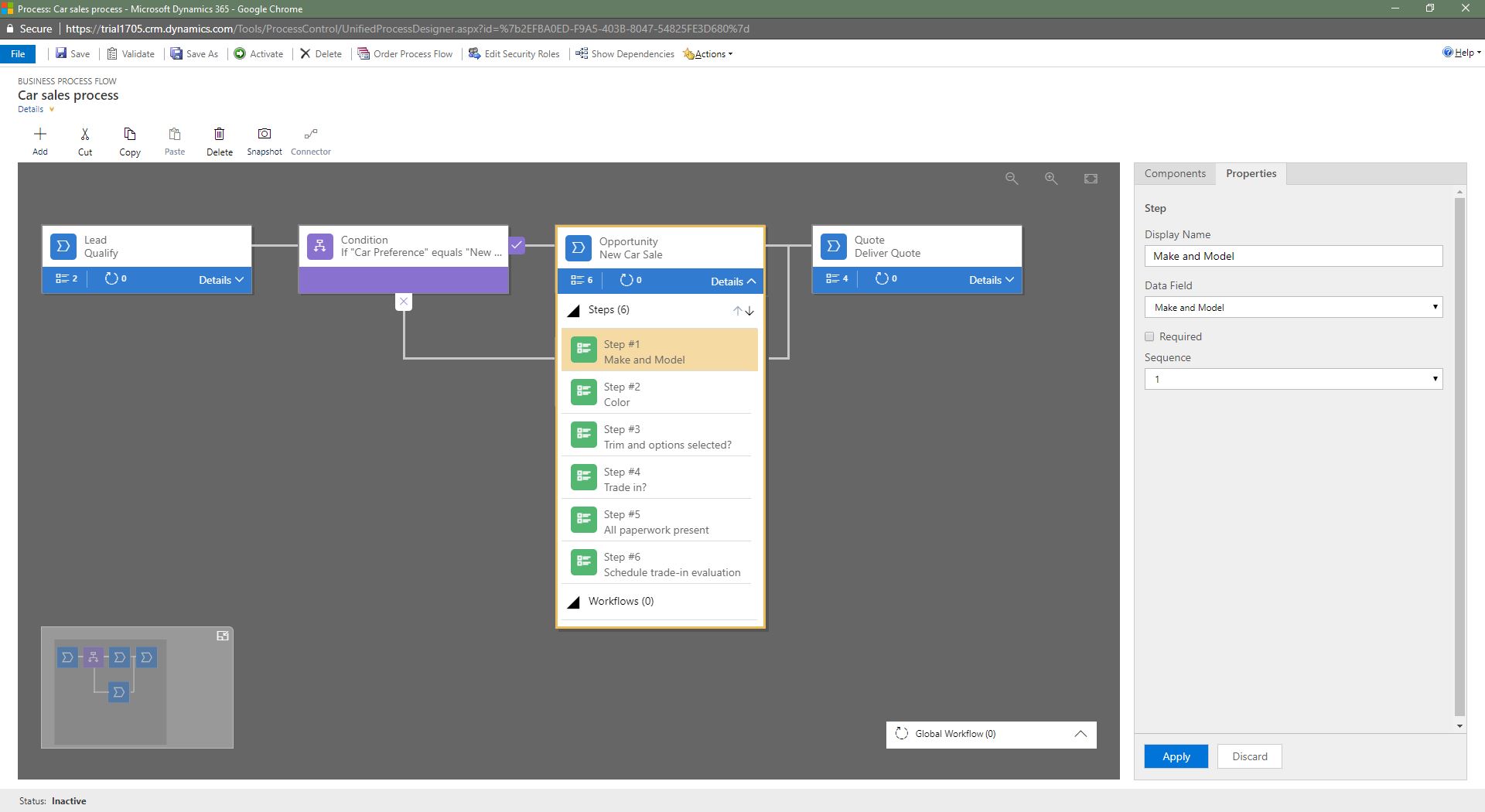
Scope matters here. A single flow can span up to five related tables, and Microsoft documents up to 10 active business process flows per table and up to 30 stages per process. For most services workflows that headroom is plenty, and the limits act as a useful forcing function: if you find yourself wanting more than 30 stages, the process is probably two processes wearing one coat, and splitting it will serve your project managers better than stretching a single bar.
Building one is a deliberate, sequenced task rather than a quick toggle. Microsoft’s guidance to create a business process flow inside a solution has you pick a starting table, add stages with column-backed steps, mark only the genuine gates as required, validate, assign the security roles that may use it, order it against any other active processes, and then activate. A draft stays invisible to users until activation, and activation errors have to be corrected before anyone sees the bar. For a services firm, that friction is healthy: it forces agreement on stages and required data before the process reaches a single project manager. Just do not read licensing entitlements off that build experience; those are a separate check we cover below.
This is also where our sibling business process flow implementation guide goes deep on stage and step design, security, app inclusion, process order, activation, and rollback. We will keep this piece at the decision level.
When several processes apply to the same record
A services team rarely runs just one guided process. When several business process flows apply to the same table, the first active process available to the user by process order becomes the default, and a single record can carry more than one process instance with only one shown at a time. People can switch between them.
That behavior is genuinely useful. A project record can support both a delivery process and a change-order process, and a given user sees the one that matches their role and the order you set. It is also a design responsibility. Set the process order deliberately so the right default appears for the right role, and when a project manager reports that the bar is missing or looks wrong, trace it to role access, app inclusion, or process order before assuming a defect. Treat "which process shows up, for whom" as a decision you own, not an accident of configuration.
The ecosystem and governance case
The stronger argument for the Microsoft default is not the visual bar. It is everything around it. Power Platform governance spans environments, security roles, Microsoft Entra ID, data loss prevention policies, auditing, and admin analytics. When your guided process already lives inside that boundary, you inherit controls your IT approvers already understand instead of assembling them after the fact. For a Minnesota firm whose security team already runs Microsoft 365, that shared boundary shortens a lot of approval conversations.
Security is layered, and you have to design it. Activating a flow creates a custom Dataverse table for its process instances, and by default only System Administrator and System Customizer roles can see that table, so runtime users need explicit privileges before the process is usable. That is a control to design, not a guarantee you receive for free. Governance tooling gives you the levers; the compliance and adoption outcomes still depend on how your team operates them. We say that plainly, because overselling governance is how projects lose trust with an approver.
One design caution belongs in any honest opinion piece. Microsoft’s guidance on branching explains that branch conditions depend on the immediately preceding stage, and it warns that people may still see branch stage names and infer sensitive actions even without access to the underlying rows. If merely seeing a stage name would disclose something confidential, split that work into a separate process. Treat the shape of the process as an information boundary in its own right, alongside row-level security.
Implementation economics, without invented numbers
We will not hand you an ROI figure. We do not have your baseline, and fabricated savings are worse than none. What we can speak to honestly is switching cost and where effort accrues.
A business process flow is a solution component with real dependencies. Microsoft solution dependency tracking protects component integrity, can block an import when a required component is missing, and can prevent deleting something other components rely on. The generated process-instance table has to be handled deliberately during export. That is a reason to plan application lifecycle management before you activate anything in production, and it is a normal cost of running a governed platform. Our recommended rollback is conservative: restore the prior active definition and security configuration rather than delete process-instance data. We treat rollback as returning to a known good state, and we validate the change in a nonproduction environment first.
The economic advantage of the Microsoft default is mostly integration and reuse. If your firm already runs Microsoft 365, Dataverse, or Dynamics 365, the guided process reuses identity, data, and admin tooling you already own and staff. If you do not, that advantage shrinks, and the alternatives below become more attractive. For a Minnesota engineering or IT consulting firm still deciding where its sales-to-delivery handoff should live, that reuse question is often the deciding one, so we put it near the front of every conversation. The business process flow business value sibling turns those levers into a governance and pilot decision with named owners and gates.
Measuring whether the guided process is working
A platform opinion is only credible if you can tell whether the choice paid off. Because instances live in Dataverse, reporting on process-instance data can populate views, charts, and dashboards, which gives an operations leader concrete signals to watch.
The measures we recommend baselining before a pilot are practical ones: how long records sit in each stage, how many complete versus how many stall, where people backtrack to an earlier stage, how often a required field blocks progress, how often users switch between processes on the same record, and adoption broken down by role. Capture those numbers before you turn the guided process on, so you have something to compare against afterward. A moving number shows activity, and activity is not proof of cause, so pair the telemetry with a process owner’s read and direct feedback from the people living in the form every day. For a Twin Cities professional services team, stage aging on the delivery handoff is usually the first measure worth watching, because that is where a missed step turns into a late kickoff.
Credible counterarguments: when an alternative fits
An honest opinion names its own limits. Here is where we would reach for something other than a business process flow.
Use a cloud flow when the job is automation rather than guidance. Microsoft cloud flows are the right tool when work should run automatically, instantly, or on a schedule. If the requirement reads "when a record changes, do these three things," that describes a trigger, and a trigger belongs in a cloud flow. Microsoft’s own business logic guidance draws the same line: a business process flow defines steps for people inside model-driven apps, while cloud, instant, scheduled, and desktop flows address other automation jobs. Many real solutions use both together, with a guided flow keeping the person on track and a cloud flow handling the background work such as notifications, provisioning, or record creation. A Minnesota managed services provider often lands here: a guided bar for the human onboarding steps, and cloud flows firing the account setup behind them.
Use a canvas app when the interface has to be highly tailored, or the data lives outside Dataverse. Microsoft notes that canvas apps give you more layout control and broader connector-based data options. A guided model-driven form is deliberately consistent, which is a virtue for a standardized process and a constraint when you need a bespoke interaction or a screen over non-Dataverse sources. When the experience itself is the requirement, a canvas app fits better.
Use a lighter tool when the process does not justify a governed application. If the workflow is short, low-risk, and rarely changes, a checklist or an existing work-management tool your team already uses may be the responsible answer. Standing up a governed Dataverse process for a five-step, low-stakes task is over-engineering, and we will say so even though it means less platform work for us. Credibility is worth more than a slightly larger engagement.
Consider a dedicated orchestration engine for complex, cross-system processes. When a process must coordinate events, human tasks, services, and APIs across heterogeneous systems, a BPMN platform such as Camunda is worth evaluating. Per Camunda’s documentation, it models processes in BPMN and orchestrates human tasks, services, and APIs through executable process instances and job workers. That fits organizations willing to own BPMN models and job-worker engineering. It asks for a different commitment in skills and operations, and it earns its place when the coordination problem clearly outgrows a guided form on a Dataverse record.
The criteria we actually use
We size the decision with five questions, in this order. That is the real substance of business process flow vs alternatives: matching the tool to the operating job, and being honest when the job points somewhere else.
- Architecture. Does the process live on related Dataverse records that people move through stages? If yes, the default holds. If the core need is event automation or non-Dataverse data, look at cloud flows or canvas apps.
- Skills. Who will own this after go-live? A firm with Power Platform makers can maintain a business process flow comfortably. A team ready to own BPMN and engineering may get more from Camunda.
- Integration. How much of your identity, data, and admin tooling is already Microsoft? The more that is true, the stronger the default becomes, because you reuse what you already staff.
- Governance. Which environment, roles, and data policies must this process respect, and who administers them? Inherited controls carry real value in a services firm with approvers to satisfy.
- Switching cost. What does it cost to change your mind later, given solution dependencies and the generated instance table? Plan the exit before you build the entrance.
If those questions point at Microsoft, and for many of the Minnesota services firms in our intended audience they do, a business process flow is the stronger default. If they point elsewhere, we would rather tell you than force the fit. The order matters too: architecture and integration usually settle the question before skills, governance, and switching cost fine-tune it.
The criteria, worked through one onboarding handoff
Abstract criteria are easy to nod at, so here is how the five play out for one common case: a Twin Cities managed services provider standardizing its new-client onboarding handoff from sales to the service desk. On architecture, the handoff clearly lives on related Dataverse records, an account or opportunity moving through named stages such as contract signed, tenant provisioned, agents deployed, and first review booked, so the default holds. On skills, this provider already staffs a Power Platform maker who maintains its ticketing customizations, so ownership after go-live is realistic without new hires. On integration, the firm runs Microsoft 365 and Intune, so identity and device tooling are already Microsoft, which strengthens the default rather than weakens it. On governance, the onboarding data touches customer tenant details, so it belongs inside an environment with the data loss prevention and auditing the security lead already administers. On switching cost, the team accepts that the generated instance table and its solution dependencies mean they plan application lifecycle management before activating in production.
Four of the five point at Microsoft, so we would recommend a business process flow for the human handoff, paired with a cloud flow that fires the background account setup once the contract stage completes. Had the same provider lacked any Dataverse footprint and needed a screen over a third-party professional services automation tool, the architecture and integration answers would have flipped, and we would have pointed them at a canvas app or a lighter checklist instead. That is the value of running the questions in order: the decision falls out of the operating facts rather than a platform preference, and it stays defensible when an approver asks why.
A word on licensing and ownership
We are deliberately not quoting a plan or a price. Licensing changes, and it depends on your tenant and agreement. Before you commit, verify current Microsoft licensing for your users and the environments involved, using your own tenant and contract as the source of truth.
Name your owners with the same care. We look for an executive sponsor to hold the outcome, a process owner to define and maintain the stages, a platform owner to manage the environment and solutions, and a person accountable for adoption. A guided process with no clear owner drifts, and no amount of tooling fixes an ownership gap. For a lean Twin Cities firm, one person may wear two of these hats, but the responsibilities themselves should never go unassigned.
Questions Minnesota teams ask us
Is a business process flow the same as automation? No. It guides a person through stages on a form and captures required data along the way. Work that should run on a trigger, a button, or a schedule belongs in a cloud flow. The two often run side by side in one solution.
Can one flow cover our entire sales-to-delivery lifecycle? Often, yes, within limits. A single flow can span up to five related tables, with up to 30 stages per process and up to 10 active flows per table. If your lifecycle wants more than 30 stages, treat that as a signal to split it into distinct processes rather than a limit to fight.
Who can see the process once we turn it on? Activation creates a custom Dataverse table for the process instances, and by default only System Administrator and System Customizer roles can access it. You grant runtime users explicit privileges as a deliberate step, and you keep sensitive stage names off processes that some viewers should not infer.
What happens if we need to undo it? Plan for that before you build. Solution dependency tracking can block an import or a deletion when components rely on each other, so we roll back by restoring the prior active definition and security configuration and validating in a nonproduction environment first, rather than deleting process-instance data.
We are a Minnesota firm not yet on Dataverse. Should we still start here? Maybe not first. The Microsoft advantage leans heavily on reusing identity, data, and admin tooling you already own. If none of that is in place, weigh a lighter tool for the immediate need and revisit a governed process when your platform footprint justifies it.
Our recommendation
For a Twin Cities professional or technical services firm already invested in Dataverse and Dynamics 365, a Microsoft business process flow is our default for human-guided, multi-stage record work, and we back that with the ecosystem, governance, and integration around it. For event automation, bespoke interfaces, trivial checklists, or heavy cross-system orchestration, we would choose a cloud flow, a canvas app, a lighter tool, or Camunda instead. That is the disclosure and the decision, together.
If you want a second set of eyes on one real workflow before you choose, Review a Workflow with Betters Agency. You can also explore our Power Platform services.