
Blog
Power BI Integration Services: Scope, Architecture and Risks
nbetters · · 13 min read
What Power BI integration services include, how data connects and refreshes, where Power Apps fits, and how to scope the work so reports stay accurate.
Power BI integration services connect your reporting layer to the systems where work actually happens: your CRM, ERP, project and finance tools, SharePoint, SQL databases and the apps your people use daily. Done well, the result is one governed set of numbers that refreshes on a schedule you chose, respects who may see what, and feeds back into the processes that produce the data. Betters Agency is a small, independent Microsoft partner that designs and builds this work on Dynamics 365 and Power Platform, with the architecture and data decisions settled before anything is configured.
This guide is for business leaders and operations owners who need to scope an integration project: what is included, which decisions matter most, what usually goes wrong, and how Power Apps and Power Automate extend a dashboard into a working process.
Key Takeaways
- Integration happens at three levels (tenant, workspace and solution), and each one has its own security, licensing, governance and training questions.
- The storage mode you choose for each data source (Import, DirectQuery and others) determines refresh behavior, speed and load on your source systems.
- Power Apps connectors and Power Automate turn a report into a process: write data back, trigger refreshes and act on what a dashboard shows.
- Governance decisions such as data loss prevention policies and row-level security are cheaper to design first than to retrofit.
- Salesforce, HubSpot or HighLevel are sometimes the better choice, and the right answer depends on where your data already lives.
Table of Contents
- What Power BI integration services include
- How Power BI connects to your business data
- Data quality, security and governance
- Power Apps data connectors and integration
- Connecting Power BI to Dynamics 365, ERP and finance data
- A scoping checklist before you hire anyone
- When this approach is the wrong one
- How we can help
- Our perspective
- FAQ
- Sources
What Power BI integration services include
The phrase covers more than “connect a data source.” Microsoft’s Power BI implementation planning guidance describes integration with other services at three levels, and it is a useful way to scope a project:
- Tenant level. Set up by Fabric administrators for the whole organization, for example Microsoft Teams integration or private network connectivity through Azure ExpressRoute.
- Workspace level. Applied to a team’s working area, for example Git source control with Azure Repos so report changes are versioned.
- Solution level. Built into a particular report or app, for example Python or R custom visuals, or an embedded Power Apps canvas app.
Microsoft’s guidance adds that each integration should be evaluated for security, licensing, governance and user-training implications, and that you should read the technical documentation and run a proof of concept before a tenant-wide rollout. That sequence is the core of a sound engagement: decide which level each requirement belongs to, prove it on a small scope, then extend it.
In practice, a Power BI integration project usually has these work packages:
- Source inventory and data model design. Which systems hold which facts, who owns them, and what a report should treat as the authoritative source.
- Connectivity. Connectors, gateways and credentials for each source.
- Transformation. Cleaning, joining and shaping data so that definitions such as “active customer” or “billable hour” mean one thing.
- Refresh and performance design. Choosing how and when each dataset updates.
- Security and governance. Access rules, data loss prevention and naming standards.
- Process integration. Automation and apps that let people act on the numbers.
- Adoption. Training and ownership so the reports are used and maintained.
The fifth and seventh items are the ones most often skipped, and they are where reporting projects decay. A dashboard that nobody trusts or owns is a cost, whatever the technical quality of its connections.
How Power BI connects to your business data
Power BI reaches data through three mechanisms, according to Microsoft’s data refresh documentation: built-in connectors to the source, an on-premises data gateway for sources it cannot reach over a direct network connection, and Power Query transformations that shape the data on the way in.
A gateway is a small piece of software installed inside your network that acts as a secure bridge between the Power BI service in the cloud and a system such as an on-premises SQL Server. If your accounting or operations data sits behind a firewall, a gateway is part of the design, and so is deciding who administers it.
Storage modes decide how data refreshes
The most consequential technical choice is the storage mode for each dataset. Microsoft’s documentation lists Import, DirectQuery, Direct Lake, live connection and Push, and explains that only Import mode requires a scheduled refresh of the data copy. DirectQuery and live connections query the source each time someone interacts with a report, and Microsoft notes a limit of one million rows per query result and a 225-second query timeout for those modes.
| Mode | How it works | Best fit | Watch for |
|---|---|---|---|
| Import | Data is copied into the model and refreshed on a schedule | Most reporting on a daily or hourly rhythm, fast visuals | Data is only as fresh as the last refresh |
| DirectQuery | Queries go to the source on each interaction | Fast-changing data, or data that must stay in the source | Load on the source system, slower visuals, row and time limits |
| Live connection | Report reads an existing published model | Shared, centrally governed models | Changes to the model belong to the model owner |
Microsoft’s guidance also warns that constantly refreshing an Import model is a mistake: when source data changes frequently or volumes are large, DirectQuery or a live connection is preferable if the source can handle the load, and aggregations are recommended for large volumes. Its other recommendations are practical enough to put into a project checklist: review refresh history regularly, schedule refreshes in off-peak windows, use incremental refresh for models larger than 1 GB, and use enterprise gateways, with separate ones for Import and DirectQuery models.
The trade-off is straightforward. Import gives you speed and a stable reporting experience at the price of staleness between refreshes. DirectQuery gives you freshness at the price of performance and source load. A project that picks one mode for everything usually picks wrong for half of its datasets.
Data quality, security and governance
Integration multiplies whatever is already true about your data. If a CRM has duplicate accounts, a connected report shows duplicate accounts faster and to more people. This is why governance and data integrity belong at the start of the project, not the end. Our guide to CRM governance for business leaders covers the ownership and rules that keep source data clean, and the same principles apply to any system feeding Power BI.
A governed semantic model
Microsoft’s Center of Excellence architecture guidance argues that business value comes from BI semantic models that describe concepts, relationships, rules and standards, not from raw data alone. It describes enterprise models as cleansed, consolidated data marts that serve as the single authoritative source for reporting, with access to sensitive data such as customer information and financials restricted on a needs basis and naming conventions that keep things consistent. For a leader, the takeaway is simple: define each key measure once, in the model, and have every report reuse it.
Row-level security
Row-level security limits which rows of data each viewer can retrieve. Microsoft’s semantic model documentation gives the example of salespeople seeing only their assigned regions, and distinguishes dynamic roles, which filter by the signed-in user, from static roles, which apply the same filters to everyone assigned to them. Dynamic roles are normally easier to maintain as people change territories, but they depend on a clean mapping between users and the data, which is a data integrity task before it is a Power BI task.
Data loss prevention
On the Power Platform side, Microsoft’s connectors overview states that data governance policies can be enforced at the tenant or environment level with data loss prevention (DLP) policies, managed through the Power Platform admin center and related admin tooling. A DLP policy decides which connectors may be combined in one app or flow, so business data in one connector cannot be passed into an unapproved one.
Microsoft’s integration planning guidance also cautions that connecting Power BI to AI services may expose internal data to external services that train their models, and recommends evaluating security risks and compliance with regional and organizational policies first. If Copilot or AI features are part of your plan, put that evaluation in the project scope on day one. For deeper background, see our pieces on data governance consulting and enterprise data governance.
Power Apps data connectors and integration
The queries about Power Apps data integration usually come from the same decision maker: the report shows a problem, and someone wants to fix it without leaving the screen or opening five systems.
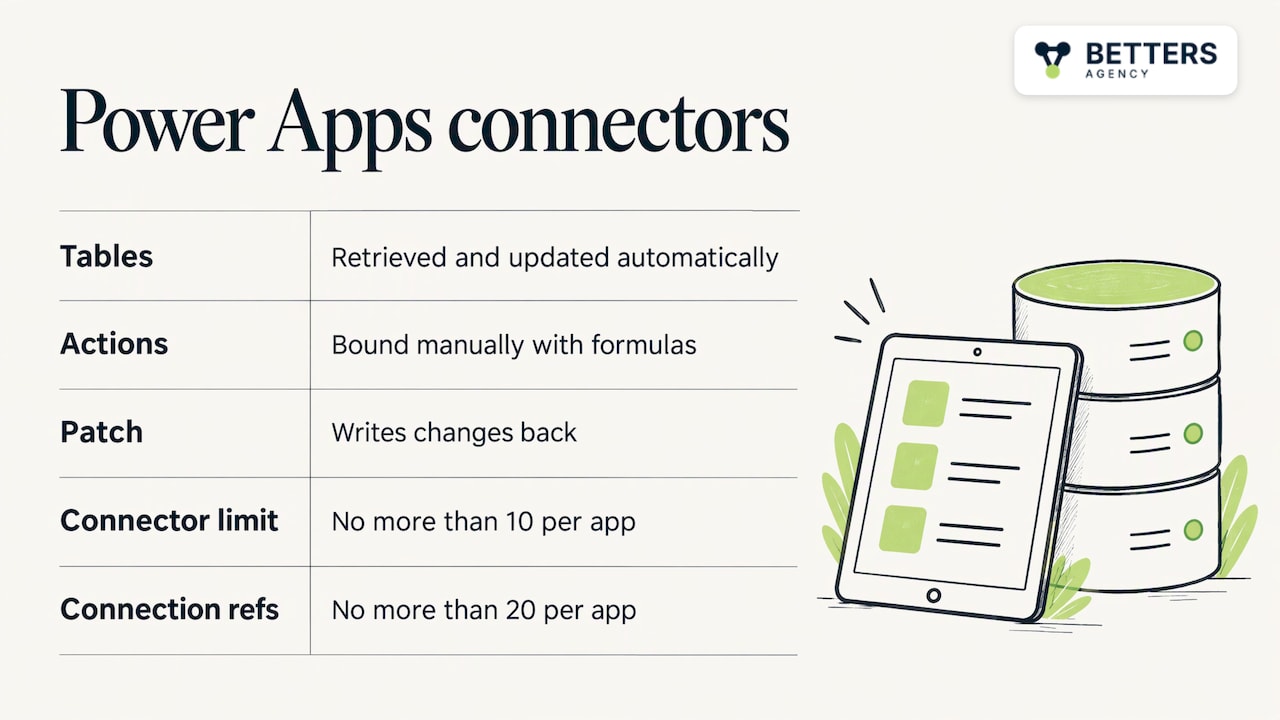
Power Apps brings data into an app by creating a connection that uses a connector to reach a data source. According to Microsoft’s canvas app connector overview, connectors provide either tables, which the app retrieves and updates automatically (SharePoint, SQL Server, Office 365 and Salesforce are among the examples), or actions, which makers bind manually with formulas. For custom updates the Patch function writes changes back. Microsoft recommends keeping a canvas app to no more than 10 connectors and 20 connection references, because more than that risks slow loading and save problems.
That limit is a design constraint you want to know before building. An app that talks to eight systems directly is a sign that the integration logic belongs in a central layer such as Dataverse, with the app talking to one place.
Putting an app inside a report
The Power Apps visual embeds an interactive canvas app in a Power BI report. Microsoft’s integration planning page lists uses such as writing back to a database (adding customer comments, adjusting a forecast), taking direct action from a satisfaction report, and submitting a form inside the report. It also notes that report viewers need a Power Apps license in addition to their Power BI licenses, or a pay-as-you-go plan, so licensing belongs in your scoping conversation with Microsoft or your reseller.
Automating Power BI itself
Power Automate can drive Power BI actions such as exporting a report, refreshing a semantic model and evaluating a DAX query. A common pattern is to trigger a model refresh when an upstream source finishes updating, rather than refreshing on a clock and hoping the data has landed. The Power BI connector reference shows the connector is available in Power Apps, Power Automate and Copilot Studio, with actions that include adding rows to a dataset through the Power BI REST API. It is not supported for sovereign cloud clusters such as US Government, which matters if you work in a regulated public sector environment.
Our technical guide to Power Apps in Microsoft Teams walks through the app side in more detail, and the article on Power Automate workflows for leaders covers the automation side.
Connecting Power BI to Dynamics 365, ERP and finance data
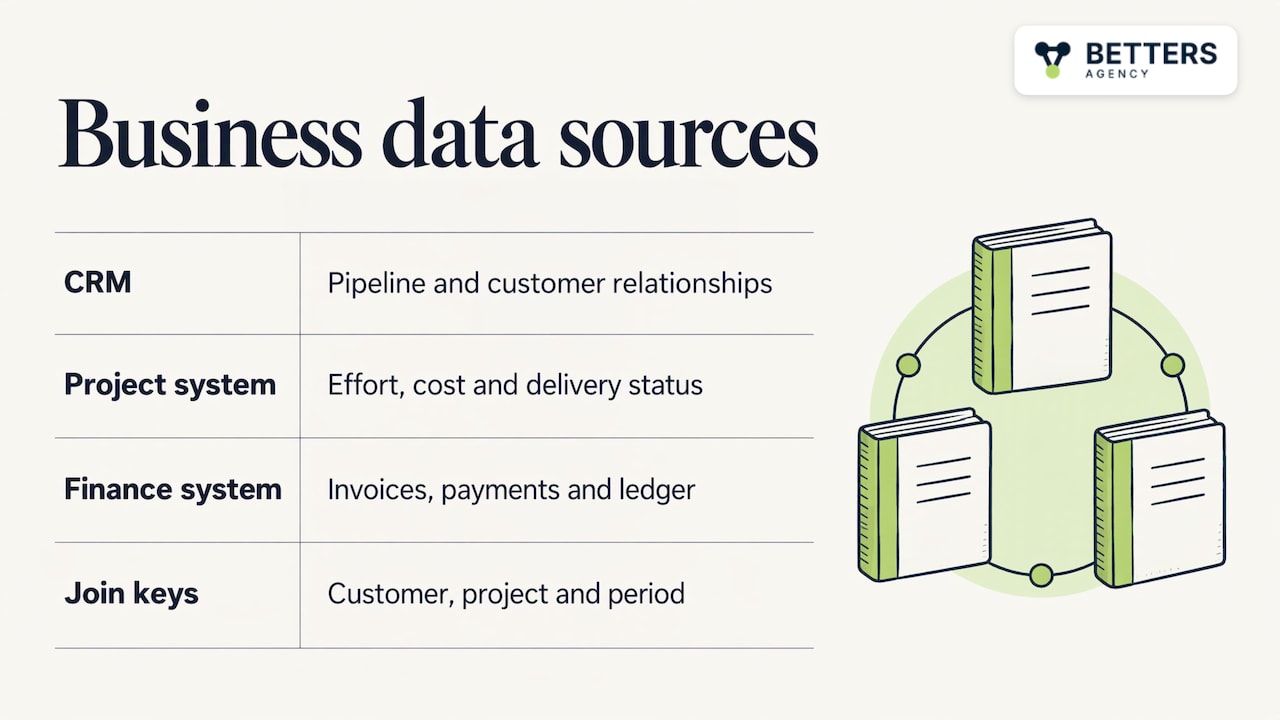
The systems most leaders want in one report are the CRM, the project or operations system, and finance. Each contributes a different kind of truth: the CRM holds pipeline and customer relationships, the project system holds effort, cost and delivery status, and the finance system holds invoices, payments and the ledger. Reporting becomes valuable when these are joined on shared keys such as customer, project and period, so the order of work matters: agree on those keys first, then connect.
For professional services firms on Dynamics 365, our article on Power BI and Dynamics 365 PSA integration shows how reporting sits on top of project data. If finance sits in a separate platform, integrated business finance software with a reporting and app marketplace illustrates the kind of connected finance layer you would want to validate against your reporting model before go-live.
A scoping checklist before you hire anyone
Use these questions to test any integration proposal, ours included:
- Which systems are the authoritative source for each metric, and who owns each one?
- What storage mode is proposed for each dataset, and why?
- How fresh must each report be, and what does that cost the source system?
- Where do gateways run, and who administers them?
- How is row-level security defined, and what happens when someone changes role?
- Which DLP policies apply, and which connectors are blocked or grouped?
- Which integrations are tenant, workspace or solution level, and who approves each?
- What is the plan for training and ownership after launch?
A proposal that cannot answer these is describing a connection, not an integration.
When this approach is the wrong one
Power BI on Dynamics 365 and Power Platform is not the right answer for every company. If your sales team lives in Salesforce or HubSpot, your data already sits there, and your reporting needs are modest, those platforms’ native reporting is sometimes the better choice, and adding a Microsoft layer would be cost without benefit. HighLevel can likewise fit a marketing-led, agency-style operation better than a Microsoft stack. Our comparison pages, such as Dynamics 365 compared with Salesforce and HubSpot, set out where each fits.
The trade-off also applies inside Microsoft’s stack: a lot of custom integration means more to maintain. If a standard connector and a single governed model meet your need, a smaller build is the correct recommendation, and we say so.
How we can help
Betters Agency is a small firm and an independent Microsoft partner. We cover Dynamics 365 implementations, Power Platform customization, custom development and integrations, Copilot and AI solutions, business process automation, CRM strategy and architecture, governance and data integrity, adoption and enablement, and Power BI data intelligence. Our track record includes 100+ production automations, $10M+ of finance-validated benefit and 5,000+ users onboarded. You work directly with the person who builds your system, and the architecture and data decisions are made before configuration starts.
If you are scoping a Power BI integration, see our services overview and bring the checklist above to the first conversation.
Our perspective
Most failed reporting projects we are asked to look at were not failures of connectivity. The connectors worked. The numbers disagreed because nobody had decided which system was authoritative, or because a definition lived in three reports instead of one model.
That is why we start with architecture and data before anything is configured. We treat governance as part of the build: who owns each dataset, how access is scoped, what policy governs the connectors, and how people are trained to use what is delivered. Adoption is a deliverable, not an afterthought.
We also think integration should end in action. A dashboard that shows an overdue approval is useful; a dashboard that lets the right person resolve it, through Power Apps and Power Automate on the same governed data, changes how the business runs. Because we are a small firm, the person who designs the model is the person who builds it, so the reasoning behind each decision does not get lost in a handoff.
And if Salesforce, HubSpot or HighLevel fits your business better, we will tell you.
Derek
FAQ
What is the difference between Power BI data integration and a Power BI integration service?
Data integration is the technical act of connecting sources, transforming data and refreshing it. An integration service wraps that with design, security, governance and adoption, so the connections stay accurate and trusted over time. For most organizations, the second is what decides whether reporting is still used a year later.
Can Power Apps write data back to the source system?
Yes. Microsoft documents that Power Apps connectors can retrieve and update table data automatically, and that the Patch function handles custom updates. Embedding an app in a Power BI report enables writeback scenarios such as adding comments or adjusting a forecast, subject to the licensing Microsoft describes.
Do I need a gateway to connect Power BI to my data?
You need an on-premises data gateway when a source cannot be reached directly over the network, for example a database inside your corporate firewall. Cloud sources with built-in connectors generally do not need one. Microsoft advises using enterprise gateways, with separate gateways for Import and DirectQuery models.
Should every report use DirectQuery for fresh data?
No. DirectQuery puts load on the source for each interaction and carries row and time limits, so it suits fast-changing or large data where the source can cope. Import with a sensible schedule or incremental refresh is the better fit for most reporting.
Sources
- Power BI implementation planning: integration with other services (Microsoft Learn)
- Data refresh in Power BI (Microsoft Learn)
- BI solution architecture in the Center of Excellence (Microsoft Learn)
- Semantic models in the Power BI service (Microsoft Learn)
- Power Platform connectors (Microsoft)
- Overview of connectors for canvas apps (Microsoft Learn)
- Power BI connector reference (Microsoft Learn)
- Business finance software for consulting (Cherry Money)
Recommended
- Dynamics 365 PSA vs Alternatives for Power BI Integration
- Power BI vs Alternatives for Dynamics 365 PSA Integration
- Executives: Resolve Spreadsheet Service Account Risks
- Power BI Leadership Framework: Key Metrics & ROI
Articles are for informational and educational purposes only, Betters Agency LLC is not a licensed financial advisor or legal counselor and does not provide these services, readers are encouraged to check multiple sources for accuracy.