
Blog
Dynamics 365 Marketing: What It Is Now and How to Implement It
nbetters · · 12 min read
Dynamics 365 Marketing is now Customer Insights - Journeys. Learn what it does, how it connects to Sales, and how to implement it around your processes.
Dynamics 365 Marketing is now called Customer Insights – Journeys, one of two apps in the combined Dynamics 365 Customer Insights offering. For a business leader, the product decision is the smaller half of the work. Results depend on how well the platform is fitted to your sales handoffs, your customer data and your consent rules before the first campaign goes out. As an independent Microsoft partner and a small firm, we design that foundation first and configure second, and this article explains what that involves.
Key Takeaways
- Per Microsoft’s Customer Insights FAQ, Dynamics 365 Marketing is now Customer Insights – Journeys, and new customers can only buy the combined Customer Insights offering.
- New environments get real-time journeys and event management. Outbound marketing is still supported but receives no new enhancements, so plan new work on real-time journeys.
- The value shows up when journeys create records and tasks in Dynamics 365 Sales, which only works well if data unification, ownership rules and consent are designed first.
- Dynamics 365 is not always the right choice. If your team is small and your needs are simple, Salesforce, HubSpot or HighLevel can be the better fit.
Table of Contents
- What Dynamics 365 Marketing is called today
- Outbound versus real-time journeys
- What the platform does for a marketing team
- Connecting journeys to Dynamics 365 Sales
- Data quality comes before campaigns
- Consent and email compliance
- Roles, licensing structure and who does what
- How to plan an implementation around your processes
- Where AI and Copilot fit
- When Dynamics 365 Marketing is not the right answer
- Our perspective
- Where to start
- FAQ
- Sources
What Dynamics 365 Marketing is called today
Microsoft merged its standalone marketing app and its customer data platform into a single offering. According to the Customer Insights FAQ, the combined product reached general availability on September 1, 2023. It has two apps:
- Customer Insights – Journeys, the successor to Dynamics 365 Marketing. It is where you build segments, emails, text messages, push notifications and the journeys that deliver them.
- Customer Insights – Data, the former standalone Customer Insights. It unifies customer records from different systems into one profile.
If you see older material that refers to Dynamics 365 Marketing, outbound marketing, or marketing lists and customer journeys in the old style, it describes the earlier product. Microsoft’s own training path warns that pages about outbound features may not apply to, or may behave differently in, real-time marketing. That matters when you brief a vendor or compare quotes, because two proposals can describe different products under the same old name.
Outbound versus real-time journeys
The most consequential product fact is the split between the two journey styles. A January 2024 Microsoft blog post states that new customer environments include only real-time journeys and event management. Outbound marketing continues to be supported but gets no new enhancements. Microsoft positions real-time journeys as the path for near-real-time response and for the generative AI and Copilot capabilities.
In practice this means:
- New projects should be designed on real-time journeys from day one.
- Existing outbound users do not face an emergency, but every new requirement you build on the old model is work you may redo later.
- Event-heavy programs such as webinars and in-person events are covered by event management, which is part of the new environments.
The trade-off is that some outbound features you may have relied on work differently in real-time marketing. A process inventory before migration shows which of your current campaigns are simple enough to move as they are and which need redesign.
What the platform does for a marketing team
According to Microsoft’s Journeys overview, Journeys supports trigger-based, real-time customer journeys across email, text message and push notification. Audiences are defined by segments, and a journey either runs on a segment at a planned time or responds to a trigger. AI-driven recommendations cover content, channels and analytics. On the data side, Microsoft’s product page describes unified customer profiles as a single source of truth, with prebuilt AI models to predict intent and segments that update with real-time data.
For an operations or revenue leader, three capabilities carry most of the value:
- Segmentation tied to unified data. A segment is only as good as the profiles behind it.
- Triggered journeys. A form submission, a download or a purchase starts the right follow-up without anyone building a list by hand.
- Handoff to sales. Journeys can create records, which is where the marketing platform meets your pipeline.
Connecting journeys to Dynamics 365 Sales
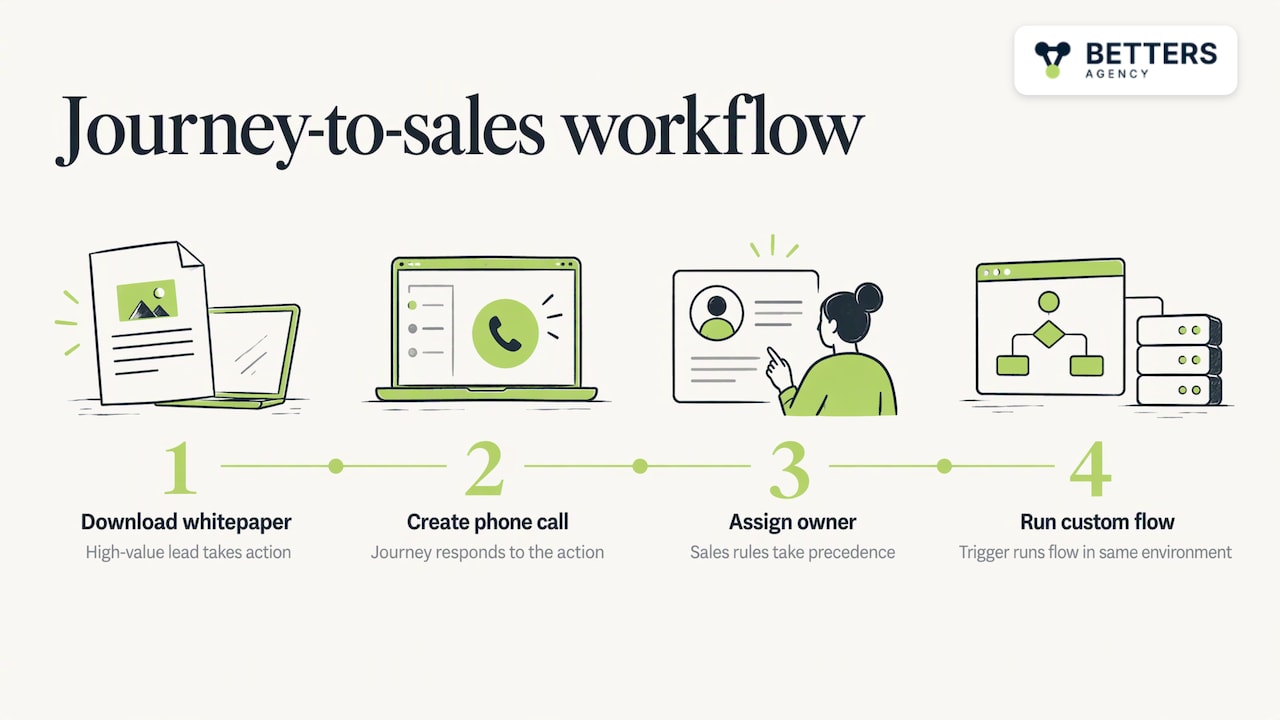
This is where a business process, not a feature list, decides the outcome. Microsoft’s documentation explains that a journey can automatically create Dataverse records in response to customer actions: phone calls, tasks, leads, opportunities and custom tables. Its example is a high-value lead who downloads a whitepaper and triggers a phone call activity assigned to a sales rep. For leads and opportunities, Dynamics 365 Sales assignment rules take precedence over the owner set in the journey.
That last rule is easy to overlook. If your assignment rules are outdated, the journey will route a hot lead according to them, and the marketing logic you carefully built will not decide who calls. Before configuring anything, we settle who owns a lead at each stage, what counts as sales-ready and what happens when nobody follows up.
Custom triggers extend this further. Microsoft documents that a trigger raised from a journey can run a Power Automate flow in the same Dataverse environment, for example creating a Dynamics 365 Sales phone call activity when a shopper is routed to a human agent. This is where business process automation and Power Platform customization turn a campaign tool into a workflow. It is also where a design error spreads quickly, because a flawed flow runs at the scale of your contact base.
If you want the sales side of this picture, our Dynamics 365 CRM licensing guide for sales teams covers how the Sales app is scoped.
Data quality comes before campaigns
Marketing automation fails quietly when profiles are duplicated or merged wrongly. Duplicate contacts mean two emails to one person, inflated audience counts and sales reps calling someone who just spoke to a colleague.
Microsoft’s quickstart guide describes the unification steps in Customer Insights – Data: select tables and columns, define deduplication rules inside each table, then define matching conditions across tables using identifiers such as customer ID, email or phone number. It also warns against using values that change, such as loyalty points, as identifiers.
Two more points from the same guide shape the project plan:
- Customer Insights – Data and Journeys must be installed in the same Dataverse environment.
- Connecting the two apps makes profiles and segments available in Journeys, but it does not replace ingestion, unification or refresh processing. Journey quiet times should be aligned with the data refresh window, because updated segment membership does not guarantee that every profile value is ready.
This is the architecture and data work we do before anything is configured. Our pages on preventing duplicate CRM data and CRM governance describe the ownership model that keeps matching rules from decaying after launch. A worked example of the stakes: if the matching rule uses email alone, a shared inbox such as a front-desk address can collapse several real people into one profile, and every personalized message for those people becomes wrong at once.
Consent and email compliance
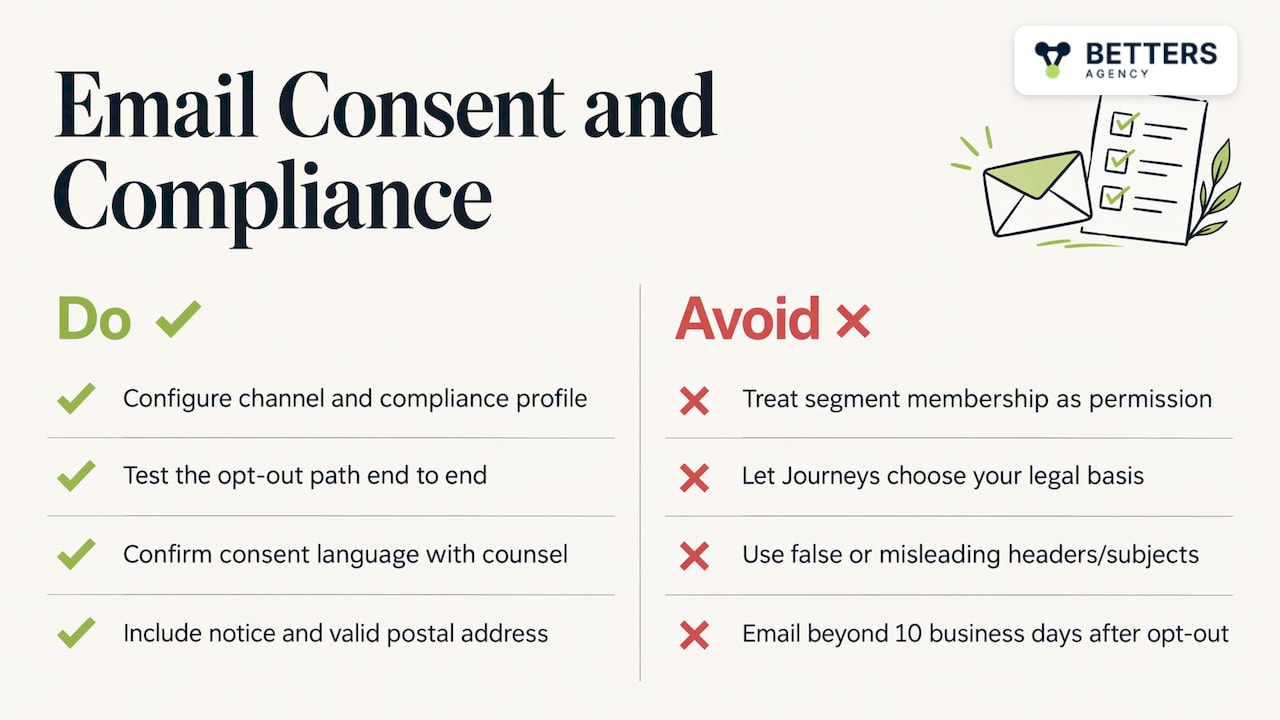
A segment is not permission. The quickstart guide states that segment membership alone does not grant permission to send, and consent requirements must be met before sending. The journey tool will not decide your legal basis for you.
For US commercial email, the CAN-SPAM Act, effective January 1, 2004, prohibits false or misleading headers and subject lines. It requires a functioning opt-out mechanism and clear identification of the message as an advertisement. Each message needs an opt-out notice and a valid physical postal address, and you may not send commercial email more than 10 business days after someone opts out.
The practical design rule: configure the email channel and compliance profile in Journeys, then test the opt-out path end to end, including how an opt-out recorded in one system reaches the profile used by every journey. If your business operates in regulated sectors such as insurance or legal services, have your attorney or compliance officer confirm the consent language before launch. Our insurance agency page shows how we approach those environments.
Roles, licensing structure and who does what
Access design is part of governance. Microsoft’s security role documentation describes a Marketing Professional – Business role that covers nearly all Journeys entities, including segments, journeys, emails, marketing pages and lists, but not LinkedIn or lead-scoring features. Separate Lead Score Modeler and Lead Score Viewer roles exist for lead-scoring models. It also states that using Sales or Service entities requires licenses for those apps.
The commercial structure is also worth understanding without quoting a number here. According to the Customer Insights FAQ, the combined offering is sold on a prepaid capacity model pooled at the tenant level, with two capacity units: People Interacted, which powers Journeys, and People Unified, which powers Data. Because capacity follows the number of people you unify and interact with, your contact hygiene directly affects what you need. Duplicates and stale records are not only a quality problem, they are a capacity problem. For current prices, use Microsoft’s official pricing page or your reseller’s quote.
How to plan an implementation around your processes
A marketing platform rollout that starts with templates and ends with a training session tends to produce a tool nobody trusts. The sequence we follow is built around the business process:
- Map the revenue process. Write down how a person becomes a lead, a qualified opportunity and a customer, including who touches them at each point. The journeys will mirror this map, so errors here become errors in every campaign.
- Decide the data model. Choose identifiers, deduplication rules and which systems feed the profile. Our CRM strategy and architecture work covers this before configuration.
- Set ownership and assignment. Define lead routing, service levels for follow-up and what happens to unclaimed leads, remembering that Sales assignment rules take precedence.
- Configure channels and consent. Set up the email channel, the compliance profile and opt-out handling, and test them with real scenarios.
- Build the first journeys small. Start with one or two journeys tied to a clear business outcome, such as new-inquiry follow-up, rather than a large library of campaigns.
- Automate the handoffs. Use triggers and Power Automate flows to create tasks and activities for sales, and keep each flow documented.
- Measure and govern. Use Power BI dashboards for engagement and pipeline reporting, and set a review rhythm for rules, roles and data quality so the system does not decay.
- Enable the users. Adoption is a project phase, not an afterthought. We have onboarded more than 5,000 users, and the lesson is consistent: people adopt what fits the way they already work.
Our Customer Insights consulting page lays out how this fits into a Dynamics 365 engagement. If you are weighing how much of this to build into a broader CRM project, the professional services CRM implementation guide shows the same discipline applied to the sales side.
Where AI and Copilot fit
Microsoft ties generative AI and Copilot features to real-time journeys, as the January 2024 post explains, which is another reason to build on the current model. AI recommendations for content, channels and analytics are only useful if the underlying profiles are clean and the consent rules are respected. Before you switch on AI features, an AI readiness assessment is a sensible way to check governance and data foundations, and our Copilot and AI solutions work assumes the same groundwork.
When Dynamics 365 Marketing is not the right answer
We name the cases where our recommendation is wrong, because they are real:
- A small marketing team with simple email needs. HubSpot is sometimes the better choice, particularly when the team wants to be productive quickly without a Microsoft data model underneath.
- A business that lives in Salesforce. If your sales process already runs there and works, Salesforce’s own marketing tools are often the better choice than adding a second platform.
- Local service businesses that want funnels, texting and appointment booking out of the box. HighLevel is sometimes the better choice.
Dynamics 365 fits best when marketing, sales, service and project delivery need to share one data model, when governance matters and when you want to extend the platform with Power Apps, Power Automate and Power BI. The trade-off is more design effort up front, and that effort pays back only if you have processes worth encoding. If you are not sure which side of the line you are on, we will say so.
Our perspective
Most failed marketing automation projects we hear about were not failures of software. They were failures of decisions made too late: who owns a lead, which record is the real customer, who may be emailed. Those decisions are cheap to make before configuration and expensive to reverse after ten thousand contacts have flowed through.
Because we are a small independent Microsoft partner, you work directly with the person who builds your system. That means the person who hears your process explanation is the one who sets the data model, writes the flows and answers when something breaks. We cover the whole stack, from Dynamics 365 and Power Platform to custom development, Copilot agents and automation tools such as Power Automate, UiPath, Zapier, Make and n8n, so the choice of tool follows the process rather than the other way around.
Our track record includes more than 100 production automations and over $10M in finance-validated benefit. Our advice is to start narrow, govern early and measure what sales actually does with the leads marketing sends.
Derek
Where to start
If you are scoping a Customer Insights or Journeys project, the most useful first step is a conversation about your lead-to-customer process and your data, before any licensing or configuration decision. We take on Dynamics 365 implementations, CRM strategy and architecture, governance and data integrity, business process automation and adoption work, and you can see the full range on our services page.
For fixed-scope starting points, our packages page lists Dynamics 365 Sales CRM from $1,495 one-off, so the sales side of the handoff can be in place before journeys are built on top of it.
FAQ
Is Dynamics 365 Marketing still sold?
Not under that name. Microsoft’s FAQ states that Dynamics 365 Marketing is now Customer Insights – Journeys, part of the combined Customer Insights offering, and that new customers can only purchase the combined offering. The capabilities continue, with real-time journeys as the focus.
Do I need Dynamics 365 Sales to use Journeys?
No, but the two work well together. Journeys can create leads, opportunities, tasks and phone calls in Dataverse, and Sales assignment rules decide ownership for leads and opportunities. Using Sales or Service entities requires licenses for those apps.
Can a segment be emailed automatically once it is built?
No. Microsoft states that segment membership does not grant permission to send. You must meet consent requirements, configure a compliance profile and honor opt-outs, which US law under CAN-SPAM also requires.
Should we stay on outbound marketing or move to real-time journeys?
New environments include only real-time journeys, and outbound receives no new enhancements, so new work belongs on real-time journeys. Existing outbound programs can be reviewed campaign by campaign to decide what moves first.
Sources
- Dynamics 365 Customer Insights FAQs, Microsoft Learn
- Explore the fundamentals of Microsoft Dynamics 365 Marketing, Microsoft Learn
- Transition to real time journeys, Microsoft Dynamics 365 blog
- Customer Insights – Journeys overview, Microsoft Learn
- Customer Insights and Journeys, Microsoft Dynamics 365
- Create records and activities from journeys, Microsoft Learn
- Raise triggers from a journey, Microsoft Learn
- Customer Insights quickstart guide, Microsoft Learn
- Manage user accounts, user licenses, and security roles, Microsoft Learn
- CAN-SPAM Act, Federal Trade Commission
Recommended
- Dynamics 365 Contact Center: What It Does and When to Use It
- Compare Dynamics 365 CRM and Alternatives
- Minnesota Leaders: Rescue D365 Adoption & Improve Service
Articles are for informational and educational purposes only, Betters Agency LLC is not a licensed financial advisor or legal counselor and does not provide these services, readers are encouraged to check multiple sources for accuracy.