
Blog
How to Automate Client Onboarding: A Practical Guide
nbetters · · 12 min read
Learn how to automate client onboarding: what to automate, what to keep personal, how to build the workflow in your CRM, and how to keep data clean.
To automate client onboarding, map the process your team actually runs, standardize each stage with an owner, a trigger and a deadline, and then connect the steps so that a closed deal in your CRM starts everything else: the client record, the welcome message, the agreement, the intake forms and the internal setup tasks. Keep the relationship-building moments human. Automate the data collection, routing, reminders and compliance checks around them.
This guide is written for business leaders and operations managers at professional services, construction, insurance, legal and manufacturing firms. It covers what to automate, what to leave personal, how to design the workflow, how to protect data integrity and how to measure the result.
TL;DR
- Automate the repeatable work: information gathering, document collection, welcome communications, scheduling, task creation and status tracking.
- Keep the first strategic conversation, expectation setting and any sensitive discussion with a named person on your team.
- Map the real process before you automate anything, then define an owner, trigger, expected result and timeframe for every stage.
- Build the workflow on your CRM so that one event, such as a won deal, triggers every downstream step and leaves an audit trail.
- Govern the automation with access controls, named owners and review points, or it will decay as your business changes.
Table of Contents
- What client onboarding automation actually means
- What to automate and what to keep personal
- Step 1: Map the onboarding process you actually run
- Step 2: Standardize before you automate
- Step 3: Connect the steps in one workflow
- Step 4: Protect data integrity and governance
- Step 5: Measure, test and improve
- Common mistakes to avoid
- How we can help with onboarding automation
- FAQ
- Sources
What client onboarding automation actually means
Client onboarding automation is the use of software, and increasingly AI, to handle the repetitive tasks involved in welcoming and setting up a new client. IBM lists data entry, routine communications, document collection, scheduling and compliance checks among them. The practical benefit is that the next step starts the moment the previous one is finished, instead of waiting for someone to notice. IBM also notes that automation can help reduce human error and creates digital audit trails as a by-product.
The need is not theoretical. In a study of more than 300 organizations published in February 2025, Moxo reported that 93% consider automation critical to onboarding success, yet only 34% rate their current processes as very efficient. Some 56% experience onboarding delays, and the most common cause, cited by 64%, is waiting on client information.
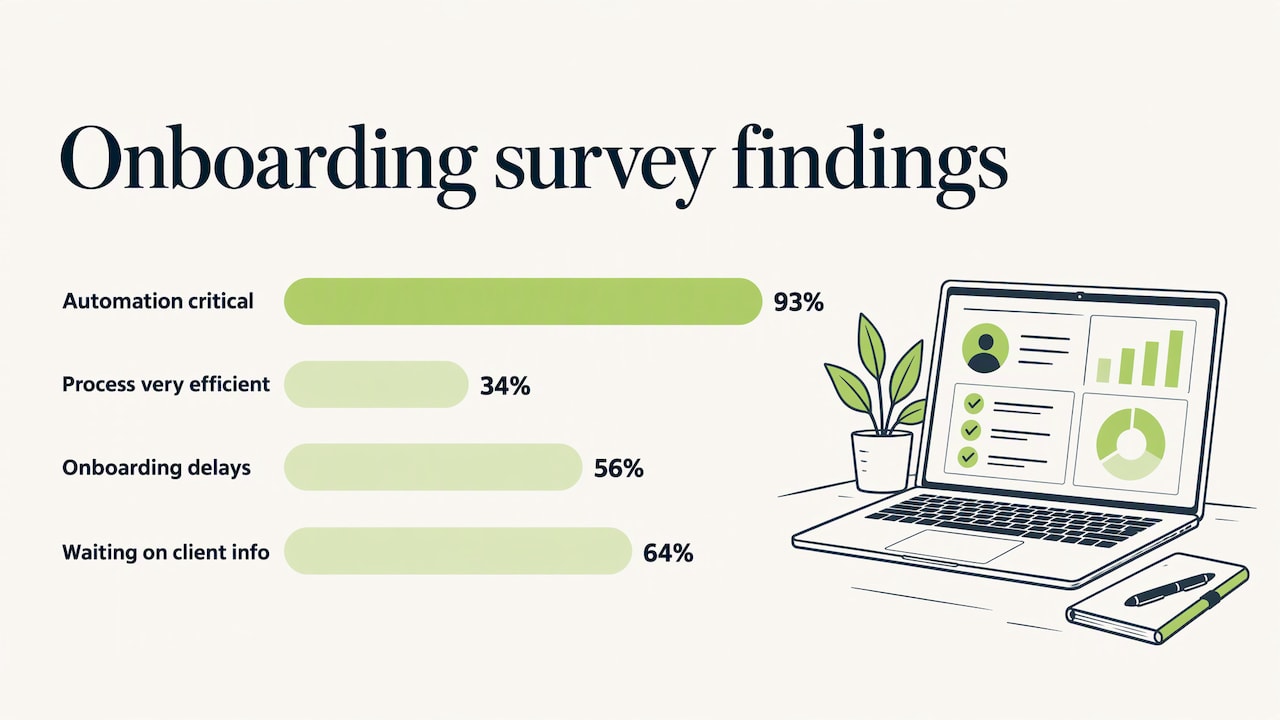
That last finding matters most for service firms. Delay rarely comes from your own team’s effort. It comes from the gaps between steps: a form that was sent but not chased, a contract that was signed but never relayed to the delivery team, a client record created twice with slightly different spellings.
What to automate and what to keep personal
The first two weeks of a client relationship set the tone, so the decision is not “automate everything” or “automate nothing.” A useful rule: automate anything where the client is waiting on your process, and keep human anything where the client is judging your judgment.
Tasks that suit automation
- Information gathering. A structured intake form that feeds your CRM directly, with required fields, so nobody retypes data from an email.
- Document collection and signatures. Automatic requests, reminders and status updates for agreements, engagement letters, certificates of insurance or tax forms.
- Welcome communications. A confirmation email triggered the moment the deal closes, with the client’s name, contact person and next steps already filled in.
- Scheduling. Kickoff meeting links offered automatically, with calendar invitations sent to the right internal team.
- Internal setup. Project records, folders, permissions, billing profiles and task lists created from a template.
- Compliance checks. Required verifications handled as a gate in the workflow, so a client cannot advance until the standard is met. IBM describes this as enforcing compliance as a structured part of the workflow.
- Status tracking. Dashboards showing which clients are stuck, at which stage and for how long.
Moments that stay personal
- The kickoff conversation. Clients want to hear that you understood their situation. Automation can book the call and prepare the briefing, but a person runs it.
- Expectation setting. Scope, timelines, and who to call when something goes wrong are better said than emailed.
- Exceptions. A client with an unusual structure, a rushed deadline or a regulatory complication should be routed to a person, not squeezed through a standard path.
- Check-ins. A short call after the first milestone does more for trust than another automated survey.
The design principle is simple: automation prepares the human moment and handles everything after it. When a partner walks into the kickoff call, the intake data, signed agreement and project setup should already be complete, so the call can be about the client’s goals and not about paperwork.
Step 1: Map the onboarding process you actually run
Before you build anything, write down what really happens today. SignWell advises listing every step, handoff, document and decision point, and warns against automating an idealized process that nobody follows. That warning is worth taking seriously: automation hard-wires whatever you give it, including the workarounds.
A practical mapping session takes half a day with the people who do the work:
- Pick the last five clients you onboarded, ideally across different service lines.
- For each, list every touchpoint from signed deal to first delivered milestone, including emails, spreadsheets and chat messages.
- Mark where the client waited, where your team waited and where data was entered more than once.
- Note who made each decision and what information they needed to make it.
- Highlight the steps that were identical for all five clients. Those are your first automation candidates.
Expect to find that handoffs between sales and delivery are the weakest point. If that sounds familiar, our guide to automating the sales to delivery handoff walks through how to assess the change impact before you commit to a design.
Step 2: Standardize before you automate
SignWell also recommends defining the owner, trigger, expected result and timeframe for each stage, and deciding which information must be collected before the workflow can proceed. A stage definition might look like this:
| Stage | Owner | Trigger | Expected result | Timeframe |
|---|---|---|---|---|
| Client record creation | Operations | Deal marked won | Complete account and contact record | Same day |
| Agreement | Account manager | Record created | Signed engagement letter | 3 business days |
| Intake | Client, tracked by delivery lead | Agreement signed | Required fields and documents received | 5 business days |
| Internal setup | Delivery lead | Intake complete | Project, permissions and billing profile ready | 2 business days |
| Kickoff | Engagement lead | Setup complete | Meeting held, plan confirmed | Within 10 business days |
The timeframes above are examples to show the format, not benchmarks. Set yours from your own mapped process.
Two disciplines pay off here. First, decide the “must-have” data for each stage and make those fields required, so incomplete information cannot silently move forward. Second, decide the paths. Different client types need different steps: a construction contractor needs insurance certificates and lien documentation, a legal client needs conflict checks, a manufacturer needs system integration details. A decision table that selects the path from client attributes and outputs the list of required steps keeps this logic readable. Rulebricks describes this pattern of choosing a path first and returning the required steps for the workflow engine to run.
Step 3: Connect the steps in one workflow
The real efficiency gain comes from chaining the tasks, not from automating each in isolation. SignWell gives a typical chain: a CRM deal marked closed creates the onboarding record, which sends the welcome email and the agreement, and once the agreement is completed, setup tasks are created.
In a Microsoft environment, that chain is usually built with Dynamics 365 as the system of record and Power Automate or Power Apps providing the logic and the client-facing forms. A reference design looks like this:
- Trigger. The opportunity status changes to won in the CRM.
- Record creation. The workflow creates the account, contacts and an onboarding record, checking for duplicates first.
- Welcome and agreement. A personalized email goes out from the account owner’s address, with the agreement attached or linked.
- Intake. A Power Apps portal or form collects the required information and documents. Reminders go out on a schedule if items are missing.
- Approvals. Compliance or finance approvals are routed to named people with deadlines, and exceptions are escalated.
- Setup. Once intake is complete, the project, resource assignments, billing profile and shared folders are created from a template.
- Kickoff. A scheduling link goes to the client, and the delivery team receives a briefing pack drawn from the intake data.
- Monitoring. A dashboard shows every client in onboarding, current stage, owner and days elapsed.
For professional services firms where onboarding flows directly into project delivery, the handoff from sales to the delivery team is where most of the risk sits. Our sales to delivery automation framework for leaders and the professional services automation implementation guide cover how to structure that handoff so project records inherit client data rather than recreating it.
Where AI fits
AI is most useful in the document-heavy parts of onboarding: reading incoming documents, classifying them, extracting key fields and flagging exceptions for a person to resolve. It is a poor substitute for the judgment calls listed earlier. Treat it as a reviewer’s assistant: it prepares and flags, and a named person decides on anything with legal, financial or relationship consequences.
Step 4: Protect data integrity and governance
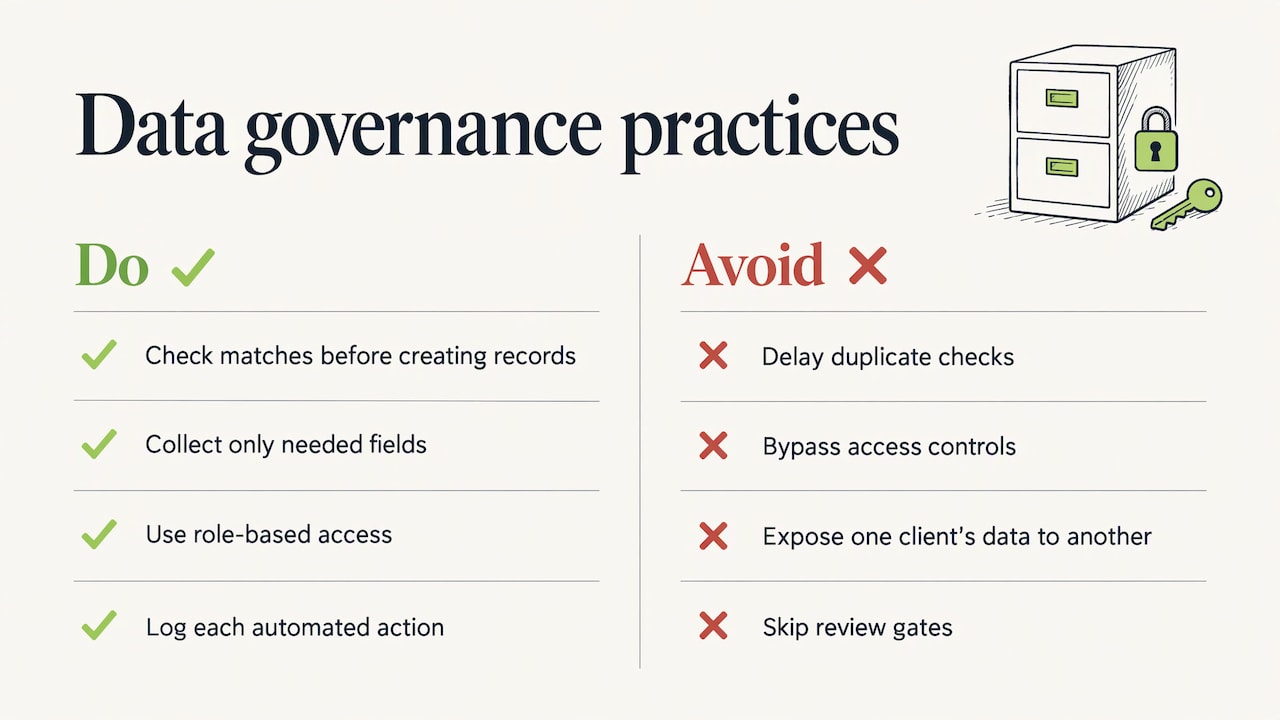
Onboarding is where client data first enters your systems, so errors made here travel into billing, reporting and forecasting. Automation helps because it removes retyping, but it also multiplies a mistake quickly if the underlying rules are wrong. Three practices matter.
Prevent duplicates at the point of entry. Matching rules should run before a new account or contact is created, not in a cleanup project a year later. Our comparison of duplicate CRM data prevention tools sets out the options.
Respect access and minimize data. Glean’s guidance on AI compliance states that automation should not bypass existing access controls or expose data a user is not authorized to see, and recommends permission-aware access, data minimization and human oversight where it matters most. In practice: collect only the fields you need, give onboarding staff role-based access, and make sure automated emails and portals never show one client’s information to another.
Name owners and review gates. The same source describes mature programs as using named owners, required artifacts and repeatable review gates, with each automation tied to a record of its purpose, risk level, data categories and controls. For a mid-sized firm that can be as simple as a register listing each onboarding flow, who owns it, what data it touches and when it was last reviewed. Our piece on choosing Power Platform governance explains how to set this up so flows do not multiply unmanaged.
Audit trails deserve a specific mention. Because each automated action is logged, you can show when an agreement was sent, when it was signed and who approved an exception. That record is valuable in legal, insurance and regulated work. If you handle personal data of people in other jurisdictions, confirm retention, consent and privacy obligations with your legal counsel, since these rules differ by country and industry.
Step 5: Measure, test and improve
Automation without measurement turns into another system nobody trusts. Track a small set of numbers from the first week:
- Time from signed deal to kickoff. The headline measure of speed.
- Time waiting on client information. Moxo’s study found this to be the leading cause of delay, so it is the number to attack first.
- Rework and error rate. Count records corrected after onboarding.
- Stuck clients. How many are past their stage deadline right now.
- Client feedback. A short question after kickoff: was it clear what happens next?
Organizations that have automated report meaningful gains. In the same Moxo study, companies with automation reported a 63% improvement in customer feedback, a 51% decrease in errors and a 74% increase in operational efficiency. These are self-reported survey results across many organizations, so use them as a direction, and set your own baseline from your mapped process.
Test before you go live. Run the workflow with a dummy client for each path, including the exception paths. Then run it alongside the manual process for a few real clients and compare. After launch, review the dashboard monthly: where do clients stall, which reminders are ignored, which fields are routinely skipped or entered wrongly? Adjust the flow, not just the reminders.
Common mistakes to avoid
- Automating a broken process. If the manual process has duplicate steps and unclear ownership, automation makes the confusion faster.
- One path for every client. A single template ends up too heavy for simple clients and too light for complex ones. Use defined paths with an exception route.
- No owner after launch. Flows that nobody owns drift out of date as services, forms and people change. This is the system decay that governance exists to prevent.
- Removing every human touchpoint. Clients should feel that a person is accountable for their experience.
- Building outside the CRM. Onboarding data kept in side tools, disconnected from the client record, brings back the retyping you were trying to eliminate.
Our perspective
We approach client onboarding as a business process problem first and a software problem second. Most firms we meet already own capable tools. What they lack is a workflow that matches how the business actually operates, with clear ownership, clean data and a governance model that survives staff changes.
That is why we design onboarding around the CRM as the single source of truth, using Dynamics 365 and Power Platform to connect the deal, the agreement, the intake, the project setup and the reporting. Automation should remove the waiting and the retyping, so your people can spend their time on the conversations that win long-term trust.
We also insist on the unglamorous parts: duplicate prevention, role-based access, audit trails and adoption support for the teams who will use the system daily. In our experience, this is what separates an onboarding flow that still works in two years from one that quietly decays.
the author
How we can help with onboarding automation
If you want onboarding built around your real processes rather than a generic template, our team implements it on Dynamics 365 and Power Platform. Our Business Process Automation and CRM strategy services cover workflow design, custom Power Apps, integrations, governance and adoption.
For a defined starting point, our published packages include Dynamics 365 Sales CRM from $1,495 one-off and Dynamics 365 Project Operations from $2,995 one-off. Larger or more customized onboarding projects are scoped individually.
FAQ
How long does it take to automate client onboarding?
The time depends on how many onboarding paths you have and how clean your current process is. A single, well-understood path can be mapped and built much faster than a multi-service firm with several client types and compliance gates. Start with the path that covers most of your clients, then add exception paths after it is stable.
Which onboarding tasks should I automate first?
Start with the tasks where clients wait on you or you wait on clients: the welcome message, intake forms, document requests and reminders, and internal setup tasks. These are repetitive, easy to standardize and quick to measure. Leave relationship-driven steps, such as the kickoff conversation, with your team.
Do I need a CRM to automate onboarding?
You can automate pieces with standalone tools, but a CRM gives the workflow a trigger, a single client record and a place to report from. If the onboarding data lives in the CRM, the project, billing and reporting teams all work from the same information, which also supports data integrity.
Can automated onboarding stay compliant and secure?
Yes, when it is designed for it. Use role-based access, collect only needed data, log automated actions and assign a named owner to each workflow. Keep a person in the loop for decisions with legal or financial consequences, and confirm privacy and retention requirements with your counsel.
Will automation make onboarding feel impersonal?
Not if you automate the logistics and protect the human moments. When intake and setup are already done, your team arrives at the kickoff prepared and can focus on the client’s goals. Personalized messages from a named account owner also keep the experience warm.
Sources
- IBM: Customer Onboarding Automation
- Moxo study on B2B customer onboarding, PR Newswire
- SignWell: Client Onboarding Workflow
- Rulebricks: API-Driven Onboarding
- Glean: How to ensure AI compliance when automating business processes