
Dynamics 365 Sales
The Configurable Kanban Board
How the Betters365 Kanban Sales Board gives every seller their own pipeline board, why a visible board changes how sales teams work, and where it stops: it complements your forms rather than replacing them.

Out-of-the-box pipeline views assume every business sells the same way. They rarely do. So producers start working around the CRM instead of in it, and leadership loses exactly the visibility the system was bought for.
The usual fixes both fail. Force one board on everybody and the sellers who do not fit it stop using it. Let everybody build their own and leadership can no longer compare anything. The Betters365 Kanban Sales Board holds both ends: the business sets the default board every seller starts from, and each seller can then shape their own without changing anyone else’s.
What you actually control
The board is built as a generative page inside the model-driven app, which means the configuration lives with the user rather than in a customization that only an administrator can change. Four things are yours to set.
Pipelines that belong to the person working them
A producer chasing renewals does not work the same pipeline as someone opening new commercial accounts. Each user can define the lanes that match how they actually sell, and those lanes save against them as a user. Two people can sit side by side, look at the same data, and each see the pipeline that makes sense for their book. The business is not choosing between them.
Cards that show the fields that matter to you
One seller needs renewal date and premium on the face of the card. Another needs carrier, effective date, and the last touch. Rather than negotiating a single card layout that half-serves everyone, each user chooses which fields appear on their cards. That is usually the difference between a board someone scans in ten seconds and one they have to open every record to understand.
Lanes you can rearrange
Order matters more than it sounds. Some people want the earliest stages on the left because that is where their attention goes first. Others want the closest-to-close work in front of them and everything else pushed right. Lanes can be reordered freely, so the board reads in the direction the person using it thinks.
Color as a working signal
Color is not decoration on a board that gets used all day. It is how a person finds the thing that needs them without reading a word. Lane colors are user-controlled, so someone can make their at-risk or awaiting-carrier lane loud and let the quiet stages stay quiet. Above the lanes sit stage totals, average age, SLA breaches, and conversion, so the shape of the pipeline is legible before anyone opens a single record.
SLA days that trigger real automation
Every stage carries an SLA measured in days, set per pipeline alongside the stage name, color, and type. Won and Lost stages do not consume SLA days, since there is nothing left to chase once a deal has landed either way.
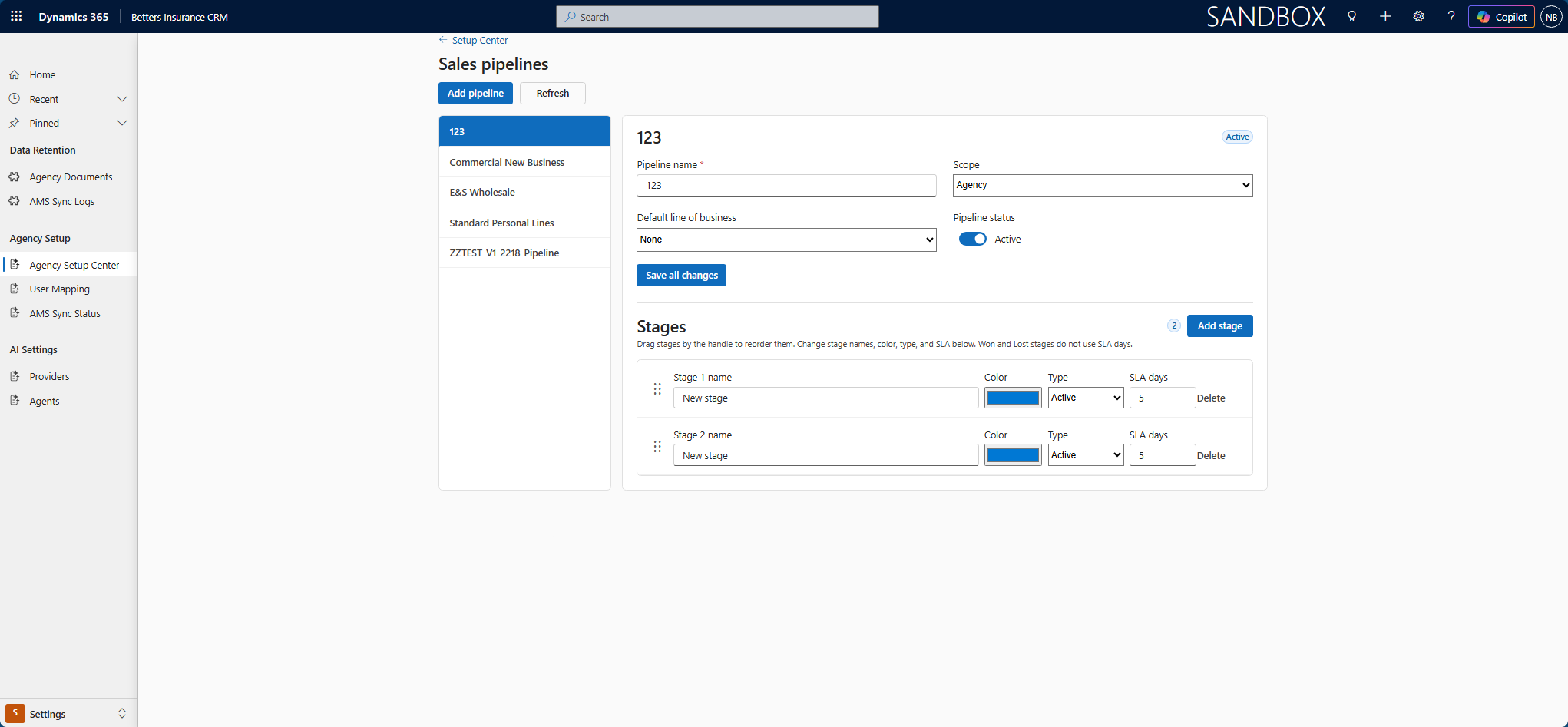
The distinction that matters: the SLA is not decoration that turns a card red and stops there. It is a stored value, which means background automation can read it. A Power Automate flow or a custom plugin can watch for work sitting past its allowance and act on it, nudging the producer, escalating to a manager, opening a follow-up task, or surfacing the deal on a report before anyone has to notice by eye.
That is what turns the board from a view of the process into the place the process is configured. An administrator changes a stage name, recolors a lane, drags it into a different position, or shortens an SLA, and the automation behind it follows the same definition.
The business still sets the defaults every new user starts from, so nobody opens an empty board on their first day and leadership keeps one consistent shape to report against.
Why Kanban matters at all
It is worth answering the question directly, because “we already have views” is a fair objection. A list tells you what exists. A board tells you where things stand. Those are different jobs, and the second one is the one people do with their hands.
Kanban came out of Toyota, where a physical card moving between stations was how the line signalled what was ready and what was waiting. It moved into knowledge work for the same reason it worked on a factory floor: people reason about work far better when they can see it laid out in space than when they read it as rows.
The “I have done this work” problem
Sales and service are unusually punishing jobs to measure yourself in. The wins are rare and far apart. A commercial deal can take months, a renewal cycle a year, and in between a producer does a great deal of real work that produces no visible result at all. Twenty calls, six follow-ups, three quotes and a carrier submission can all happen in a week where the closed number stays exactly zero.
That is corrosive over time. It is not a motivation problem, it is a feedback problem. The work happened and nothing in the system acknowledged it. So people build their own acknowledgement somewhere else, which is one of the real reasons the private spreadsheet keeps coming back. The sheet gives them the satisfaction the CRM withheld.
Dragging a card is a small completion event. It is the moment the work becomes visible, to the person who did it and to everyone else looking at the board. The record was already updated, technically, when a field changed on a form. But a field change is invisible and a card moving is not, and people do not feel invisible progress.
Why the visible board also thinks better
There is a well-documented tendency, first described by Bluma Zeigarnik in the 1920s, for unfinished tasks to keep occupying attention in a way completed ones do not. Anyone who has lain awake running through what they might have forgotten has met it. A board externalises that load. The open work is on the screen rather than in your head, which is both calmer and more accurate.
It also makes the pile-ups obvious. Fourteen cards stacked in one lane is a bottleneck you can see from across the room, and no list view has ever communicated that as fast. That is the honest answer to “why does Kanban even matter”: it turns the pipeline from something you query into something you notice.
How Minnesota sales teams use a Kanban board to stay organized
Most of the businesses we work with in Minnesota share a shape: small sales teams, long cycles, and a season or a renewal calendar that concentrates the pressure into part of the year. That combination is exactly where an unorganized pipeline does the most damage, and where a board earns its place fastest.
Insurance agencies and the renewal calendar
An agency’s year is governed by dates that do not move. Renewals land when they land, carrier submissions sit waiting for a response, and the cost of losing track is not an awkward conversation but a lapsed account. A board where the awaiting-carrier lane is colored and the average age of each stage sits above it turns “what is outstanding” from a question somebody has to research into something visible on arrival.
Construction and the compressed season
Minnesota construction sales run against a build season that is shorter than the twelve months of overhead the business carries. Bids move in months, not weeks, and they tie directly to backlog. Seeing the bid pipeline as a board, with totals per stage, tells a principal whether the summer is actually covered while there is still time to do something about it.
Professional services and the long cycle
When the same handful of people sell the work and then deliver it, pipeline hygiene is the first thing that slips in a busy month. A board that takes ten seconds to read gets updated. A list view that takes ten minutes to reconcile does not, and by the quarter’s end nobody trusts the forecast built on it.
Small teams where coverage matters
On a team of five, one person being out should not mean their pipeline goes dark. Because the board reads from Dataverse and respects the same permissions as the rest of the app, a colleague with the right access can pick up a book of business and see its true state immediately, rather than reconstructing it from an inbox. For a growing Minnesota business, that continuity is often worth more than any individual feature on the board.
What it deliberately does not do
This is worth being blunt about, because a component that oversells its scope creates a disappointed client three months later. The Kanban board is not a replacement for your forms and it is not where the substance of the relationship lives.
Relationship management, the communication history, notes, activities, documents and file management, quotes and policies, and every other detail of the record continue to live on the standard model-driven forms and views, exactly as they do today. That is the right place for them. A form is built to hold depth; a board is built to show position.
The board is a complementary surface on top of the app you already have. It changes how people navigate and prioritize their work, not where the work is recorded. Clicking a card takes you to the full record, and everything you rely on is still there when you arrive. Nothing is migrated, nothing is duplicated, and nothing about your existing configuration has to be given up to adopt it.
How this differs from the out-of-the-box Kanban view
Dynamics 365 Sales does ship a Kanban control for opportunities and activities, and for some teams it is enough. It is worth knowing exactly where it stops, because those limits are documented by Microsoft rather than argued by us.
- Card fields are not configurable. The standard control gives no way to choose which columns appear on a card. Ours lets each user pick the fields they need.
- Aggregation is limited to one field. On the standard opportunity board, the totals above the lanes are available for estimated revenue and cannot be configured for anything else. Ours shows stage totals, average age, SLA breaches, and conversion.
- Lanes are locked to specific fields. The standard opportunity Kanban works from the Status field or the Sales Process business process flow, and the activity Kanban from Status. You cannot point it at another option set. Ours follows the stages you actually use.
- There is no per-user configuration. The standard board is what the system customiser configured, the same for everyone. Ours saves each user’s lanes, colors, and card fields to that user, with business defaults underneath.
- It is not available in the phone app. The standard Kanban control is not supported in Dynamics 365 for Phones.
None of that makes the built-in board bad. It makes it a fixed board, and a fixed board is precisely the thing sellers work around. If your stages are the standard ones and your team is happy reading a card someone else designed, use what Microsoft ships and spend your budget elsewhere. We will tell you that on the first call. The component exists for the businesses where that is not true.
The white paper goes further into the build itself: how a generative page inherits Dataverse role-based access control rather than inventing its own security model, which tables it runs on and what that means for licensing, and what porting it into another tenant actually involves.
What is inside
- Why one-size pipeline views get worked around, and what that costs you
- How per-user boards and business-wide defaults coexist without conflict
- Where Dataverse role-based access control applies, unchanged
- Which tables it runs on, and what that means for your licensing
- What porting it to another tenant actually involves