
Blog
Microsoft Dynamics GP in 2026: Support Dates and Next Steps
nbetters · · 11 min read
Microsoft Dynamics GP (Great Plains) support ends December 31, 2029. See what that means for your business and how to plan the move to Dynamics 365.
Microsoft Dynamics GP, the accounting and ERP system formerly known as Great Plains, is still supported, but on a fixed schedule: product support ends on December 31, 2029, and security updates end on April 30, 2031. For a business leader running finance, inventory or project accounting on GP, the practical question is how to use the years that remain. The best use is to document how your processes actually run today and rebuild them deliberately on Dynamics 365 and Power Platform, instead of copying every old workaround into a new system. We are an independent Microsoft partner and a small firm, and this guide covers what GP is, what the dates mean, what to inventory, and where process automation fits in a transition.
Key Takeaways
- Dynamics GP is on the Modern Lifecycle Policy, with product support ending December 31, 2029 and security updates ending April 30, 2031, according to Microsoft Learn.
- The current version is 18.x, and staying supported means installing at least one of the yearly updates.
- Your migration scope is driven less by the module list and more by integrations, customizations, reports, security roles and manual workarounds.
- A move to Dynamics 365 Business Central is a staged process, and the stages go faster when data and processes are cleaned up first.
- The right moment to design the target architecture is well before cutover, because that is when process decisions are still cheap to change.
Table of Contents
- What Microsoft Dynamics GP is
- The support timeline in plain language
- Why the 2029 date is a planning problem, not a deadline day
- What to inventory before you decide
- GP versus Dynamics 365 Business Central
- Where Power Platform fits after GP
- When our recommendation is the wrong one
- A practical sequence for the next 12 months
- Perspective
- How we help with a GP transition
- FAQ
- Sources
What Microsoft Dynamics GP is
Microsoft describes Dynamics GP as a business management solution for small and mid-sized organizations that automates and streamlines business processes. In plain terms, it is the system of record for money: the general ledger, payables, receivables, and usually inventory and purchasing around them. “Great Plains” is the product’s former name, which is why many finance teams still use it in conversation and why the two search terms point to the same software.
A Gartner Peer Insights summary describes GP as supporting financial management, human resources, manufacturing, supply chain management and business analytics. In practice, how much of that a given company uses varies widely. Some firms run GP only for the ledger and payables. Others, particularly in manufacturing, distribution, professional services and construction, run order processing, project accounting and production through it.
That range matters. A company using GP for the ledger alone has a small migration. A company that has spent fifteen years adding custom reports, third-party add-ons and spreadsheet handoffs around GP has a business process problem as much as a software problem.
The support timeline in plain language
Microsoft publishes two dates. End of product support, enhancements, regulatory updates and technical support is December 31, 2029, which Microsoft moved from the earlier September 30, 2029 date. Security updates and patches continue until April 30, 2031. Microsoft’s announcement post, updated in January 2025, states the same two dates.
What each date means for you:
- Until December 31, 2029: you receive product updates, including the tax and regulatory updates a US finance department relies on for payroll-adjacent and year-end reporting.
- From January 2030 to April 30, 2031: you receive security patches only. The software keeps running, but it no longer keeps pace with changing regulations.
- After April 30, 2031: no Microsoft updates of any kind.
How staying current works
GP follows the Modern Lifecycle Policy. Under it, customers stay supported by taking at least one of the three all-inclusive updates that Microsoft typically releases in June, October and December each year, and those updates include hotfixes and tax and regulatory changes. The latest version is 18.x. If your installation is several versions behind, bringing it current is a project in itself, and it competes for the same time and budget as a migration.
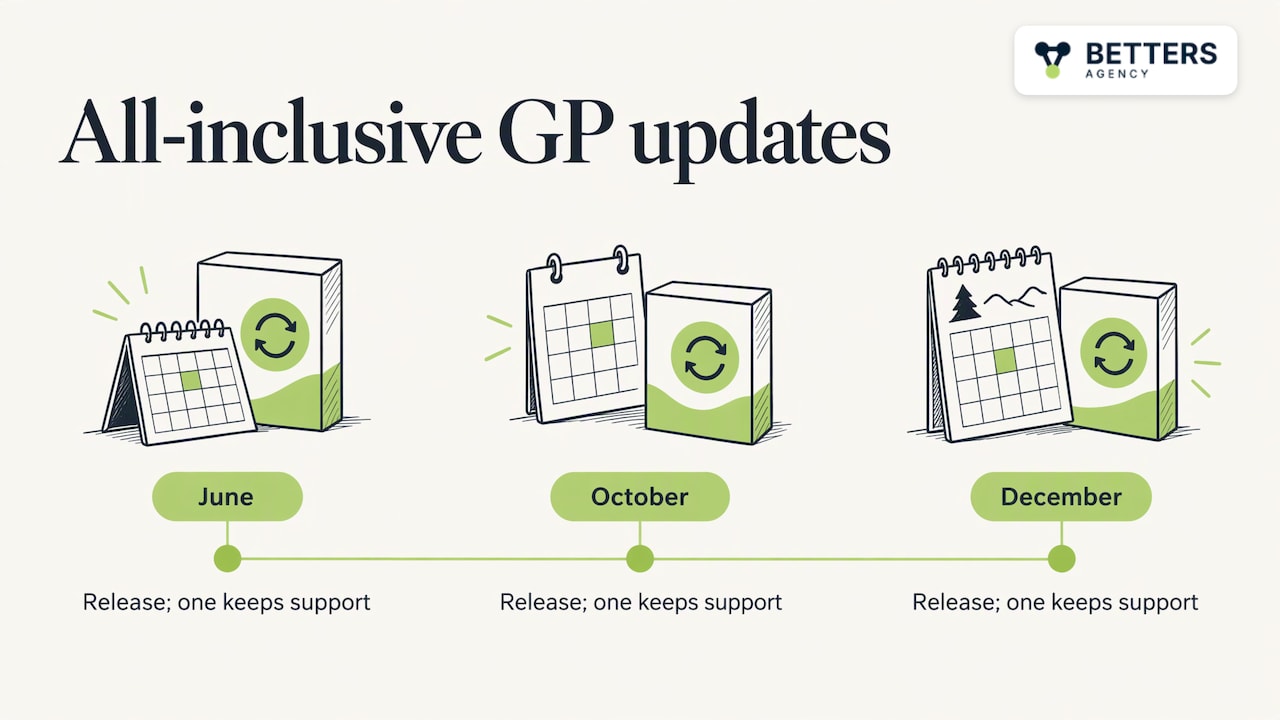
The release cadence is predictable, so check Microsoft Learn for the current version and release schedule before you plan any work. Dates and version numbers there change with each update.
Why the 2029 date is a planning problem, not a deadline day
The date looks far away. The difficulty is that a finance system migration touches the people who are least able to pause: the accounting team closing every month and every year. Realistic plans avoid a quarter-end or year-end cutover, need parallel testing across at least one close cycle, and need budget approved a cycle ahead. Working back from December 2029, the decisions that matter come first: which platform, which partner, which processes to change, and who inside your company owns the data.
A useful rule is to start the assessment while you still have choices. Companies that begin late tend to move processes as they are, because there is no time to question them. Companies that begin early get to retire manual steps they never liked.
What to inventory before you decide
A module list is the least informative document you can produce. The things that determine scope, cost and risk are the ones around the modules. Build an inventory with these columns:
- Companies and entities: every GP company database, including dormant ones nobody has closed.
- Modules in actual use: not purchased, used.
- Security roles: who can post, approve and edit, and whether those permissions match your current org chart.
- Reports: every report finance, operations and leadership open each month, and the owner of each.
- Integrations: every system that sends data to or reads data from GP, whether through a formal interface or a nightly spreadsheet import.
- Third-party add-ons: each one, and whether the target platform already covers the function.
- Customizations: custom fields, forms, stored procedures and scripts.
- Batches and recurring jobs: what runs, when, and who watches it.
- Manual workarounds: the emailed approvals, the copy-paste steps and the shadow spreadsheets.
The last row is the one that tends to surprise leadership. Every workaround is a process the software never handled, and each one is a candidate for automation instead of migration.
Data integrity is part of the inventory
Decades of ledger data include duplicate vendors, inactive customers, inconsistent naming and unused accounts. Moving all of it unchanged simply relocates the problem. Decide per data set what moves in full, what moves as summarized history and what stays in an archive. Our governance and data integrity work is built around this decision: agreeing on who owns each data set and what clean means before anything is configured, so the new system does not decay the way the old one did.
GP versus Dynamics 365 Business Central
Microsoft’s recommended destination for most GP customers is Dynamics 365 Business Central. Its migration guidance describes a staged process: assessment, preparation, cloud migration setup, data replication, data upgrade and completion with follow-up. Each stage has a business counterpart that Microsoft’s tooling does not do for you:
| Migration stage | What the tooling handles | What your business still has to decide |
|---|---|---|
| Assessment | Identifying what exists | What should exist |
| Preparation | Readiness checks | Data cleanup, ownership, naming standards |
| Cloud setup | Connecting environments | Security model, roles, approvals |
| Data replication | Moving records | Which history moves and which is archived |
| Data upgrade | Mapping to new structures | Chart of accounts and dimension design |
| Completion and follow-up | Cutover | Training, adoption, ongoing governance |
Many GP features map directly to Business Central features, which is why it fits so many mid-sized companies. Where it fits less neatly is in the processes built around GP: custom approvals, bespoke reports and integrations. Those are rebuilt, and rebuilding them is the best chance you will get to improve them. If you want a deeper look at the platform side, our Business Central implementation guide and our notes on implementing and troubleshooting Business Central cover the common problems.
Where Power Platform fits after GP
Most GP environments carry a long tail of small automations: someone exports a report, reformats it and emails it for approval. A migration is the natural time to replace those with governed workflows. The Power Platform tools are built for exactly this layer:
- Power Automate handles approvals, notifications and system-to-system flows, such as routing a purchase request or invoice exception to the right approver.
- Power Apps replaces spreadsheet-based intake and field data capture with forms tied to your data.
- Power BI replaces the stack of exported reports with dashboards on a single data source.
- Dataverse is the shared data layer that Dynamics 365 apps and Power Platform apps use, so a customer or project record is defined once.
- Copilot Studio supports agents that answer routine questions or draft routine documents once the underlying data is trustworthy.
The order matters. Automating a messy process produces a faster mess. We design the architecture and data decisions first, and only then configure workflows, which is the sequence we follow in our CRM strategy and architecture work.
When the CRM side matters
Many GP companies track customers and quotes in a separate tool, or in spreadsheets, and reconcile with the ledger by hand. If sales, projects and finance share customers and contracts, connecting a Dynamics 365 CRM to the ERP removes a monthly reconciliation. Our Dynamics 365 CRM consulting page explains how we approach that work. If you are weighing platforms, our comparison of Dynamics 365 CRM and alternatives lays out the criteria.
When our recommendation is the wrong one
A clear trade-off belongs in any honest plan. A Dynamics 365 and Power Platform build is a larger commitment than swapping one ledger for another, and it pays back only if your processes are worth improving. If your GP use is a simple ledger with few integrations and your team is happy with its workflow, a like-for-like ERP move with minimal redesign may be the right call, and the automation layer can wait.
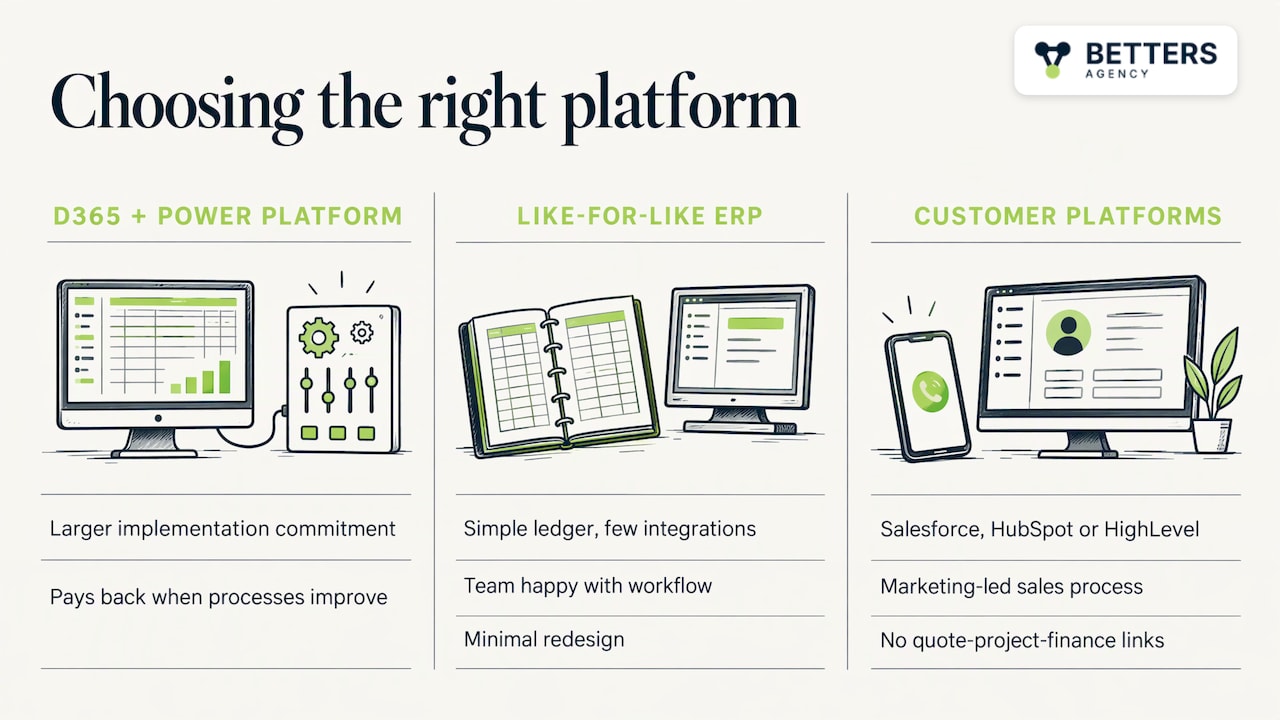
On the customer side, Salesforce, HubSpot or HighLevel are sometimes the better choice. A company whose sales process is mostly marketing-led, with no need to tie quotes, projects and finance together, can be better served by one of them. We will tell you so if your situation looks like that, because a wrong platform choice costs far more than a short conversation.
A practical sequence for the next 12 months
- Confirm your version. Check whether you are on 18.x and which of the yearly updates you last installed.
- Build the inventory from the nine columns above, with a named owner for each report and integration.
- Mark each workaround as keep, automate or retire.
- Decide on data scope: full history, summarized history or archive.
- Choose the target architecture before any configuration begins, including what lives in the ERP, in Dataverse and in Power BI.
- Set the cutover window away from year-end and quarter-end, with at least one parallel close.
- Plan adoption. People who closed the books in GP for ten years need training on new screens and new habits. We have onboarded more than 5,000 users across our projects, and adoption planning is part of how we scope work.
Perspective
We are a small firm, and the person who scopes your project is the person who builds it. That shapes how we look at a GP transition.
The mistake we see most often in ERP moves is treating them as a data copy. The software is the smaller part of the problem. The larger part is the set of habits, spreadsheets and approvals that grew around the old system, and each one carries a decision nobody wrote down. We would rather spend the early weeks on that inventory than on configuration, because the architecture and data decisions are the ones that are expensive to reverse later.
Our work across Dynamics 365 and Power Platform includes more than 100 production automations, and it comes with a finance-validated benefit of more than $10M across engagements. The pattern behind that is simple: automate a process only after it is understood, and put governance in place so the system stays clean after go-live.
If you are on GP today, you have time. Use it to decide what your finance and operations processes should look like, and then choose the platform that supports them.
Derek
How we help with a GP transition
We are an independent Microsoft partner, and our Dynamics 365 implementations are paired with CRM strategy and architecture, business process automation, governance and data integrity, and adoption and enablement. For a GP customer, that means a plan that starts with your inventory and your data, and ends with workflows and dashboards your team uses.
If you want to talk through your GP estate and the 2029 timeline, see our services and book a conversation.
FAQ
What is the latest version of Dynamics GP?
Microsoft Learn lists the current version as 18.x, governed by the Modern Lifecycle Policy. Microsoft typically releases updates in June, October and December, and each is cumulative. Check Microsoft Learn for the newest release before you plan an upgrade.
When does Dynamics GP support end?
Product support, enhancements, regulatory updates and technical support end on December 31, 2029, and security updates end on April 30, 2031, per Microsoft. Planning typically starts well before the first date, so finance can avoid a cutover at year-end.
Is Great Plains the same as Dynamics GP?
Yes. Great Plains is the former name of the product, and many finance teams still use it. Both names refer to the same accounting and ERP software, which Microsoft now calls Dynamics GP.
Where should a GP customer move?
Microsoft’s migration guidance points to Dynamics 365 Business Central as the path, with a staged process from assessment to follow-up. The right choice for you depends on your inventory of integrations, customizations and workarounds, so assess those first.
Sources
- Welcome to Dynamics GP, Microsoft Learn
- Understand the Lifecycle Policies, Dynamics GP, Microsoft Learn
- Announcing End of Support for Dynamics GP, Microsoft Dynamics 365 Blog
- Why migrate now: moving from Dynamics GP to Business Central, Microsoft Dynamics 365 Blog
- Microsoft Dynamics GP (Legacy) Reviews and Ratings, Gartner Peer Insights
Recommended
- D365 Project Operations Technical Guide for Services
- Dynamics 365 F&O Implementation Guide
- Dynamics 365 PSA vs Spreadsheets for Resource Scheduling
- Dynamics 365 PSA vs Alternatives in Accounting
Articles are for informational and educational purposes only, Betters Agency LLC is not a licensed financial advisor or legal counselor and does not provide these services, readers are encouraged to check multiple sources for accuracy.