
Dynamics 365 CRM Licensing Guide: Choose by Role and Workflow
August 10th, 2026
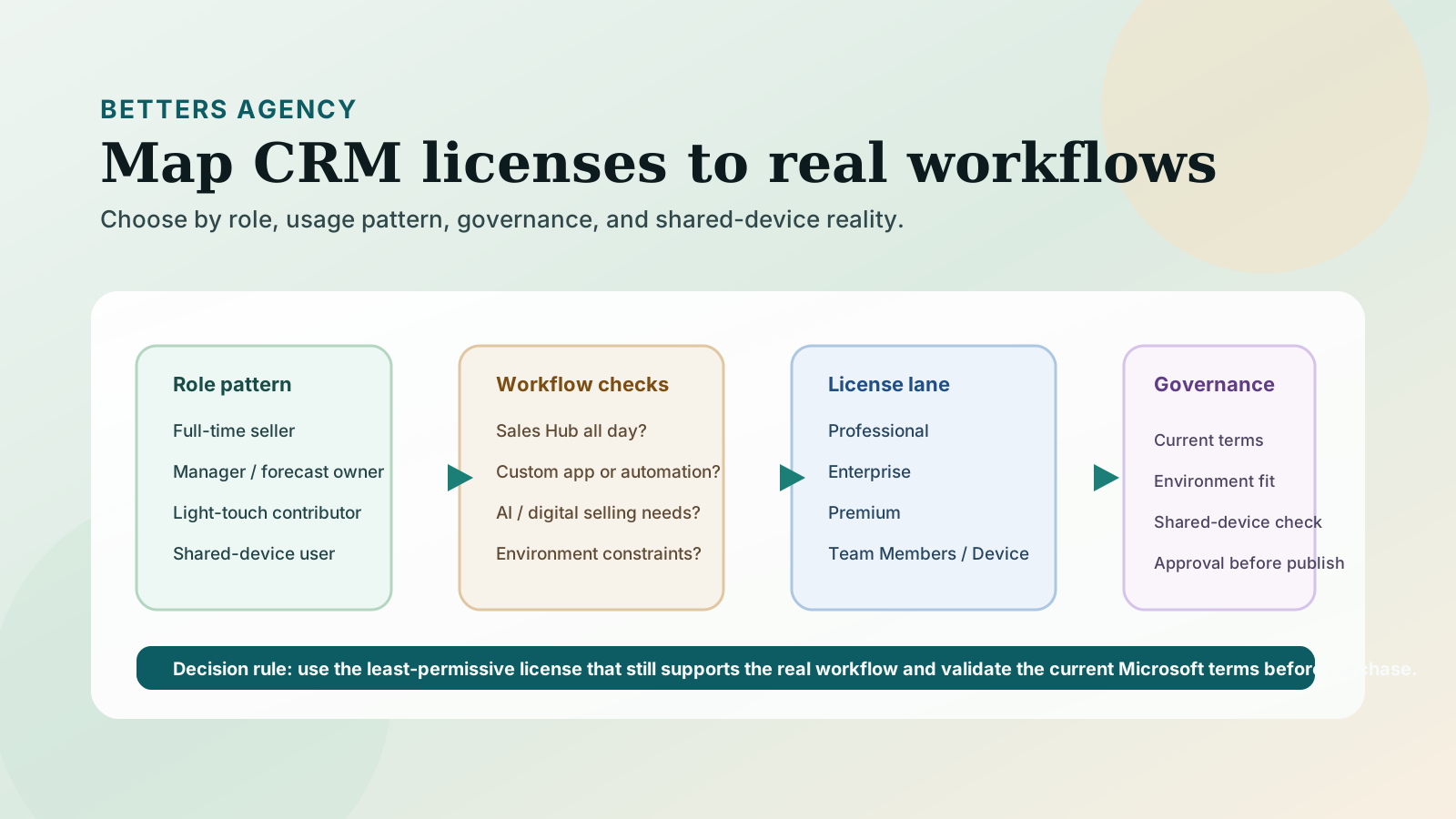
There is no single Dynamics 365 CRM license that is right for every person. The responsible choice depends on the work each role performs, the Sales application experience it needs, whether the person works across other Dynamics 365 applications, and whether the organization needs advanced automation or AI-assisted selling capabilities.
For most teams, the decision starts with four Dynamics 365 Sales options: Professional, Enterprise, Premium, and Microsoft Relationship Sales. Team Members and Sales Device address different participation patterns; they are not lower rungs on the same seller-license ladder.
The practical goal is not to find the license with the longest feature list. It is to give each role enough access to complete its real workflow without treating a light-participation license as a substitute for a full-time seller license. Current Microsoft Product Terms and the current licensing guide govern actual use rights, so verify the final design before purchasing.
Start with the role and workflow, not the license name
A useful licensing exercise begins with a role-to-work matrix. List the people who touch the sales process, the records they create or change, the application experience they use, and the steps they own. For a project-centric professional-services firm, that often means separating several patterns that can look similar on an organization chart:
- a seller who qualifies leads, manages opportunities, builds account relationships, and forecasts work;
- a sales leader who reviews pipeline, coaches sellers, and changes the sales process;
- an operations or finance participant who needs limited visibility or designated updates across applications;
- a delivery leader who occasionally contributes to an account or opportunity but does not run the sales cycle; and
- a worker using a genuinely shared device rather than a personal login.
Next, identify the application experience each person needs. A named user working all day in the Sales Hub is a different licensing case from someone performing a small set of designated actions across multiple Dynamics 365 applications. A shared-device scenario is different again. Do not choose by job title alone; two people called account manager can have materially different workflows.
Finally, separate current requirements from attractive future features. If advanced sales engagement, forecasting, scoring, conversation intelligence, LinkedIn relationship data, or custom applications are part of the decision, document who will use them and for what process. This keeps an appealing demo from becoming an entitlement assumption.
Compare the four Dynamics CRM license types
Microsoft's Dynamics 365 Sales purchase overview identifies Sales Professional, Sales Enterprise, Sales Premium, and Microsoft Relationship Sales. The descriptions below are a decision guide, not a replacement for the current licensing guide.
Sales Professional: essential sales-force automation
Microsoft's August 2026 licensing guide describes Sales Professional as intended for essential sales-force automation where the sales process is not complex. It supports a more bounded Sales experience for teams whose work fits the Professional application and does not require the broader Enterprise capabilities.
The important correction to many older CRM license summaries is that Professional is not accurately described as having no customization or automation. Microsoft's current Sales comparison describes limited customization and automation. That distinction matters: limited is not the same as absent, but it is also not a promise that every Enterprise design can be reproduced in Professional. Validate required tables, workflows, integrations, apps, and automation against the current entitlement before selecting it.
Professional is a plausible fit when sellers follow a relatively straightforward process and the organization can operate within its application boundary. It is a weak fit when the sales model depends on extensive custom applications, advanced process design, or capabilities Microsoft reserves for Enterprise and above.
Sales Enterprise: broader process and application control
Microsoft's August 2026 licensing guide says Sales Enterprise adds customization, extensibility, custom apps, embedded intelligence, manual forecasting, and Copilot in Dynamics 365 Sales to the essential sales workflow. It is often the more defensible starting point when the sales process has meaningful variations, connected workflows, or governance requirements that exceed Professional's limits.
Enterprise also includes limited-capacity digital-selling capabilities. Microsoft's current digital-selling documentation documents unlimited conversation-intelligence hours plus 1,500 sequence-connected records and 1,500 scored records per environment per month. Those capacities and their conditions can change, so treat them as current documentation to verify, not as a permanent design assumption.
Choose Enterprise because the workflow needs its capabilities, not because it is labeled the common middle option. A team with a simple process may not need it. A team with several selling motions, custom apps, forecasting needs, or connected automation may find that Professional creates more design compromise than the initial license difference justifies.
Sales Premium: full access to listed advanced selling capabilities
Microsoft's current Sales comparison shows Sales Premium building on the Enterprise foundation and providing full access to the listed advanced sales-force automation and intelligence capabilities. Microsoft describes Premium as supporting advanced sales engagement and AI-powered capabilities, while its comparison distinguishes Premium from the limited capacities included with Enterprise.
Premium becomes relevant when those advanced capabilities are part of a governed operating process rather than a wish list. Define who owns configuration, which sellers use the capability, how data quality will be maintained, and how managers will incorporate the resulting signals into their work. A license does not create a useful sales practice by itself.
Before choosing Premium, test whether the required use case truly exceeds Enterprise's documented capabilities or capacities. Confirm current licensing, regional availability, prerequisites, and any related capacity or credit requirements directly with Microsoft or a qualified partner.
Microsoft Relationship Sales: Enterprise plus LinkedIn relationship tools
Microsoft describes Microsoft Relationship Sales as combining Sales Enterprise with LinkedIn Sales Navigator. It is intended for relationship-driven selling in Dynamics 365 Sales environments rather than as a general license for every Dynamics 365 workload.
This option deserves consideration when sellers consistently use LinkedIn relationship intelligence as part of account research and outreach, and when the bundled experience matches the team's actual process. Microsoft currently lists variable commercial terms. Because the repair does not introduce pricing, verify the current purchasing route and terms rather than treating any summary as a quote.
If LinkedIn relationship data is not central to the selling motion, Enterprise or Premium may be the cleaner comparison. The right answer depends on workflow adoption as much as bundle contents.
Team Members and Sales Device solve different problems
Team Members is a named-user license for light, designated cross-application scenarios. Microsoft's Team Members guidance makes clear that it supports limited use rights rather than full application access. It can fit someone who needs approved light-touch participation across Dynamics 365 applications, but it is not a full Sales license for a person who owns and executes the sales process.
Avoid building the decision around an informal list of actions copied from an old article. Start with the actual tasks, then validate every required create, read, update, approve, and application-access right against the current guide and Product Terms. If a role behaves like a full-time seller, Team Members should not be used as a workaround for that reality.
Microsoft's August 2026 licensing guide describes Sales Device as a full-access device license with rights equivalent to the Sales Enterprise user license, limited to the licensed device. It fits a legitimate shared-device workflow, such as a common workstation used by multiple people in a defined location. It should not be treated as a cheaper substitute for named-user access when people work from their own devices or need personal mobility.
The environment-mixing constraint can change the design
Microsoft's August 2026 licensing guide states that Sales Professional and Sales Enterprise users cannot be deployed in the same environment. Separate environments on the same tenant are possible, and users can access only the environment for which they are entitled. Premium and Microsoft Relationship Sales build from the Enterprise side of this distinction.
This is not a minor procurement footnote. Splitting users across environments can affect data ownership, reporting, integrations, security administration, support, and the user experience. If the proposed savings depend on mixing Professional with Enterprise-class users, model the additional environment and operating complexity before calling the design efficient.
The same discipline applies when one person needs more than one Dynamics 365 application. Map the complete application workload and have a licensing specialist verify the appropriate base, attach, or other licensing treatment under current Microsoft rules. Do not infer cross-application rights from a Sales license name.
A verification checklist before you purchase
Use this checklist to turn a license comparison into a defensible decision:
- Name every role. Include full-time sellers, sales leaders, occasional contributors, administrators, service or project users, and genuine shared-device users.
- Map the work. Record the tables, processes, approvals, forecasts, reports, apps, and automation each role must use.
- Choose the required app experience. Confirm whether the role needs Sales Professional, the broader Sales Hub experience, custom apps, or only designated light participation.
- Test advanced capabilities. Document the business process behind scoring, sequences, conversation intelligence, forecasting, Copilot, or LinkedIn relationship data.
- Check capacities and prerequisites. Verify current limits, credits, regional availability, configuration dependencies, and related licenses.
- Model environments. Account for the Professional and Enterprise environment boundary plus its impact on data, integration, reporting, security, and support.
- Review cross-application use. Identify anyone who also works in Customer Service, Field Service, Project Operations, or another Dynamics 365 application.
- Validate current terms. Use the current Dynamics 365 Licensing Guide, Microsoft Product Terms, and a qualified licensing review before purchase.
This process can also reveal that the problem is not licensing. A team may need clearer role ownership, a simpler sales process, better data standards, or a more focused application design. The license should support the operating model, not substitute for one.
Make the CRM license decision part of workflow design
Betters Agency starts with the workflow: who does the work, where information changes hands, which controls matter, and what each role must accomplish. You can learn more about our Dynamics 365 approach and how we work, or review the available Dynamics 365 Sales packages.
Betters Agency sells and implements Dynamics 365 services, so our perspective is informed but commercially interested. This guide is educational and does not replace Microsoft Product Terms, the current licensing guide, or a commercial quote. Product names, capabilities, entitlements, capacities, purchasing routes, and terms can change.
If you want to test a proposed license mix against the way your team actually sells, schedule a 25-minute Review a Workflow. We will map one workflow and identify the licensing questions that need a current Microsoft answer before you buy.