
Blog
Insurance Claims Automation: A Practical Guide for US Insurers and Agencies
nbetters · · 11 min read
How insurance claims automation works from FNOL to payment, what to automate first, which controls US regulators expect, and how to measure results.
Insurance claims automation uses software to run the repeatable work in each claim, from first notice of loss (FNOL) to payment. It captures intake data, reads documents, checks values against the policy, routes the file and updates your systems, while coverage decisions stay with your adjusters. For a small or midsize carrier, MGA or agency, the practical path is to automate the routine steps around the adjuster first, design the data model before building anything, and put governance in place from day one.
This guide covers what the work looks like in practice, which technologies fit which task, what US regulators expect when AI is involved, and how to measure whether the project paid off.
Key Takeaways
- Claims automation handles routine work across the lifecycle (intake, document extraction, coverage checks, routing, correspondence, payment) and leaves judgment to people.
- Start where volume is high and rules are clear: intake validation, document classification and status communication usually come before adjudication.
- If you use AI in claims decisions, the NAIC model bulletin expects a written program with governance, human involvement and explainability proportionate to risk.
- Data design comes first. Automation built on inconsistent claim data produces fast errors instead of fast resolutions.
- Measure cycle time, touches per claim, rework and exception volume before and after, using your own baseline.
Table of Contents
- What claims automation actually covers
- Which technologies do which job
- Where to start: sequence by volume and clarity
- The data model decides whether it works
- AI in claims: benefits and the regulatory picture
- Power BI dashboards for claims operations
- How to assess options and measure results
- Our perspective
- Talk to us about your claims workflow
- FAQ
- Sources
What claims automation actually covers
Claims automation, also called claims process automation, applies technology to the tasks and workflows across the whole claims journey. Flowable describes it as streamlining the traditional five steps of submission, validation, assessment, approval and payment.
Most vendor guides split the lifecycle into similar stages. In practice they look like this:
- FNOL and intake. Structured digital forms, portals, email parsing or a phone intake script feed one record. Assured notes that validation logic can check completeness and accuracy at the point of entry and flag inconsistencies before the claim moves on.
- Document processing. Estimates, police reports, medical bills and photos are classified, and the key fields are extracted into the claim record.
- Coverage and eligibility checks. The claim details are compared with policy status, deductibles, limits and exclusions. When data is missing or ambiguous, the system prompts for clarification instead of stalling.
- Triage, routing and adjudication support. Rules assign the claim to the right queue or adjuster, set deadlines and surface the facts the adjuster needs.
- Settlement and communication. Approval notices, payment instructions and status updates are generated and sent, and downstream systems are updated.
The line that matters most is the one between automation and decision-making. As Docsumo puts it, automation can take over routine work before and after the adjuster’s decision, while the adjuster keeps responsibility for coverage, investigation and communication with the people involved. We build to that line.
Which technologies do which job
“Insurance automation” is a broad label. It covers quoting, underwriting, billing and policy administration as well as claims, and EIS describes claims automation as data pipelines, rules engines and event triggers applied to intake, review and resolution. Inside claims, different tools fit different tasks:
| Task | Typical technology | What it does |
|---|---|---|
| Repetitive keying between systems | Robotic process automation (RPA) | Moves data between screens and systems that have no clean API |
| Reading scans, PDFs and forms | OCR and intelligent document processing | Extracts and validates fields from unstructured documents |
| Rule-based routing and approvals | Workflow automation | Assigns, escalates, tracks deadlines and logs every step |
| Summaries, drafts and missing-information requests | Copilot and AI agents | Prepares correspondence and surfaces context for the adjuster |
| Claims reporting | Dashboards and analytics | Shows cycle time, backlog and exceptions to management |
Flowable’s overview lists the same families: RPA for rule-based work, AI and machine learning for pattern recognition and fraud detection, natural language processing for text, OCR and IDP for images and scans, and business process management for orchestrating connected workflows.
On the Microsoft side, this maps to Power Automate for workflows and desktop automation, Dataverse as the governed data layer, Power Apps for intake and adjuster screens, Copilot Studio for conversational agents, and Power BI for reporting. Where a client already runs UiPath, Zapier, Make or n8n, we work with those as well, because replacing a working automation for the sake of a single-vendor stack rarely makes sense.
Where to start: sequence by volume and clarity
The best first automations share two traits: they happen on nearly every claim, and the rule is easy to state. A sensible order for most carriers and agencies:
- Intake validation. Required fields, policy lookups and duplicate checks at the moment of entry. Errors are cheapest to fix here.
- Document handling. Classification, extraction and attachment to the right claim, with a review queue for low-confidence reads.
- Routing and deadlines. Assignment by line of business, severity or jurisdiction, plus reminders tied to regulatory and internal timelines.
- Correspondence. Acknowledgments, requests for information and status updates generated from approved templates.
- Reporting. A single view of where every claim sits and why.
Adjudication support comes later, once intake data is clean and you trust the rules. Our reasoning is simple: adjudication logic depends on every upstream field being right.
If you are an agency rather than a carrier, the work often centers on claim intake, status tracking and client communication, and the same sequence applies. Our piece on AI for insurance agency operations goes deeper on that side of the business.
The data model decides whether it works
Most failed automation projects fail on data, not on tooling. Before configuring a single flow, decide:
- What a claim, a policy, a party and a coverage line are as records, and how they relate.
- Which system owns each field when two systems disagree.
- Which fields are required at each stage, and who can change them.
- How exceptions are recorded so they can be counted, not just handled.
This is the architecture work behind our CRM strategy and architecture and governance and data integrity services. Skipping it is the most common way a system decays: fields get reused for other purposes, flows nobody owns keep running, and reports stop matching reality. For the integration side, see our guide on governing CRM data integration.
AI in claims: benefits and the regulatory picture
Insurers are using AI in claims. Insurance.com reports that AI is applied to reviewing documents and analyzing photos to assess damage, and cites vendors claiming instant resolution of a share of claims. The same article also flags risks: AI has been shown to deny claims at a higher rate than human adjusters, models trained on historical data can encode past discriminatory patterns, and policyholder data can be exposed through AI platforms.
Those risks are the reason to design controls in, and US regulators have said what they expect. The NAIC model bulletin on the use of AI systems by insurers expects insurers to comply with all applicable federal and state insurance laws and to develop and maintain a written AI systems program that mitigates adverse consumer outcomes. Controls should be commensurate with risk, and the bulletin points to factors such as the nature of the decision, potential harm, human involvement, transparency and explainability, and reliance on third-party data and models. Adoption and enforcement vary by state, so confirm what your state’s department of insurance requires.
Practical consequences for design:
- Keep a human on adverse decisions. Route denials, partial denials and disputed claims to an adjuster, with the automation preparing the file instead of closing it.
- Log every automated step. Who or what acted, on which data, with which rule version.
- Document the program. Model and flow inventory, owners, testing and change control.
- Control third-party exposure. If a vendor model scores or reads claims, your governance covers it too.
This is not legal advice. Have your compliance officer or counsel confirm the requirements that apply to your lines and states.
Power BI dashboards for claims operations
Automation without visibility just moves the problem somewhere harder to see. A claims dashboard in Power BI works best when it answers operating questions, not when it displays every available number. Useful views include:
- Pipeline by stage. Open claims by status, age and assigned adjuster, so backlogs show up before customers call.
- Cycle time by step. Where time is actually spent between FNOL and payment, split by line of business.
- Touches and rework. How often a claim returns to a prior stage and why.
- Exceptions. Claims that fell out of automation, grouped by cause, which tells you what to fix next.
- Document quality. Extraction confidence and the share sent to manual review.
Three data controls belong behind every dashboard. First, a single governed source, so the numbers match the claim system. Second, row-level security, so adjusters and agents see only the claims they should. Third, agreed metric definitions, because “closed” and “cycle time” mean different things in different departments. Our Power BI data intelligence work starts with those definitions.
How to assess options and measure results
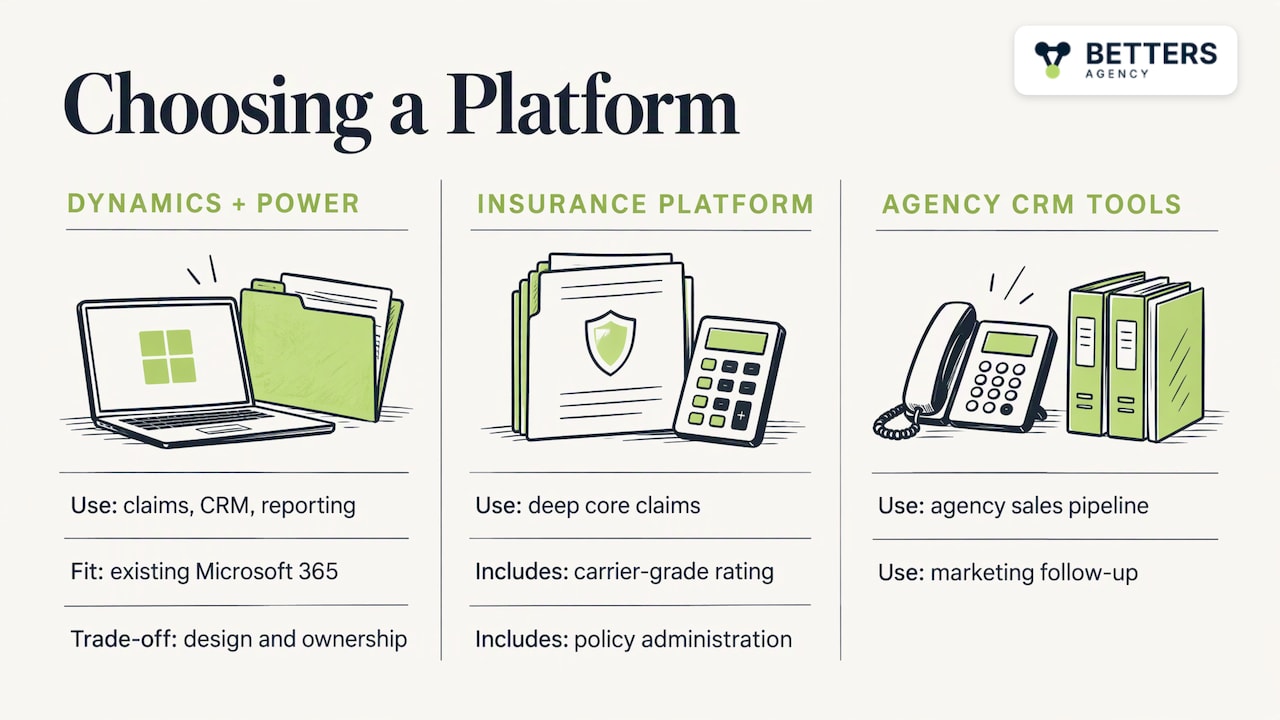
There are broadly three routes: a purpose-built claims platform, a configurable low-code platform such as Dynamics 365 with Power Platform, or a point tool for a single task like document extraction. Compare them on criteria that affect your operation:
| Criterion | Question to ask |
|---|---|
| Fit with your process | Does it model your claim types and jurisdictions, or force you to change them? |
| Integration | How does it connect to your policy admin, billing and document systems? |
| Governance | Are audit logs, role-based access and change control built in? |
| Adoption | Will adjusters actually use the screens, and who trains them? |
| Ownership | Can your own staff adjust a rule without a change order? |
| Total effort | What does it take to implement and to maintain after launch? |
Where another platform is the better choice
We recommend Dynamics 365 and Power Platform when you need claims workflows, CRM and reporting tied together on a configurable base, particularly if your organization already runs Microsoft 365. The trade-off is that configurable platforms need deliberate design and ongoing ownership. If you need a deep, pre-built core claims system with carrier-grade rating and policy administration, a dedicated insurance platform may serve you better. If your main need is agency sales pipeline and marketing follow-up, Salesforce, HubSpot or HighLevel are sometimes the better choice, and we will say so. Our comparison of Dynamics 365 CRM and alternatives explains how to decide.
Measure against your own baseline
Before you build, record the current numbers: average days from FNOL to payment, touches per claim, share of claims needing rework, backlog age, and hours spent on manual entry. Do not borrow a benchmark from a vendor brochure. After launch, compare the same measures monthly and review the exception report, since that report tells you which automation to build or repair next. For turning those gains into a business case, see our guide to assessing the value and change impact of automation.
Our perspective
Claims automation succeeds or fails on three things: the data model, the handoff between software and adjuster, and whether people use what you built. Tool choice comes after those.
We are a small firm and an independent Microsoft partner. You work directly with the person who builds your system, so the decisions made in the architecture session are the ones that end up in production. That matters in claims, where one badly defined field can distort every report built on it.
We would rather automate the unglamorous parts first: validation at intake, document handling, routing, correspondence. Those steps rarely make headlines, but they remove the rework that slows every file. Our delivery experience includes 100+ production automations, 5,000+ users onboarded and $10M+ in finance-validated benefit across our work, and the lesson from that body of work is consistent: governance and adoption are not an afterthought. Flows without owners and screens nobody trusts are how systems decay.
The trade-off is honest. A configurable platform asks more of you in design and ownership than a packaged product does. If a packaged claims system or another CRM fits your situation better, we will tell you.
Derek
Talk to us about your claims workflow
If you run claims, or the agency side that supports them, and want a realistic plan for what to automate first, we can map your current process, define the data model and build the workflows, integrations and reporting on Dynamics 365 and Power Platform. Our work covers Dynamics 365 implementations, business process automation, Copilot and AI solutions, governance and adoption, and you can read more about our Dynamics 365 consulting.
Bring a sample of your claim types and the systems they touch, and we will show you where automation is safe to start and where a human should stay in the loop. Start at Betters Agency.
FAQ
What is claims automation?
Claims automation is the use of software to handle the routine work of a claim, from FNOL through document processing, coverage checks, routing, correspondence and payment. Final coverage decisions stay with the insurer’s people. The goal is fewer manual touches and fewer errors, not removing the adjuster.
Are insurance companies using AI for claims?
Yes. Insurance.com describes AI being used to review documents and analyze damage photos. Regulators expect governance around it: the NAIC model bulletin calls for a written AI systems program with controls that match the risk, and state adoption varies.
Which technologies automate the claims process?
Most projects combine workflow automation, RPA for system-to-system tasks, OCR and document processing for scans and PDFs, AI for summaries and triage support, and dashboards for reporting. The right mix depends on which tasks are highest in volume and clearest in their rules.
Can Power BI dashboards support claims operations?
Yes. Dashboards can show pipeline by stage, cycle time, rework, exceptions and document quality in one place. They are only as reliable as the data behind them, so agree on metric definitions and access rules before building visuals.
Should every insurer build claims automation on Dynamics 365?
No. It suits organizations that want configurable workflows, CRM and reporting on one governed platform. A packaged core claims system, or Salesforce, HubSpot or HighLevel for sales-led agency needs, can be the better fit in other situations.
Sources
- Insurance Claims Automation: What It Is and How It Works (Flowable)
- Insurance claims automation: how automated claims processing works (Docsumo)
- Claims automation with AI in P&C operations (Assured)
- Insurance Claims Automation (EIS)
- How AI is transforming insurance claims for policyholders (insurance.com)
- NAIC Model Bulletin: Use of Artificial Intelligence Systems by Insurers
Recommended
- The AI Advantage for Insurance Agencies
- PSA Software Implementation Guide for Agencies
- PSA Workflow Automation Consultant Implementation Guide
Articles are for informational and educational purposes only, Betters Agency LLC is not a licensed financial advisor or legal counselor and does not provide these services, readers are encouraged to check multiple sources for accuracy.