
Blog
AI Integration Consulting: How to Scope, Govern and Deploy
nbetters · · 12 min read
What AI integration consulting covers, which CRM workflows suit it, how an engagement runs, and how to govern it and measure results before you hire.
AI integration consulting connects AI models to the systems, data, permissions and people that run your business, so that AI does a defined job inside a real process and can be tested, monitored and maintained. For a growing company on Microsoft, that usually means Dynamics 365, Dataverse, Power Automate, Copilot Studio and Power BI working from one clean architecture. BetterS Agency is a small, independent Microsoft partner that designs and builds this work, and you work directly with the person who builds your system. The sections below explain what the work includes, which workflows are worth automating first, how an engagement runs, and where the recommendation changes.
Key Takeaways
- AI integration is a process and data problem before it is a model problem. The business process that should change, and the data feeding it, decide whether a project pays off.
- Start with workflows that have clear inputs, triggers, actions and outputs. Reserve AI judgment for the steps where data is unstructured or ambiguous.
- Governance belongs at the start: permissions, data policies, human review and audit trails are far cheaper to design than to retrofit.
- Measure against a baseline you capture before launch, and track adoption alongside financial results.
- Dynamics 365 and Power Platform are not always the right base. Salesforce, HubSpot or HighLevel are sometimes the better choice, and a good consultant says so.
Table of Contents
- What AI integration consulting actually covers
- Which processes and CRM workflows suit AI
- How an engagement runs, from assessment to deployment
- Data quality, security and governance
- Off-the-shelf AI tools or a tailored build
- Measuring ROI and operational impact
- When Dynamics 365 is the wrong base
- Working with us
- Questions to settle before you hire anyone
- FAQ
- Sources
What AI integration consulting actually covers
General AI consulting often ends with a strategy deck or a prototype. Integration consulting starts where those end: it puts AI into the operational system. That means deciding whether AI is the right tool at all, identifying the process that should change, mapping the systems and permissions involved, and designing an architecture that can be tested and governed. A published overview of AI systems integration draws the same distinction: an AI developer may build a model application, while an integration consultant works across business processes, enterprise platforms, governance and operations.
In practice, the work spans several layers:
- Process design. Which steps are rules, which need judgment, and where a person must approve.
- Data foundation. Where records live, who owns them, and whether they are clean enough for AI to read.
- Platform build. Configuring Dynamics 365, building Power Platform apps and flows, connecting external systems through custom development and integrations.
- AI layer. Copilot and AI solutions, including agents built in Copilot Studio, scoped to specific tasks and data.
- Governance and adoption. Access rules, data policies, training and the habits that keep a system healthy after launch.
The market behind this is growing. Mordor Intelligence values agentic AI consulting at USD 2.86 billion in 2025 and reports that implementation and systems integration held the largest share by service type. Demand is moving toward getting AI to work inside existing systems, not toward more strategy documents.
Which processes and CRM workflows suit AI
The most useful test comes from workflow design itself. HubSpot’s guidance on choosing between AI agents and workflows asks you to define the input, trigger, actions and output of a successful result before you build anything. It separates three kinds of goals: rule-based goals with specific criteria and predefined actions, judgment-based goals that involve unstructured or ambiguous data, and hybrid goals that combine both. The logic applies on any platform, including Dynamics 365.
Applied to a services or insurance business, the sort looks like this:
| Goal type | Typical example | Best tool |
|---|---|---|
| Rule-based | Route a new lead by territory, create a project record when a deal closes, send a renewal reminder at a set interval | Power Automate flow, no AI needed |
| Judgment-based | Summarize a long email thread, classify an inbound request, draft a reply from a case history | AI action or Copilot agent with human review |
| Hybrid | Read an incoming document, extract fields, then apply approval rules and write to the CRM | Flow with an AI step and a defined approval stage |
Most firms find that more of their list falls in the first row than they expected. That is good news: rule-based automation is cheaper, easier to test and easier to audit. AI earns its place in the second and third rows, where reading and interpreting are the bottleneck.
Good first candidates tend to share traits: high volume, a clear definition of correct, data already inside a system you control, and a low cost when a person corrects an error. Poor first candidates involve sensitive write actions with no review step, or data scattered across spreadsheets and inboxes. If you want to see how this plays out in a professional services context, our AI in PSA value assessment guide walks through the decision.
How an engagement runs, from assessment to deployment
There is no single standard, but the research on enterprise AI maturity gives a useful frame. The MIT CISR Enterprise AI Maturity model describes four stages: experiment and prepare, build pilots and capabilities, develop AI ways of working, and become AI future ready. In its 2022 survey of 721 companies, 28% sat in stage one, 34% in stage two, 31% in stage three and 7% in stage four. Most organizations, in other words, are still moving from experiments to systematic delivery, which is where integration work matters most.
A practical engagement maps onto that progression:
- Assess the process and the data. Pick one business problem, document how work flows today, and check whether the data is accurate and accessible. MIT Sloan’s Leading with AI recommends defining the critical problems first, then assessing whether data is AI-ready and starting data cleansing and governance.
- Decide the architecture before configuring anything. Choose where data lives, which system is the source of truth, how Dataverse tables relate, and which integrations are needed. This is the step that most often separates systems that last from systems that decay.
- Build a narrow pilot. One workflow, one user group, a defined success measure. MIT Sloan encourages continuous experimentation, proofs of concept and capturing lessons from both successes and failures.
- Add governance and review points. Permissions, data policies, human approval on sensitive actions, logging.
- Train and onboard users. Adoption is part of delivery, not a follow-up. Our approved track record here is 5,000+ users onboarded.
- Measure, then expand. Compare against the baseline, fix what drifted, and only then widen scope.
The small-firm model matters in steps two and four. The person who makes the architecture decisions is the person who builds the flows and configures the permissions, so there is no handoff where intent gets lost. We have delivered 100+ production automations, and the pattern holds: the projects that go well are the ones where scope was kept narrow and the data decisions were made first.
Data quality, security and governance
Governance is where AI integration projects quietly fail. The MIT Technology Review and Boomi playbook reports that data quality was cited by half of respondents as the most limiting data issue, and that moving from first experiments to firm-wide integration depends on changes in infrastructure, data governance and supplier ecosystems. MIT CISR makes a similar point about stage two: consolidate data silos and serve data to AI safely and securely.
On the Microsoft stack, several controls are concrete:
- Data policies. Administrators can govern how Copilot Studio agents and Power Platform apps connect to data and services through data policies in the Power Platform admin center. Microsoft states that enforcement has applied to all tenants since early 2025, so agents cannot be exempted.
- Role-based access. Agents should see only the records and fields the requesting user may see, and read and write capabilities should be separated.
- Human review. Sensitive actions, such as changing a financial record or sending an external message, should pass an approval step.
- Audit trails. You should be able to answer who or what changed a record, and why.
Legal exposure grows with every system an agent can touch. Law firm Squire Patton Boggs notes that agents connected to email, CRM, HRIS and document systems widen legal risk around access controls, scope of authority, cybersecurity, vendor management and confidential information, and it lists contract topics worth addressing, including training use of your data, retention, audit rights and human review. If your business handles regulated data, such as insurance or legal client records, involve your own counsel before an agent goes live.
There is also a framework layer. The NIST AI Risk Management Framework organizes risk work into govern, map, measure and manage, with governance running through all the others. Georgetown’s CSET warns that organizations struggle to combine guidance from several frameworks into one coherent approach, and that a lack of implementation detail is a barrier. A concrete, system-level governance design is how that guidance becomes something a user actually experiences. Our governance and data integrity approach covers the Power Platform side in more depth.
Off-the-shelf AI tools or a tailored build
This is the question most buyers ask first, and the answer depends on how much your process differs from the standard one.
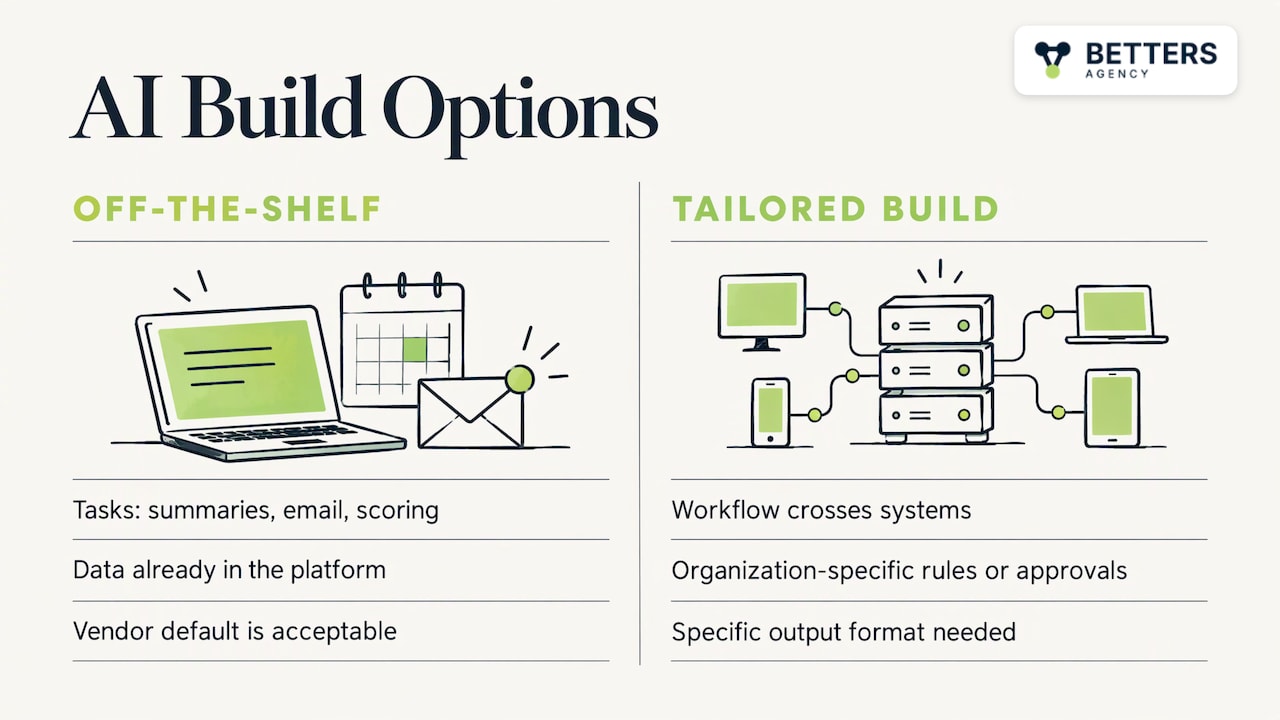
Off-the-shelf features fit when the task is common (meeting summaries, email drafting, lead scoring), your data already sits in the platform that offers the feature, and a vendor default is acceptable.
A tailored build fits when the workflow crosses systems, depends on your own rules or approvals, or needs a specific output format. Examples include reading incoming documents and writing structured records, routing work across a CRM, project system and billing system, or building a Copilot agent limited to a defined set of tables.
Most real projects mix both. We typically configure the platform’s built-in AI where it fits, then add custom development and integrations only where the process needs it. That keeps the maintenance surface small, which matters because every custom component is something you must keep running. Our guide to choosing an AI platform goes through the criteria.
Measuring ROI and operational impact
The simplest discipline is to set a baseline before you build. Record how long the process takes now, how many errors occur, how many people touch each item and what the work costs. After launch, compare the same measures. Total benefits minus total costs, divided by total costs, gives a basic return figure, and payback period shows how quickly it pays for itself. Total costs should include build, ongoing support, usage charges and the time people spend reviewing AI output.
Two cautions keep the numbers honest. First, count only benefits someone in finance would accept, such as hours removed from a measured process or errors that previously needed rework. Our approved reference point is $10M+ in finance-validated benefit across delivered work. Second, track adoption. A workflow that people route around produces no benefit, whatever the design says. The MIT Technology Review playbook makes the same point from the other side: ROI methods should capture efficiency gains and new value created by AI.
For detailed frameworks, see how leaders can measure business value from AI-powered CRM and CRM value beyond software costs.
When Dynamics 365 is the wrong base
A recommendation is only useful if it names where it fails. Dynamics 365 and Power Platform suit organizations that already live in Microsoft 365, need configurable process logic, and want one governed environment for CRM, project delivery and automation. The trade-off is that they reward upfront design. A company that wants a simple sales pipeline live this week, with no custom process and no one to administer a configurable platform, will often be better served elsewhere.
Salesforce, HubSpot or HighLevel are sometimes the better choice. HubSpot can suit a marketing-led team that wants fast setup and a single interface. HighLevel can suit agencies that manage many small clients and want built-in funnels and messaging. Salesforce can suit large organizations with deep existing investment and a dedicated administrator group. We would rather tell you that during assessment than build the wrong system. Our comparison of Dynamics 365 and alternatives sets out the criteria.
A second case where the advice changes: if your data is in poor condition and nobody owns it, an AI project should wait. Clean-up and ownership come first, and the AI layer follows.
Our view on AI integration
We run BetterS Agency as a small firm, and that shapes how we approach AI. Most of the failed AI projects we hear about began with a tool and went looking for a process. We start from the process and the data, then decide what, if anything, AI should do.
We think the architecture and data decisions have to be right before anything is configured, because every flow, agent and report inherits them. We also think governance is part of the build, not a review at the end: who can see what, where a person approves, what gets logged.
Our work covers the whole stack in one place: Dynamics 365 implementations, Power Platform customization, custom development and integrations, Copilot and AI solutions, and business process automation, with Power BI data intelligence and adoption and enablement around them. You deal with the person who builds your system, so decisions are not lost in handoffs.
And if Salesforce, HubSpot or HighLevel fits your business better, we will say so.
Derek
Working with us
If you want AI working inside Dynamics 365 or Power Platform, we start with a scoped assessment of one process and its data, then move to a pilot. Published package pricing starts at $1,495 one-off for Dynamics 365 Sales CRM and from $2,995 one-off for Dynamics 365 Project Operations, both on our packages page. AI integration, automation and governance work is scoped individually on our services page.
For a Minneapolis-area business, our Dynamics 365 CRM consulting page describes how local engagements work.
Questions to settle before you hire anyone
Whoever you choose, get clear answers to these:
- Who designs the architecture, and who builds it?
- Which data will the AI read, and who owns its accuracy?
- Which actions can the AI take on its own, and which need approval?
- How will success be measured, and against what baseline?
- Who maintains the system after launch, and what does that cost?
- Under what circumstances would the consultant recommend a different platform?
A consultant who answers these specifically has probably done the work before. One who answers with a framework slide probably has not.
FAQ
How is AI integration consulting different from AI consulting?
AI consulting often focuses on strategy, use-case selection and prototypes. AI integration consulting carries the work into production: connecting models to your CRM, data and permissions, and adding governance, testing and user training. You can need both, but integration is where value shows up in daily operations.
Which workflows should we automate with AI first?
Choose a high-volume process with a clear definition of correct and data already in a governed system. Automate rule-based steps with standard flows, and use AI only where reading or interpreting unstructured information is the bottleneck. Keep a human approval step on any action that changes financial or external records.
Do we need clean data before starting?
You need data that is accurate and accessible for the specific process you are automating, not a perfect company-wide dataset. Assess that one process first, fix the gaps that affect it, and expand from there. If nobody owns the data, settle ownership before building the AI layer.
How do we measure the return on an AI integration project?
Capture a baseline before launch: time, error rate, handoffs and cost for the process. After launch, compare the same measures and divide net benefit by total cost, including build, support, usage and review time. Track user adoption in parallel, since unused workflows deliver nothing.
Is Dynamics 365 always the right platform for AI integration?
No. It suits organizations in Microsoft 365 that need configurable processes and governed automation. Salesforce, HubSpot or HighLevel are sometimes the better choice, depending on company size, sales model and who will administer the system.
Sources
- AI systems integration consulting overview
- Agentic AI Consulting Services Market, Mordor Intelligence
- HubSpot: choose when to use AI agents or workflows
- MIT CISR: Building Enterprise AI Maturity
- MIT Sloan: Leading with AI
- MIT Technology Review and Boomi: A playbook for crafting AI strategy
- Microsoft Learn: Configure data policies for agents
- Squire Patton Boggs: What GCs should consider for U.S. AI deployment in 2026
- NIST AI Risk Management Framework 1.0
- CSET: Harmonizing AI Guidance
Recommended
- Cloud Integration Consultant Implementation Guide
- Project-Based Business Integration Architecture Guide
- AI-Powered CRM Guide for Minnesota Service Firms
Articles are for informational and educational purposes only, Betters Agency LLC is not a licensed financial advisor or legal counselor and does not provide these services, readers are encouraged to check multiple sources for accuracy.