
Blog
CRM Implementation Cost: What to Budget in the US in 2026
nbetters · · 12 min read
What a CRM implementation costs beyond the license: the cost lines, what drives the total, realistic timelines, and how to scope a project so the budget holds.
A CRM implementation costs the work of getting the system to match how your business operates, and that work is usually a larger line than the software itself. For a small business, a scoped project can start in the low thousands of dollars. For a firm with 100 or more users, published industry estimates reach into six figures. What separates a project that holds its budget from one that doubles is rarely the platform. It is whether the architecture, the data and the adoption plan were decided before anyone configured a screen.
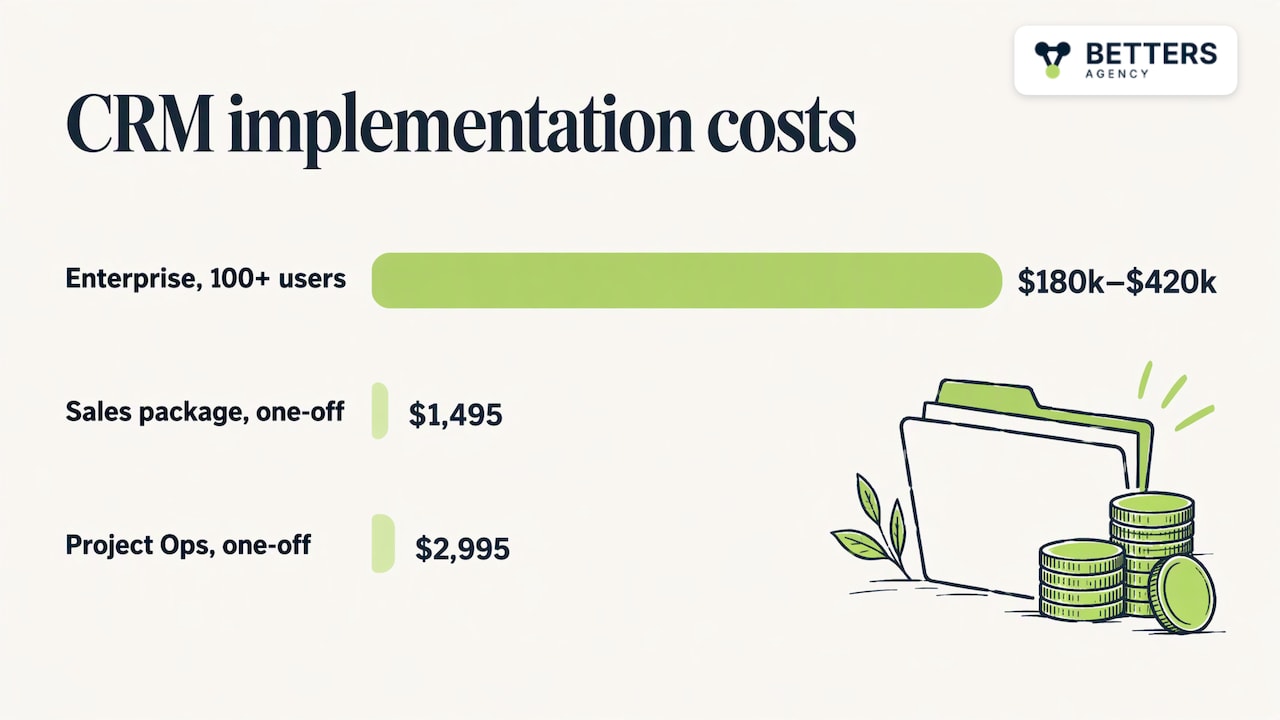
We are Betters Agency, a small, independent Microsoft partner in Minnesota that implements Dynamics 365 and Power Platform. Our packages for Dynamics 365 Sales CRM start at $1,495 one-off, and Dynamics 365 Project Operations starts at $2,995 one-off. This article explains what sits behind numbers like those, so you can scope a project and read any quote with confidence.
Key Takeaways
- Implementation cost is the sum of discovery, configuration, data migration, integrations, training and ongoing administration. The license is a separate line and usually not the largest one.
- Scale drives the total. ZoomInfo’s published guidance puts enterprise implementations with 100+ users between $180,000 and $420,000 in total.
- Dirty data and thin training are the two most common sources of budget overruns, and both are cheaper to address before go-live than after.
- Timelines run from one to three months for small deployments to 6 to 18 months for complex enterprise rollouts, according to ZoomInfo’s implementation whitepaper.
- Salesforce or HubSpot is sometimes the better choice. The right platform depends on your processes, your team and what you already run.
Table of Contents
- What a CRM implementation actually includes
- What the numbers look like by company size
- The cost lines people forget
- What drives your budget up or down
- How long a CRM implementation takes
- A practical way to build your budget
- Fixed-scope packages versus custom projects
- When another platform is the better choice
- Where to start with Betters Agency
- FAQ
- Sources
What a CRM implementation actually includes
A subscription gives you access to software. An implementation turns that software into a system your people use. The second part is where the money goes, and it breaks into a handful of lines that appear in almost every quote.
Discovery and architecture. Someone documents your sales, service or project workflows, decides which objects and fields the system needs, and defines who sees what. This is the cheapest phase per hour and the most expensive one to skip, because every later decision rests on it.
Configuration and customization. Pipelines, forms, security roles, automation rules, dashboards and any custom modules. Cost scales with how far your process departs from the standard model, not with how many screens you have.
Data migration. Moving records from spreadsheets, an old CRM or an ERP, after deduplicating and mapping fields. We cover this in more depth in our data migration guide for CRM implementations.
Integrations. Connecting the CRM to email, accounting, document storage, ERP or project systems. Each connection is its own piece of work with its own testing.
Training and adoption. Role-based training, documentation and a plan for the first months of use.
Ongoing administration. Someone has to own the system after launch: new fields, user changes, security reviews and fixes. Whether that is a fraction of an internal role or a support contract, it belongs in the budget.
What the numbers look like by company size
Published figures vary widely because the projects vary widely. Treat them as orders of magnitude, not quotes.
At the large end, ZoomInfo reports that enterprise implementations with 100 or more users typically total $180,000 to $420,000, a figure that far exceeds the per-user subscription cost. Those projects involve multiple departments, extensive integration and long change-management programs.
At the small end, a focused project with one team, one pipeline and a short list of integrations is a different animal. That is the territory our fixed-scope packages address: a Dynamics 365 Sales CRM package from $1,495 one-off and a Project Operations package from $2,995 one-off, both listed on our packages page. Anything broader, such as a full Dynamics 365 implementation, custom development or several integrations, is scoped individually, and we do not publish a price for it because the scope decides it.
Mid-sized organizations sit between those poles, and this is where estimates are least reliable. A 40-person firm with clean data and one workflow can come in far below a 25-person firm with six years of duplicated records and three systems to connect. Size sets the range. Complexity sets where you land in it.
The cost lines people forget
The most common budgeting error is counting only what a vendor or consultant invoices. A fuller picture includes your own time.
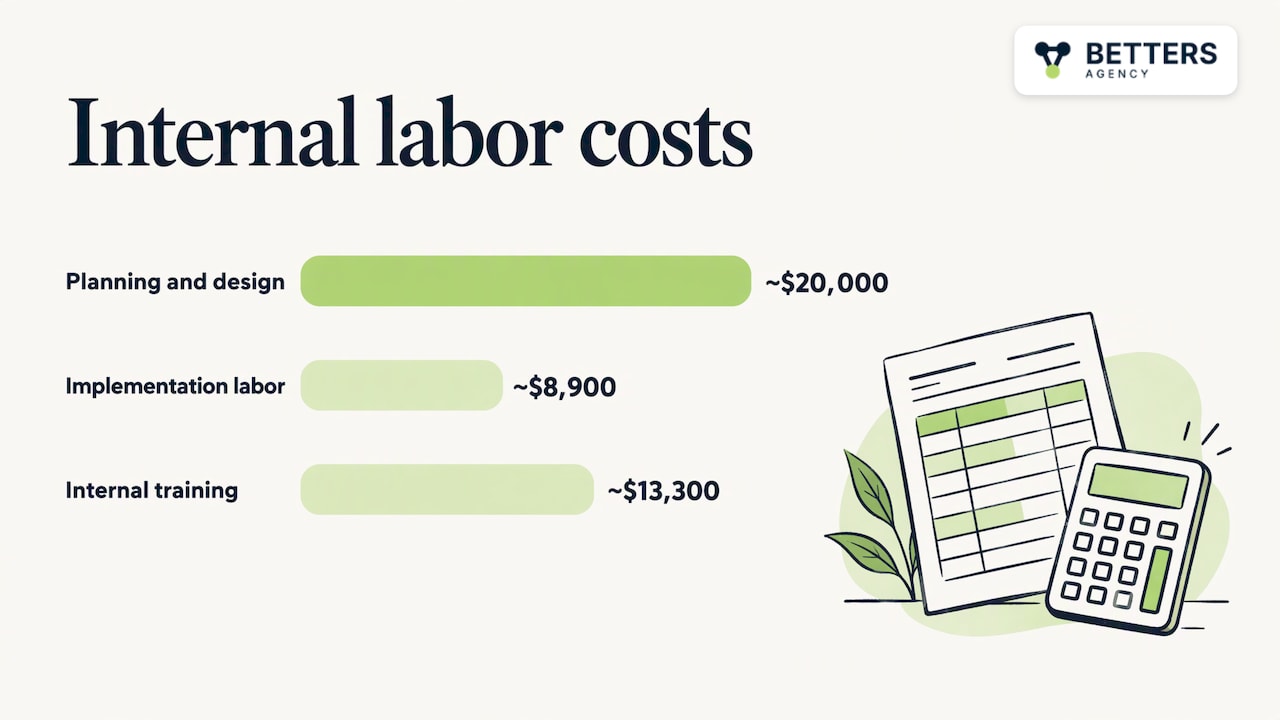
A Forrester Total Economic Impact study from 2011, commissioned by Microsoft, modeled a 50-user deployment for a 2,000-employee organization. It itemized internal labor on top of partner fees, including $20,000 of internal planning and design, about $8,900 of internal implementation labor and about $13,300 of internal training. The dollar figures are dated, but the structure holds today: your people spend real hours on requirements, testing and learning the system, and those hours are a cost whether or not they appear on an invoice.
Three other items regularly surprise buyers:
- Data cleanup before migration. Duplicates, missing owners and inconsistent fields do not disappear when you move them. They arrive in the new system intact. ZoomInfo warns that dirty data found late in migration is the most expensive failure mode, because schema design, field mapping and routing logic must be reworked on top of the flawed foundation.
- Integration testing. Connecting two systems takes a morning. Making sure the connection behaves correctly with real edge cases takes longer.
- Post-launch change requests. Once people use the system, they discover what they need. A budget with no room for the first quarter of refinements will be spent anyway, just reactively.
We have written separately on what duplicate CRM data costs versus what prevention costs, which is worth reading before you approve a migration scope.
What drives your budget up or down
TechTarget’s CRM Handbook frames project complexity on two measures: how many functions you implement and how widely they are used across departments. A multi-function, company-wide rollout needs executive sponsorship, more varied skills and longer up-front planning. That framing is still the most useful way to estimate a project. In practice, six factors move the number.
Scope of functions
Sales pipeline tracking alone is the lightest scope. Adding customer service cases, project delivery, quoting or marketing each adds configuration and testing. Starting with the function that hurts most and expanding later is usually cheaper than a single large launch.
Degree of customization
Standard configuration is fast. Custom modules, bespoke approval flows and Copilot or AI features take design and development time. Customization is worth paying for when it removes manual work that your people repeat every day. It is waste when it recreates a spreadsheet habit inside a new tool.
Data condition and volume
A clean export of a few thousand contacts is routine. A decade of records spread across systems, with no consistent customer identifier, is a project in itself. Our leadership framework for CRM data migration lays out the decisions that determine this cost.
Number and type of integrations
Email and calendar are well-trodden. ERP, accounting and project systems carry more risk, particularly in manufacturing and professional services, where the CRM must agree with a financial system about who a customer is and what was sold.
Governance requirements
Security roles, audit needs and data-quality rules cost more to design than to ignore, and they cost far more to retrofit. Regulated sectors such as insurance and legal carry heavier requirements here. Our CRM governance framework shows what to decide up front.
Adoption plan
Training is the line most often cut when a budget tightens, and it is the line that decides whether anyone uses the system. The Forrester study above includes internal training as a distinct cost for a reason. A system nobody opens returns nothing, however well it was built.
How long a CRM implementation takes
Timeline and cost move together because most of the cost is working hours. ZoomInfo’s whitepaper reports typical timelines of one to three months for small and mid-sized business deployments, three to six months for mid-market organizations and 6 to 18 months for complex enterprise rollouts.
Within those ranges, the phases are consistent:
- Discovery and architecture: the first weeks, and the phase that sets everything after it.
- Configuration and build: the longest stretch for custom work, shortest for a packaged scope.
- Data migration and testing: often runs in parallel with the build, and slips when data quality is worse than expected.
- Training and go-live: short in calendar time, but only if training material was prepared during the build.
- Stabilization: the first weeks after launch, when real use exposes gaps.
The usual cause of delay is not technical. It is waiting on decisions: who owns a field, which of two duplicate records is correct, which approval path applies. Naming a decision-maker on your side at the start saves more calendar time than any tool.
A practical way to build your budget
You can produce a defensible estimate before you talk to anyone.
- List the processes the CRM must support. Write them as workflows with a start, an owner and an outcome, not as features.
- Count users by role. Salespeople, managers, back-office staff and executives need different access and different training.
- Inventory your data. Where do customer records live today, how many are there, and who trusts them? A rough audit of duplicates and blank fields gives you a realistic migration scope.
- List the systems that must connect. Rank them by how often people re-key data between them today.
- Add your internal hours. Requirements sessions, testing and training count. Put a number on them, even an approximate one.
- Reserve a post-launch allowance. Hold back part of the budget for refinements in the first months, and plan an owner for ongoing administration.
With that list in hand, a quote becomes easy to read. Each line should map to something you wrote down. A line you cannot map is a question to ask. A process you wrote down that no line covers is a gap.
If you want a view of the return side, our technical guide to implementing CRM for positive ROI connects cost lines to the benefits they should produce.
Fixed-scope packages versus custom projects
Two pricing models dominate, and each fits a different situation.
A fixed-scope package suits a single team with a known workflow. You know the price at the start, the scope is bounded, and the project is short. The Dynamics 365 Sales CRM package at $1,495 one-off is built for that case.
A custom engagement suits organizations whose processes do not fit a standard model: multiple departments, several integrations, custom modules or automation across systems. Cost depends on scope, so the first step is a conversation about architecture, not a price list. Our services page lists what we take on, including Dynamics 365 implementations, Power Platform customization, custom development and integrations, business process automation, Copilot and AI solutions, governance and data integrity, adoption and enablement, and Power BI data intelligence.
When another platform is the better choice
The right answer is not always Dynamics 365. Salesforce, HubSpot or HighLevel are sometimes the better choice. HubSpot often fits a marketing-led team that wants to be productive quickly with minimal configuration. Salesforce can fit organizations with deep in-house Salesforce skills or an ecosystem of apps they already depend on. HighLevel suits agencies that run many small client accounts from one place.
Dynamics 365 tends to earn its place where your processes are specific, your data must connect to other Microsoft tools, or you want Power Platform automation and Copilot built into the same environment. Our comparison of Dynamics 365 against Salesforce and HubSpot sets out where each fits. The trade-off is that a more configurable platform asks for more design decisions up front. If your team has no capacity to make them and your needs are standard, a simpler tool will cost less to implement and be quicker to adopt. In that case our recommendation would be wrong for you, and we would say so.
Our view on cost
Most CRM budgets fail in the same place: the decisions that determine cost are made after the money is committed. A team picks a platform, signs a quote, and only then discovers that its customer data has three versions of every account and that two departments define a deal differently.
We approach implementation the other way around. We are a small firm, and you work directly with the person who builds your system. That matters for cost because the architecture and data decisions get made by the same person who will later configure them, so nothing is lost in a handoff between a sales team and a bench.
We would rather spend your first hours on process, data and governance than on screens. A system built on clear ownership and clean records is cheaper to extend, cheaper to support and far more likely to be used. That is where our work on governance, data integrity and adoption pays for itself, and it is why we treat them as part of the build and not as add-ons.
We have delivered 100+ production automations and onboarded 5,000+ users, and the pattern is consistent: projects stay on budget when the scope is honest at the start.
Derek
Where to start with Betters Agency
If your need is a focused Dynamics 365 Sales or Project Operations setup, start with our packages: Dynamics 365 Sales CRM from $1,495 one-off and Dynamics 365 Project Operations from $2,995 one-off. For broader work, such as multi-system integration, custom development or automation across your processes, we scope the project against your workflows and data.
As an independent Microsoft partner, we cover Dynamics 365, Power Platform, custom development and Copilot agents, along with automation across UiPath, Power Automate, Zapier, Make and n8n. You can reach us through the Betters Agency site to talk through your scope.
FAQ
How much does it cost to set up a CRM?
The cost depends on users, scope, data condition and integrations. A focused single-team setup can start in the low thousands of dollars, while published guidance puts enterprise implementations with 100+ users at $180,000 to $420,000. Our Dynamics 365 Sales CRM package starts at $1,495 one-off.
Is the software subscription the main cost?
For most projects it is not. Discovery, configuration, data migration, integrations, training and administration typically add up to more over the life of the system. Your own staff time for requirements, testing and training belongs in the total too.
How long does a CRM implementation take?
ZoomInfo’s whitepaper reports one to three months for small deployments, three to six months for mid-market and 6 to 18 months for complex enterprise rollouts. Data quality and slow decisions are the usual causes of delay, so settling ownership early shortens the schedule.
How do I keep a CRM project from going over budget?
Fix the scope around written workflows, audit your data before migration, and fund training and a post-launch allowance. Changes to scope are cheapest before configuration starts. Our governance guidance covers the ownership rules that keep a system from drifting after launch.
Sources
- ZoomInfo: Cost of CRM Software, full pricing breakdown
- ZoomInfo: CRM implementation whitepaper
- Forrester: The Total Economic Impact of Microsoft Dynamics CRM 2011
- TechTarget CRM Handbook, Chapter 7: Planning Your CRM Program
Recommended
- CRM Implementation ROI: Technical Guide vs Alternatives
- Minnesota PSA Software ROI Evaluation Guide for Executives
- How Leaders Can Measure CRM Business Value and ROI Beyond
- D365 Project Operations: Guide to Implementing CRM ROI
Articles are for informational and educational purposes only, Betters Agency LLC is not a licensed financial advisor or legal counselor and does not provide these services, readers are encouraged to check multiple sources for accuracy.