
Blog
Enterprise Data Integration: A Practical Guide for Growing Firms
nbetters · · 12 min read
What enterprise data integration is, which methods fit growing firms, and how to connect CRM, ERP and operations data with Dynamics 365 and Power Platform.
Enterprise data integration is the work of connecting the data held in your CRM, ERP, project, finance and operations systems through one managed layer, so that every team sees the same accurate record. For a growing firm running on Dynamics 365 and Power Platform, the decisive work happens before any connector is switched on: you settle which system owns each record, how it is cleaned, and which business process depends on it. As an independent Microsoft partner and a small firm, Betters Agency builds these integrations around that order of work, and the sections below show what it involves.
Key Takeaways
- Enterprise data integration combines data from many systems into a governed, consistent view. Application integration, by contrast, lets systems exchange data as a process runs. Most firms need both.
- The method (batch, change data capture, virtualization) matters less than deciding ownership of each data object, its quality rules and the process it feeds.
- In manufacturing, the CRM-to-ERP link is where most value and most breakage sit, because master data such as products, routings and bills of materials must agree on both sides.
- Governance is part of the build. Without it, an integration decays into inconsistent records within months.
- Salesforce, HubSpot or HighLevel are sometimes the better choice, and so is a simple native connector when only two systems are involved.
Table of Contents
- What enterprise data integration actually means
- Why growing firms need it
- The methods, and when each one fits
- Architecture and data decisions come before configuration
- Manufacturing data integration: connecting CRM, ERP and the floor
- A working sequence for your first integration
- When this advice is wrong
- Where Betters Agency fits
- FAQ
- Sources
What enterprise data integration actually means
The phrase covers a lot of ground, so it helps to separate two ideas that vendors often blur.
Data integration combines data from disparate sources, such as ERP, CRM, supply chain and partner systems, into a central place where it can be analyzed and trusted. NetSuite’s explanation adds that data integration works independently of the applications themselves, while application integration is about independent applications exchanging data through technologies such as APIs.
Application integration is the real-time cousin. IBM’s comparison describes data integration as typically batch-based work on large data sets at rest, and application integration as real-time work on smaller data sets. In plain terms: when a signed proposal in your CRM must create a project in your delivery system within seconds, that is application integration. When finance wants a clean quarterly view of margin by client across five systems, that is data integration.
What makes it “enterprise” is scale and control, not company size. A firm of 60 people with eight systems has an enterprise-grade problem. The difference from a tangle of point-to-point connections is a managed layer that handles transformation, quality, security and access, rather than one-off links that each work differently and break separately.
Why growing firms need it
Growing firms rarely plan their systems. A CRM arrives first, then a billing tool, then a project tracker, then a spreadsheet that quietly becomes the real source of truth. Each addition solves a local problem and creates a new place for facts to disagree.
Microsoft’s overview of data integration lists the benefits that business leaders usually care about: a unified view that reduces duplication, better decisions, operational efficiency through automation, higher data quality and accuracy, and a foundation for AI. That last point deserves attention. Copilot and AI features are only as reliable as the records they read. If the same client exists three times with three spellings, an AI assistant will summarize the wrong one with great confidence.
The cost of not integrating shows up in familiar ways:
- Sales promises a scope that delivery never sees, because the handoff is an email.
- Leadership reports differ by department, so meetings start with arguing about the numbers.
- Staff re-key the same data into two or three systems, and errors accumulate.
- Dashboards in Power BI are technically correct but built on records nobody trusts.
Our own work covers this ground: Betters Agency has delivered 100+ production automations and onboarded 5,000+ users, and has $10M+ in finance-validated benefit behind its projects. Those results come from the same pattern every time: the data model and the process are fixed first, and the tooling follows.
The methods, and when each one fits
There is no single correct way to move data. NetSuite’s manufacturing guide describes four common methods, and the trade-offs it lists apply well beyond manufacturing.
| Method | How it works | Where it fits | Watch for |
|---|---|---|---|
| ETL (extract, transform, load) | Data is cleaned and shaped before it lands in the destination | Reporting stores where structure is defined up front | Effective but time-consuming to build and change |
| ELT (extract, load, transform) | Raw data lands first and is transformed in the destination | Large data volumes and analytics | Needs high-performance infrastructure |
| Change data capture | Only changes are detected and passed on | Frequently changing records such as inventory | Can overburden performance at scale |
| Data virtualization | A unified view without moving the data | Quick consolidated views across sources | The data stays where it is, so source quality still matters |
For most business leaders the practical question is simpler: does this process need the data in seconds, hourly or overnight? A sales order that triggers production scheduling needs near real time. A margin report for the board does not. Choosing the slowest acceptable method keeps cost, failure points and maintenance down.
At the architecture level, Appian’s overview distinguishes warehouses, lakes, meshes and fabrics, which differ mainly in whether data is copied into a central structure or left in its source and connected. A firm with a handful of core systems seldom needs the most elaborate of these. It needs a clear system of record for each business object and a reliable way to keep copies in step.
Architecture and data decisions come before configuration
Most failed integrations fail at the whiteboard stage, not in the code. Gartner’s guidance on data integration frames maturity across six dimensions: strategy, organizational model, styles and architecture, technology and tools, governance, and metadata. It recommends reaching a baseline level in strategy, architecture and tooling before adding advanced capabilities. That sequence matches what we see as sensible for a growing firm: do not buy sophistication you cannot yet operate.
In practice, the decisions that matter are these:
- System of record. For each object (client, contact, project, product, invoice), one system owns it. Others read or receive copies.
- Identity. How do you know two records are the same client? A shared identifier agreed before the first sync prevents duplicates later.
- Direction and timing. One-way or two-way, real time or scheduled. Two-way sync doubles the conflict rules you must write.
- Quality rules. Required fields, allowed values, formats. Enforce them at the point of entry where possible, not only during transfer.
- Exception handling. What happens when a record fails? Someone must see it, and the process must not silently drop it.
- Ownership after go-live. A named business owner for each data domain, with a way to review changes.
This is the CRM strategy and architecture work, and it connects directly to governance and data integrity. Dataverse, the data platform under Dynamics 365 and Power Apps, gives you a structured place to hold shared business data, but it does not decide for you which system is authoritative. That decision is organizational, and it is cheaper to make on paper than in production.
Manufacturing data integration: connecting CRM, ERP and the floor
Manufacturers ask about this more than almost any other group, because the cost of disagreement is physical: wrong parts, late shipments, scrapped batches.
The most valuable connection for many manufacturers is between the CRM, where quotes and customer commitments live, and the ERP, where inventory, costing and production planning live. When the two disagree on a product configuration or a price, the error surfaces as a rework order. We cover this in more depth in our manufacturing CRM to ERP integration gap analysis, and our guide to CRM-ERP integration exception review shows how to catch failed records before customers notice.
Two findings from outside the CRM world are worth knowing.
Master data causes delays. A manufacturing execution system implementation guide from Lemon Learning reports that corrupted master data, including work centers, bills of materials and routings, is among the most common causes of go-live delays. Cleaning that data before connecting anything is unglamorous and nearly always worth it.
Interoperability gaps are real. A 2023 ACM paper on manufacturing dataspaces identifies gaps between platforms at the levels of identity, security, communication protocol, data model and data format. A peer-reviewed paper in PMC on semantic integration notes that data exchange standards reduce investment risk. For a mid-sized manufacturer, the takeaway is practical: agree on a common data model for the objects that cross systems, and document how each system’s fields map to it.
If you want to compare approaches, our pages on CRM-ERP integration frameworks and integration bottlenecks lay out the options side by side.
A working sequence for your first integration
Whether you build it with us or lead the work internally, this is the order that holds up.
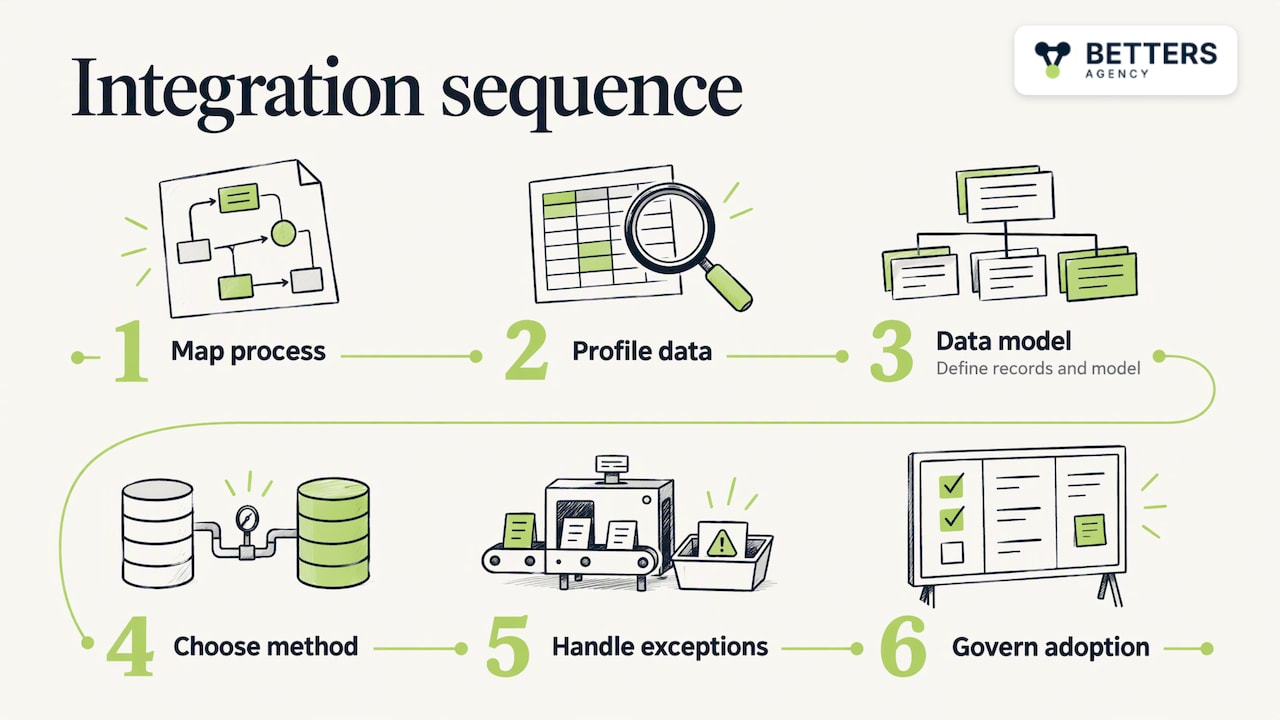
Step 1: Map the process, not the systems
Start with the business event that hurts: a quote that does not become a project, an order that does not reach scheduling. Write down who acts at each point and which data they need. We start here because the process, not the software, defines what must be integrated. You work directly with the person who builds your system, so what you describe is what gets built.
Step 2: Inventory and profile the data
List every system that holds the objects involved, then look at the actual records: duplicates, blank required fields, inconsistent formats. NetSuite names data quality, inconsistent formatting, legacy systems and security as the typical challenges, and recommends avoiding over-integration. Connect only what a process needs.
Step 3: Fix the system of record and the data model
Use the six decisions above. For Dynamics 365 projects this is where the model in Dataverse is designed, so that sales, delivery and finance share one definition of a client and a project.
Step 4: Choose the method per flow
Match each flow to the slowest acceptable timing. Real-time flows are built with Power Automate or custom development and integrations. Reporting flows feed Power BI. Where a process crosses tools outside the Microsoft stack, we automate with Power Automate, UiPath, Zapier, Make or n8n, depending on what fits the job.
Step 5: Build exception handling and monitoring
Every integration fails eventually: an API changes, a field is renamed, a user enters unexpected data. Design the failure path first, with alerts routed to a named person and a queue that shows what needs attention.
Step 6: Govern and enable the people
Adoption decides whether the integration pays off. If users bypass the CRM because it is awkward, the integrated data goes stale. Adoption and enablement, together with governance and data integrity, keep the system from decaying into improper configurations.
When this advice is wrong
A recommendation is only useful if you know where it stops applying.
- Two systems, one flow. If you only need your CRM talking to one accounting tool, a native connector or a simple automation is often enough. A full architecture exercise would cost more than the problem.
- Sales-led firms with simple delivery. If your work is mostly pipeline management, with little project, resource or operations data, Salesforce, HubSpot or HighLevel are sometimes the better choice. They offer mature marketing and sales tooling, and a lighter setup can serve you well.
- Heavy analytics workloads. If your main need is petabyte-scale analytics across many external sources, a dedicated data engineering platform is the right tool, and a CRM-centered integration is not.
- Systems about to be replaced. Do not build deep integrations into a platform you will retire within a year. Integrate to the future system, or accept a manual bridge for now.
If none of those describes you, and your problem is that sales, delivery, finance or the plant floor disagree about the facts, the approach above applies.
Perspective: why we start with the data decision
We are a small firm, an independent Microsoft partner, and the pattern we see in integration work is consistent: firms buy a connector to solve what is really a question about ownership. Nobody has decided whether the CRM or the ERP is right about a customer’s billing address, so the connector faithfully copies the argument between them.
Our view is that the integration is a business process with a data model underneath, and the software is the smallest part of it. That is why our work starts with CRM strategy and architecture, moves into Dynamics 365 implementation, Power Platform customization and custom development and integrations, and only then into dashboards and Copilot and AI solutions. Skipping to the last step gives you a polished view of unreliable data.
We also think governance belongs in the first estimate, not the last. A data model without an owner, change rules and exception review drifts, and the drift is what people later blame on the software.
Derek
Where Betters Agency fits
If your integration problem sits between a CRM, project delivery, finance or operations systems, our work covers it end to end: Dynamics 365 implementations, business process automation, custom development and integrations, governance and data integrity, and Power BI data intelligence. Dynamics 365 Sales CRM packages start from $1,495 one-off, and Dynamics 365 Project Operations packages from $2,995 one-off, both listed on our packages page. Integration scope is quoted on our services page, where you can see how each service is described.
If you work in professional services, our guides on consolidating professional services CRM data and the sales-to-project handoff show the same method applied to that sector. For the platform comparison, see Power Platform versus alternatives for CRM data integration. To discuss your own systems, start at bettersagency.com.
FAQ
What is the difference between enterprise data integration and enterprise integration?
Enterprise integration is the broader term for connecting applications, data and processes across your IT landscape. Enterprise data integration is the part focused on combining data from many sources into a consistent, governed view. Most firms use both: application integration for real-time process triggers, and data integration for reporting and a single source of truth.
How long does an enterprise data integration project take?
It depends on how many systems are involved, how clean the data is and how many processes depend on it. A single well-defined flow between two systems can be scoped far more tightly than a program spanning CRM, ERP and operations. Data cleanup and ownership decisions usually set the schedule more than the build itself, so profiling your data early gives the most reliable estimate.
Can Power Platform handle enterprise integration?
For many growing firms, yes. Power Automate, Power Apps and Dataverse cover a wide range of application integration and workflow needs, and Power BI covers reporting. Where a flow needs custom logic or a system without a standard connector, custom development and integrations fill the gap. Very large data engineering workloads may call for dedicated tooling alongside it.
What makes manufacturing data integration different?
It links business systems with production systems, so errors have physical consequences, and master data such as bills of materials and routings must agree across CRM, ERP and shop-floor software. That makes data model agreement and exception review the priorities. Real-time flows are common for orders and inventory, while costing and performance reporting can run on a schedule.
Should we choose Dynamics 365 or a CRM like Salesforce or HubSpot?
It depends on your processes. If your operation depends on connecting sales to project delivery, finance or manufacturing data inside the Microsoft ecosystem, Dynamics 365 with Power Platform is a strong fit. If your needs are mainly sales and marketing, Salesforce, HubSpot or HighLevel are sometimes the better choice. Our comparison of Dynamics 365 CRM and alternatives sets out the criteria.
Sources
- NetSuite: What Is Data Integration?
- IBM: Application Integration vs. Data Integration
- Microsoft Fabric: What is data integration?
- NetSuite: The Ultimate Guide to Data Integration in Manufacturing
- Appian: Enterprise Data Integration
- Gartner: Comprehensive Guide to Data Integration
- Lemon Learning: How to Implement a Manufacturing Execution System
- ACM: Requirements and Building Blocks for Manufacturing Dataspaces
- PMC: Standards-based Semantic Integration of Manufacturing Information
Recommended
- Cloud Integration Consultant Implementation Guide
- Technical Guide to Implementing Your Big Data Strategy
- Data Architecture Consulting: Value vs Efficiency Gains
- Data Architecture Consulting Implementation Guide
Articles are for informational and educational purposes only, Betters Agency LLC is not a licensed financial advisor or legal counselor and does not provide these services, readers are encouraged to check multiple sources for accuracy.