
Blog
Contract Management Automation: A Practical Guide for US Businesses
nbetters · · 11 min read
How contract management automation works, which lifecycle stages to automate first, and how to build it on Dynamics 365 and Power Platform with sound governance.
Contract management automation uses software to move agreements through request, drafting, approval, signature, storage and renewal with defined owners, rules and reminders, so that people spend their time on judgment instead of chasing documents. For most growing businesses the best results come from automating the repeatable steps first, keeping contract data in one governed system, and connecting that system to the tools where sales, delivery and finance already work. This guide explains what to automate, how to sequence it, where it goes wrong, and when another platform is the better fit.
Key Takeaways
- Contract management automation covers the full lifecycle, from intake to renewal, but the biggest early gains come from approvals, routing, reminders and obligation tracking.
- Workflow automation handles predictable, repeatable steps. Exception-heavy work, such as disputes or claims, is closer to case management and needs a different design.
- Benchmark research from the ACC links fully automated contract processes to faster legal responses and fewer missed obligations.
- Map the process and fix the data model before you configure anything. Automating a broken process only makes the problem faster.
- Dynamics 365 and Power Platform suit businesses already in Microsoft 365, but Salesforce, HubSpot or HighLevel are sometimes the better choice.
Table of Contents
- What contract management automation covers
- Contract workflow automation, contract management and case management
- What the evidence says about benefits
- Choosing which contract workflows to automate first
- Building contract automation on Dynamics 365 and Power Platform
- When another platform is the better choice
- Governance and data integrity for contract automation
- Integration, adoption and measurement
- Our perspective
- Plan a contract automation project with us
- FAQ
- Sources
What contract management automation covers
Contract management is a lifecycle, and automation can touch every stage of it. Sources describe the stages slightly differently. IBM lists seven: request and initiation, authoring and drafting, negotiation, review and approval, implementation and signing, compliance and risk monitoring, and renewal. Other vendors split the same ground into five or six stages, but the sequence is consistent.
In practice, the stages break into two groups.
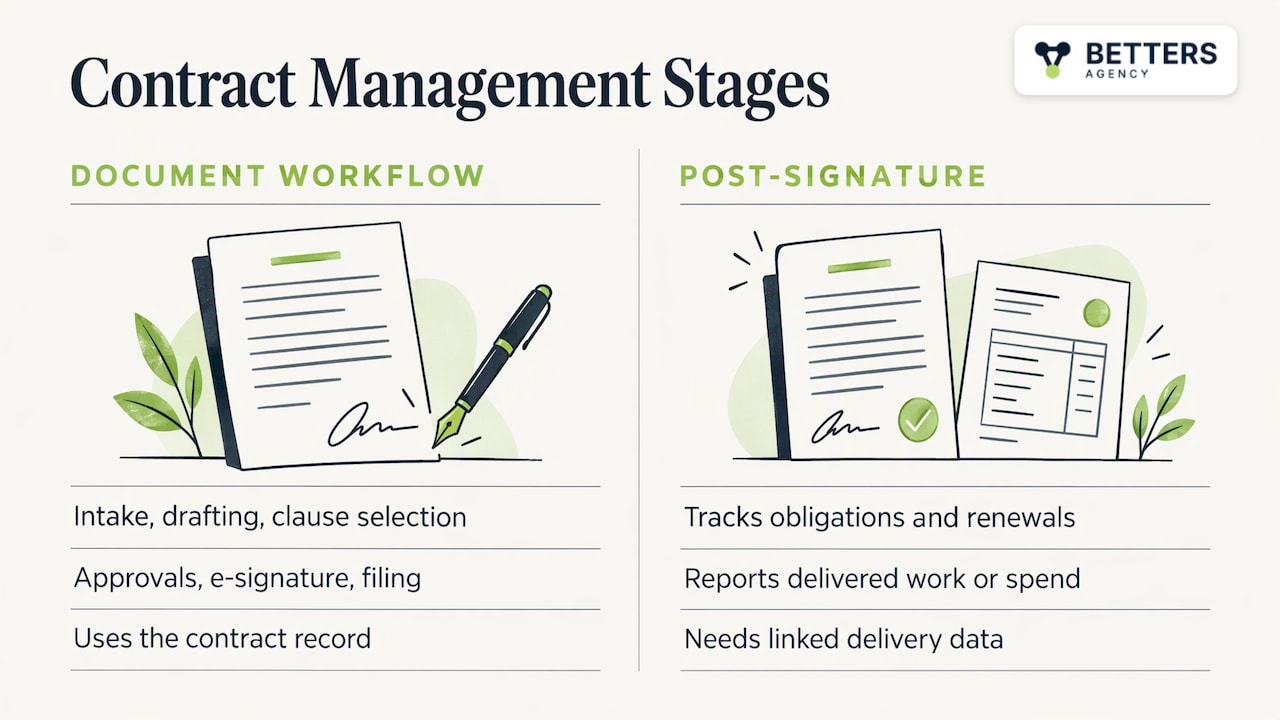
Document workflow stages. Intake forms, template-based drafting, clause selection, approval routing, e-signature and filing. These are rule-driven and are the natural starting point.
Post-signature stages. Obligation tracking, renewal alerts, amendments, and reporting against what was actually delivered or spent. These are the stages most teams neglect, and they are where the contract’s value is realized or lost.
This distinction matters because the two groups need different data. Drafting and approval need the contract record. Post-signature management needs the contract record connected to the customer, the project, the invoice or the spend record. A contract that is signed correctly but never linked to delivery data cannot tell you whether you are meeting its terms.
Contract workflow automation, contract management and case management
Three terms overlap, and mixing them up leads to the wrong build.
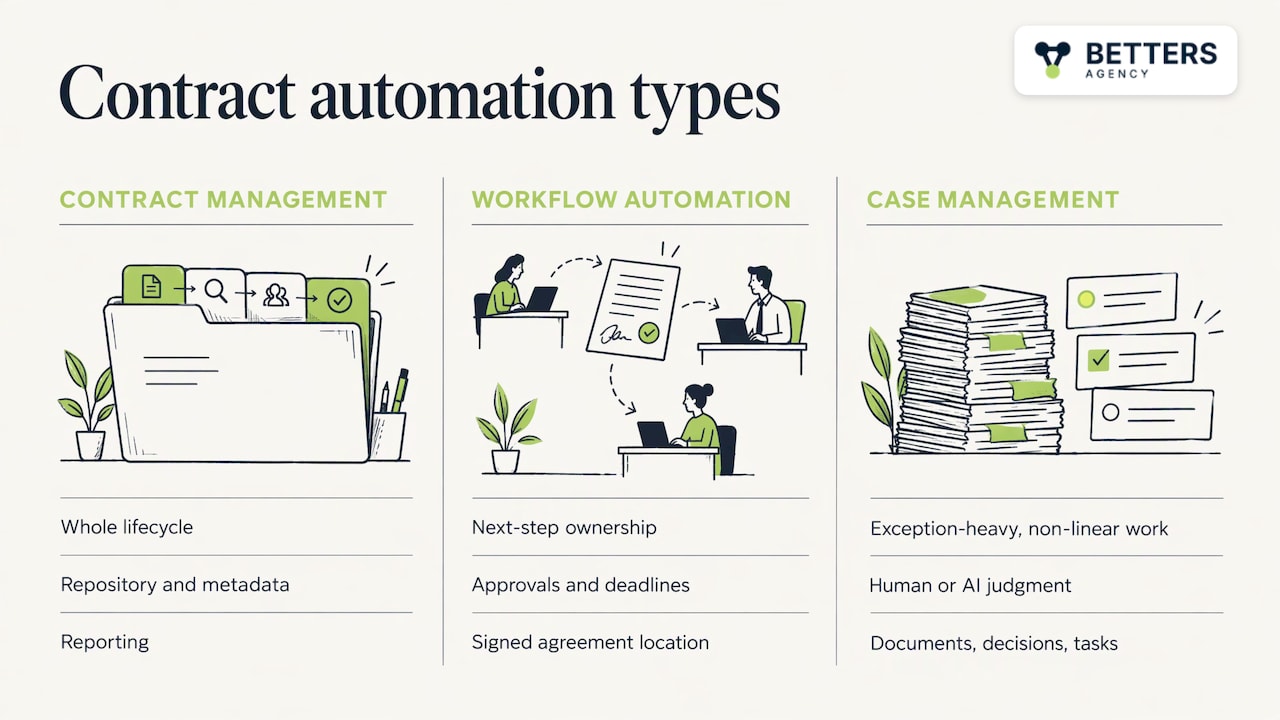
Contract management automation is the broad umbrella: the whole lifecycle, the repository, the metadata, the reporting.
Contract workflow automation is the movement layer inside it. It defines who owns the next step, which approval applies, what deadline matters and where the signed agreement lives. A well-built workflow stays attached to the agreement and its metadata, so status is never a matter of asking around.
Case management automation is a different kind of problem. UiPath’s documentation describes case management as suited to exception-heavy, non-linear scenarios that depend on human or AI judgment at key points, while traditional process automation works best when work is predictable and repeatable. A standard NDA approval is a workflow. A contract dispute, an insurance claim or a regulatory inquiry that references several agreements is a case: it accumulates documents, decisions and tasks over weeks and cannot follow a fixed path.
Most real organizations need both. Routine contracts run through workflows, and the exceptions escalate into cases with their own task lists, history and audit trail. Designing that handoff deliberately is one of the more valuable decisions in the project.
What the evidence says about benefits
Much of the published material on contract automation comes from software vendors, so it helps to anchor expectations in independent research. The ACC’s 2023 True Impact of CLM Benchmark Report found that 78% of companies with fully automated contract lifecycle management could address legal requests within 72 hours, compared with 33% of teams relying on manual processes. The same report found that fully automated practices cut contract delays caused by staff shortages and heavy workloads by 50%.
The risk findings are just as relevant. Only 4% of legal teams with manual processes strongly agreed that they were aware of key contractual risks, and teams with manual processes missed contractual obligations 75% more often than teams with fully automated systems.
These are survey findings from legal teams, not guarantees for any given company. Your results depend on process quality, data quality and whether people use the system. Treat the figures as evidence of direction, then set your own baseline and measure against it.
Choosing which contract workflows to automate first
The most common failure is starting with the tool. A better starting point is a map of what happens today. HashiCorp’s workflow guidance recommends documenting current workflows to find manual tasks and bottlenecks, then producing baseline metrics and a prioritized backlog. That approach applies well to contracts.
A workable sequence looks like this:
- List contract types. NDAs, master service agreements, statements of work, vendor agreements, change orders, subcontracts, renewals.
- Trace each one from request to renewal. Record who touches it, where it waits, and where information is retyped.
- Record the baseline. Time from request to signature, number of approval rounds, number of renewals missed or caught late.
- Score candidates. Volume, repeatability, risk if wrong, and number of systems involved.
- Start with high-volume, rule-based work. Intake, routing, approvals, reminders and status updates are good first candidates.
- Leave judgment calls for later. Heavily negotiated agreements can follow once the repository and data model are proven.
Our guide to evaluating automation process value goes deeper on scoring candidates, and our piece on document approval workflows in SharePoint and alternatives covers the approval stage specifically.
What a good approval workflow contains
Whatever tool you use, an approval workflow should define:
- the trigger (a request form, a won opportunity, a renewal date)
- the routing rules (value thresholds, contract type, non-standard clauses)
- the owner and backup owner for each step
- time limits and escalation when a step stalls
- the record of every decision, retained with the contract
If any of these is undefined, the automation will encode the ambiguity rather than remove it.
Building contract automation on Dynamics 365 and Power Platform
For organizations already running Microsoft 365, the Microsoft stack can carry much of the contract lifecycle without a separate contract platform. The pieces fit together as follows.
- Dataverse holds the contract record, parties, terms, dates and obligations, linked to accounts, opportunities, projects and cases.
- Dynamics 365 provides the customer and project context. A contract connected to a won opportunity and an active project can drive handoffs and billing milestones automatically.
- Power Automate runs approvals, notifications, document generation and renewal reminders, and connects to outside systems.
- Power Apps gives requesters a simple intake form and gives legal or operations a working view of the queue.
- Power BI reports on cycle time, bottlenecks, upcoming renewals and obligations at risk.
- Copilot and AI solutions can help summarize agreements, flag non-standard language and answer questions about terms, with a person making the decision.
The main advantage is integration. When the contract record sits beside sales and delivery data, post-signature management becomes practical. Our sales to delivery automation framework shows how that handoff is designed, and the professional services CRM implementation guide covers the data model underneath.
Some processes need tools outside Microsoft. Robotic process automation across UiPath, Zapier, Make or n8n can bridge systems that lack clean connectors, and we use those where they fit the job.
Packages for a first step
If you are starting with the customer and project side of the process, our published packages begin with Dynamics 365 Sales CRM from $1,495 one-off and Dynamics 365 Project Operations from $2,995 one-off. Contract-specific automation is scoped as business process automation work, since the right design depends on your contract types and systems.
When another platform is the better choice
A recommendation is only useful if you know where it breaks. Dynamics 365 and Power Platform are the wrong answer in several situations.
- You live in Salesforce or HubSpot already. If your sales team works in Salesforce or HubSpot and contracts originate there, adding a second system for contracts can create more handoffs than it removes. Staying put and automating inside the platform is often the better choice.
- You are a small sales-led business with simple agreements. HighLevel or HubSpot, plus an e-signature tool, may cover quote-to-signature with far less setup than a custom build.
- You need a packaged legal repository on day one. If your main need is clause libraries, redlining and a legal-team-owned repository, a dedicated contract lifecycle platform may reach that goal sooner than a configured build.
- Nobody owns the process. No platform fixes a process that has no owner. If approvals depend on who is available, define ownership first.
Our comparison of Dynamics 365 CRM and alternatives lays out these trade-offs in more detail. We would rather tell you early that another platform fits than build the wrong thing.
Governance and data integrity for contract automation
Contract data is only as useful as it is accurate. Wrong renewal dates, duplicate counterparties and missing owners turn automated reminders into noise, and people stop trusting the system. Governance is the work that prevents this decay.
For AI-assisted steps, the same principle holds. The Institute of Internal Auditors’ Spanish affiliate states that reliable, accurate and intact data is a priority for good governance of AI models, because model performance depends on the data behind it. If an AI feature reads your contracts, the quality of your metadata and document storage sets the ceiling on its usefulness.
A practical governance checklist:
- Required fields. Counterparty, contract type, effective date, term, renewal terms, owner and value, enforced at intake.
- Single source of truth. One repository for executed agreements, with clear rules on where drafts live.
- Role-based access. Restrict sensitive agreements and log who changed what.
- Change control. Treat edits to workflows, approval thresholds and templates as controlled changes with a named approver.
- Retention and audit. Keep decision history with each contract for audits and disputes.
- Review cadence. Check duplicates, orphaned records and failed flows on a schedule.
Integration, adoption and measurement
Integration
Contracts rarely live alone. They connect to the CRM, the project system, billing, document storage and e-signature. Decide early which system is authoritative for each data point, so that a change in one place updates the others and never conflicts with them.
Adoption
An automated workflow that people bypass by email is worse than none, because it creates a false record. Adoption comes from making the intake form faster than an email, training each role on its own steps, and removing the old path once the new one works. We have onboarded 5,000+ users onto systems we have built, and the pattern holds: short, role-specific training and a visible owner matter more than long documentation.
Measurement
Set your baseline before launch, then track a small set of measures:
- time from request to signature, by contract type
- time spent in each approval step
- renewals caught before the notice window versus after
- share of contracts with complete required fields
- workflow failures and manual overrides
Review these monthly at first. A rising override count signals a rule that does not match reality. A rising failure count signals an integration or permissions problem. Reliable workflows are maintained, not just launched, which is why ongoing support matters after go-live.
Our perspective
We are a small independent Microsoft partner, and the pattern we see most often is that contract automation fails at the data model, not at the workflow. Businesses buy a tool, build an approval chain, and only later discover that nothing links the signed agreement to the project, the invoice or the renewal owner.
So we work in a different order. We map the process, decide what the contract record must contain and which system owns each field, and only then configure anything. You work directly with the person who builds your system, which keeps those decisions from getting lost between a sales conversation and a build.
We have delivered 100+ production automations and a finance-validated benefit of $10M+ across the systems we have built, and the common thread is governance: required fields, change control and a named owner for every workflow. We also tell clients when Salesforce, HubSpot or HighLevel is the better fit, because the right platform is the one your people will actually use.
Derek
Plan a contract automation project with us
If your contracts connect to sales, projects or service delivery, we can design and build the workflow, the data model and the reporting on Dynamics 365 and Power Platform. The work typically combines business process automation, governance and data integrity, and adoption support, scoped to your contract types and systems.
To see how this fits professional services firms specifically, read our professional services automation implementation guide, or start from the Dynamics 365 consulting page.
FAQ
What is the difference between contract automation and contract lifecycle management?
Contract lifecycle management is the discipline of managing an agreement from request to renewal. Contract automation is the use of software rules and workflows to carry out the repeatable steps in that lifecycle. In practice the terms overlap, and most automation projects aim to deliver a managed lifecycle.
Which contract tasks should I automate first?
Start with high-volume, rule-based work: intake forms, approval routing, reminders, status updates and renewal alerts. These have clear rules and a measurable baseline. Move to negotiation support and clause analysis once your contract data is clean and consistently structured.
Is case management automation the same as contract workflow automation?
No. Workflow automation suits predictable, repeatable paths such as a standard approval. Case management suits long-running work with exceptions, such as disputes or claims, where the next step depends on new information and human judgment. Many businesses use both, with exceptions escalating from a workflow into a case.
Do I need a dedicated contract platform, or can I use Dynamics 365 and Power Platform?
If you already use Microsoft 365 and your contracts tie closely to customers and projects, Dynamics 365 and Power Platform can cover intake, approvals, tracking and reporting. If your priority is a legal-owned clause library and redlining from day one, or your sales team is based in Salesforce or HubSpot, another platform may fit better.
Sources
- IBM: What is Contract Lifecycle Management (CLM)?
- UiPath: Introduction to Case
- ACC: The True Impact of CLM Benchmark Report (2023)
- HashiCorp: Map your current workflows
- IIA Spain: Internal Audit of Artificial Intelligence Applied to Business Processes
Recommended
- Sales-to-Delivery Automation Implementation Guide
- Project-to-Cash Automation: Leadership Decision Framework
- PSA Tools for Executives Automating Estimates-to-Delivery
- Evaluate Time and Expense Automation for Services Firms
Articles are for informational and educational purposes only, Betters Agency LLC is not a licensed financial advisor or legal counselor and does not provide these services, readers are encouraged to check multiple sources for accuracy.