
Blog
Dynamics 365 Support Services: What They Cover and How to Choose
nbetters · · 12 min read
What Dynamics 365 support services include, how Microsoft's plans and partner support differ, and how to choose a support model that fits your business.
Dynamics 365 support services keep your system working after go-live. They resolve incidents, apply updates safely, maintain integrations and data quality, and help users stay productive. You can get this from Microsoft’s own support plans, from an internal team, or from an implementation partner. Most mid-sized organizations end up combining two or more of these. This guide explains what each option covers, what Microsoft’s plans actually include, and how to match the model to your business processes.
TL;DR
- Support covers more than bug fixes. Microsoft’s own operating guidance includes licensing, security, monitoring, release adoption, data synchronization, user training and responsive support.
- Microsoft’s Standard support comes with any Dynamics 365 purchase. Professional Direct costs $9 per user per month (paid yearly, minimum 20 users), and Unified Enterprise is custom priced.
- Microsoft supports the product. It does not own your custom code, integrations or processes, so most organizations add a partner or an internal team.
- The most common model is mixed: internal staff handle simple issues and triage, and a partner handles custom code, integrations, and demand peaks.
- Plan support during implementation, not after launch.
Table of Contents
- What Dynamics 365 support services cover
- Technical and functional issues support can resolve
- Managed support versus incident-based support
- What Microsoft’s own support plans include
- Choosing a support model
- Governing change after go-live
- How to get faster resolutions from any support team
- A perspective on support from the implementation side
- Getting support from BetterS Agency
- A checklist for evaluating support services
- FAQ
- Sources
What Dynamics 365 support services cover
Support is easiest to understand as the “operate” half of a Dynamics 365 project. Microsoft Learn describes the administer-to-operate process as covering business continuity plans, licensing and entitlements, system features, access and security, user training for adoption, monitoring of systems and capacity, background jobs and notifications, software release adoption, data synchronization, compliance, and responsive support.
In practice, those responsibilities group into six service areas:
- Incident resolution. A user reports an error, a workflow stops, or a record will not save. Someone diagnoses it, fixes it or escalates it.
- Configuration and change requests. Adding a field, adjusting a security role, changing an approval path, or updating a system parameter.
- Integration care. Keeping connections to finance, email, document storage and line-of-business systems running as those systems change.
- Performance and monitoring. Watching capacity, background jobs and response times before users complain.
- Release management. Reviewing Microsoft’s updates, testing them against your customizations, and scheduling them.
- User enablement and data quality. Training new hires, running refreshers, and cleaning up duplicates and incomplete records.
A provider that offers only the first item is offering a help desk. A provider that offers all six is offering ongoing stewardship of the system, which is where the long-term value sits.
Technical and functional issues support can resolve
The issues that reach a support team fall into a few recurring categories.
Configuration and user-path problems
Many tickets turn out to be a user taking a path the system was not designed for, or a setting that interacts with another setting. Microsoft’s triage guidance in Help us help you lists the questions a support team asks first: whether the issue was resolved in a different context, whether it relates to a known product limitation, whether a user followed an invalid path, whether custom or ISV code is involved, and whether API constraints or performance restrictions apply.
Custom code and third-party extensions
The same Microsoft page warns that custom or ISV code the support team does not know about can send troubleshooting in the wrong direction and delay resolution. This is why a partner who built or documented your customizations resolves such issues faster than a generic queue.
Performance and throttling
Microsoft’s guidance to monitor and optimize your environments recommends testing performance before production, monitoring it in production while accounting for network traffic, integrations and background jobs, and setting notifications that warn when performance falls below an acceptable range. The same page notes that Microsoft limits API usage to prevent overuse of resources. It recommends batch operations, change tracking, alternate keys and asynchronous operations to avoid throttling or blocking. If a nightly integration suddenly slows or fails, API limits are one of the first things a capable support engineer checks.
Data problems
Duplicate accounts, orphaned records and broken sync between systems rarely announce themselves. They show up as wrong reports and distrust in the system. Data quality maintenance is one of the five responsibility areas Microsoft assigns to a technical support team, alongside business process support, technical support, user proficiency, and new features and developments, as described in its guidance on setting up a technical support team.
Managed support versus incident-based support
This is the distinction buyers most often miss, and it changes both cost and outcomes.
| Incident-based (break-fix) | Managed support | |
|---|---|---|
| Trigger | You raise a ticket when something breaks | The provider works to a standing schedule and scope |
| Typical billing | Per incident or per hour | Recurring retainer or contracted hours |
| Focus | Restore normal operation | Prevent problems, improve the system |
| Typical activities | Bug fixes, error diagnosis, how-to answers | Monitoring, release testing, security role reviews, data audits, small enhancements, user training |
| Best fit | Stable, simple environments | Systems that carry critical processes or change often |
Incident-based support is reactive by design. Managed support adds proactive work: reviewing environment health, testing each release wave against your customizations, auditing user access, and processing a steady backlog of small enhancements. Many providers bundle a monthly pool of hours that can be spent on either fixes or improvements.
The tradeoff is predictability. If Dynamics 365 sits under invoicing, project delivery, claims or case handling, an outage costs more than a retainer. If you use it as a lightly customized contact database, incident-based help may be enough.
What Microsoft’s own support plans include
Microsoft publishes three tiers on its Dynamics 365 support page:
| Plan | Price | Best for |
|---|---|---|
| Standard | Included with any Dynamics 365 purchase | Simple environments, or organizations that rely on a full-service partner |
| Professional Direct | $9 per user per month, paid yearly, minimum 20 users | Continuous production environments needing faster response and expert access |
| Unified Enterprise | Custom pricing through a Microsoft sales representative | End-to-end support across all Microsoft technologies |
The page lists a fastest response of under one hour for critical incidents on all three, with priority routing on the paid tiers.
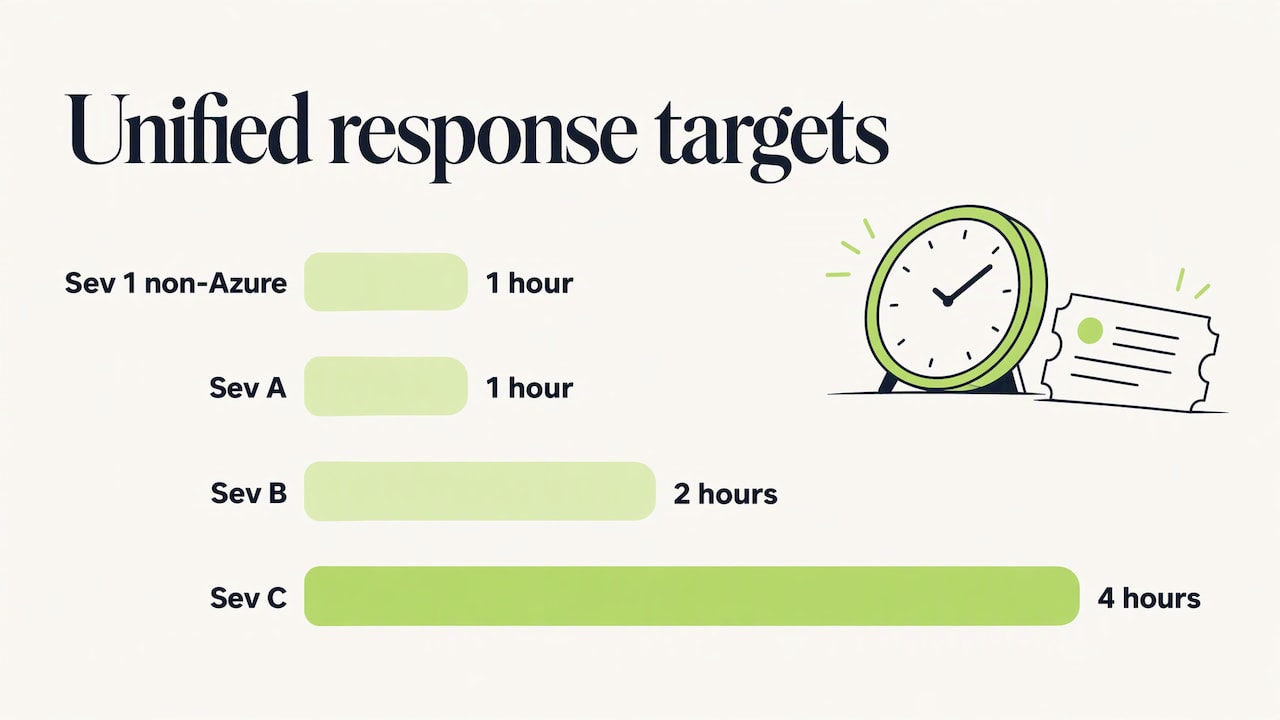
For Unified contracts, Microsoft’s plan details give severity-based response targets. Critical Sev 1 is 1 hour for products other than Azure, around the clock. Sev A is 1 hour around the clock. Sev B is 2 hours, with 24×7 available on request. Sev C is 4 hours, during business hours only. Optional add-ons include Unified Assured (in-country technical support aligned to local regulatory requirements), Mission Critical Services and Value Acceleration Services.
A quick example of the cost arithmetic: 40 users on Professional Direct at the listed rate is 40 x $9 x 12 = $4,320 per year, before any partner fees.
What Microsoft’s plans do not do is own your business. They support the product. A question such as “why did our approval flow route this quote to the wrong manager?” involves your configuration, your process and possibly custom logic. That is where a partner earns its place.
Choosing a support model
Microsoft Learn’s guidance on support models describes three options:
- Fully outsourced: suited to smaller projects without many critical processes or much internal expertise.
- Fully internal: suited to larger projects where the organization has the resources and skills in-house.
- Mixed: the most common model. Internal staff handle simple issues, training and triage. External partners handle strategic advice, demand peaks, custom code and integrations.
For most growing businesses in professional services, construction, insurance, legal and manufacturing, the mixed model is the practical choice. You do not need to hire a developer and a release manager. You do need someone internal who knows the processes and can describe a problem clearly.
Roles to put in place
Microsoft’s team guidance lists business super users as part-time frontline support and business process experts as second-line support. It adds technical architects, technical experts, developers, a release manager, a support manager and business and IT stakeholders. It also notes that a Center of Excellence can bring together specialist knowledge across business units. A 50-person firm will not fill every role, but each responsibility still needs a named owner, even if one person holds three of them.
When to plan it
Microsoft advises starting to plan the support model during the Implement phase, so it can be tested before user acceptance testing, used during Prepare, and be fully operational at Operate. Organizations that treat support as an afterthought typically discover the gaps on the first week after go-live.
Governing change after go-live
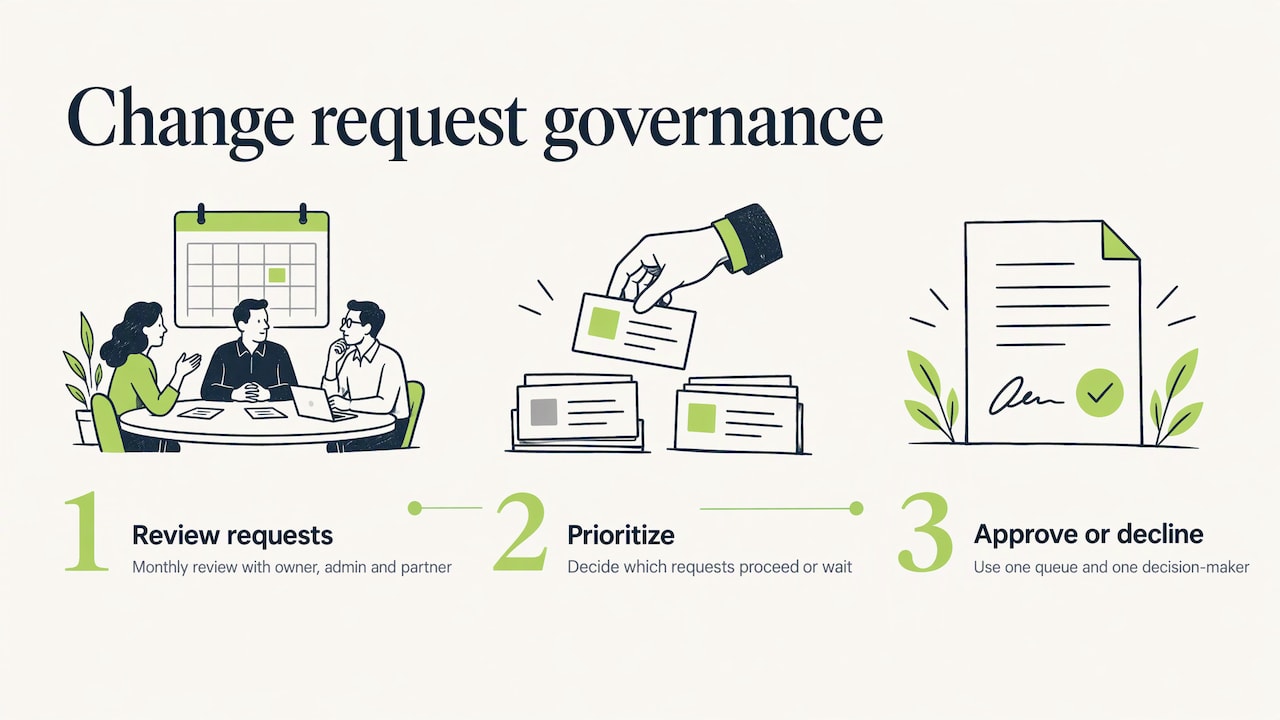
A system that supports the business will keep receiving new requirements. Microsoft’s guidance on planning support operations notes they can come from phased rollouts, changes in connected systems, shifts in market or regulatory conditions, and incremental updates from Microsoft or partners. It recommends a clear process for reviewing, prioritizing and approving them.
The same page lists the kinds of change a support team handles: core data changes, system parameter changes, configuration changes, approval process changes and bug fixes. It recommends defining the support team’s scope and setting up change management boards or committees.
In a smaller company this does not need to be heavy. A monthly 30-minute review with a business owner, an administrator and your partner is often enough to decide which requests proceed, which wait, and which are declined. The value is in having one queue and one decision-maker, rather than ad hoc requests that quietly pile configuration on configuration. That pile is how systems decay.
For Finance and Operations, Microsoft’s cloud operations and servicing guidance also describes validating after each update: confirm it fixed the issue it was applied for, check for regressions, and verify that the build information reflects the update. Whichever Dynamics 365 application you run, build the same habit of post-update validation into your support routine.
How to get faster resolutions from any support team
The quality of the ticket decides the speed of the answer. Microsoft’s guidance asks for a clear problem description with context, steps to reproduce, company-specific terms, custom extensions or ISV code, expected versus actual outcome, error messages, frequency, and tenant and environment details.
A simple intake template makes this routine:
- What were you trying to do, and in which app and environment?
- What did you expect, and what happened instead? Include the exact error text and a screenshot.
- Can you reproduce it, and how often does it occur?
- Does it affect one user, a team, or everyone?
- What changed recently: a release, a customization, an integration, a security role?
Other industries standardize intake in the same way. Field-service teams, for example, use a schedule, inspect, review workflow so every job reaches the reviewer with the same information. A Dynamics 365 help desk benefits from the same discipline, and a super user who triages with a template can close many issues before they reach a partner.
A perspective on support from the implementation side
We see the same pattern across professional services, construction, insurance, legal and manufacturing firms. The software rarely fails. The surrounding process drifts. Fields multiply, automations overlap, and nobody owns data quality, so confidence in the system slowly drops.
That is why we treat support as an extension of the implementation, not a separate product. Our approach puts business process automation ahead of simply deploying software, and we pair it with governance and data integrity work so that configuration stays aligned with how your teams actually operate.
In our experience, a support relationship works best when the partner knows why each customization exists. That context is what shortens triage, makes releases safer and keeps adoption high. We build that knowledge in during the project through documentation, enablement and a clear change process, so the support conversation starts from understanding rather than from scratch.
We also work beyond Microsoft tools when integrations require it, so connected systems are looked after together rather than as separate problems.
the author
Getting support from BetterS Agency
Support works best when it is connected to the people who designed the system. BetterS Agency implements and customizes Dynamics 365 and Power Platform, and our services cover CRM strategy, governance and data integrity, adoption and enablement, automation, Copilot and AI solutions, Power BI and custom integrations. Those are the areas where ongoing support has the most effect.
If you are starting a new deployment, our published packages include Dynamics 365 Sales CRM from $1,495 one-off and Dynamics 365 Project Operations from $2,995 one-off, plus Customer Service and custom Power Apps options, all on the packages page. If you already run Dynamics 365 and need a partner who will own configuration, integrations and releases, talk to us about your environment.
If you are still weighing partner types, our guide to choosing a Dynamics 365 partner sets out the criteria.
A checklist for evaluating support services
Whichever provider you consider, ask for these items in writing:
- Scope: which apps, environments, integrations and custom components are covered, and which are excluded.
- Severity definitions and response targets: the time to first response for each level, and the hours they apply.
- Escalation path: who takes over when a first-line engineer cannot resolve the issue, and when Microsoft is engaged.
- Release handling: who reviews Microsoft updates, tests them against your customizations and schedules deployment.
- Change process: how enhancement requests are submitted, estimated and approved.
- Knowledge transfer: whether documentation and training are produced as part of the work.
- Reporting: monthly visibility into tickets, hours, recurring causes and system health.
- Continuity: who covers when the main engineer is absent.
Compare providers on those items before comparing rates. Two retainers with the same price can differ widely in what they deliver.
FAQ
What is included in Dynamics 365 support services?
At a minimum, incident diagnosis and resolution, configuration changes and user help. Fuller services add monitoring, release testing, integration maintenance, data quality work and training. Microsoft’s own operating guidance treats all of these as part of running the system.
Does Microsoft provide Dynamics 365 support?
Yes. Standard support is included with any Dynamics 365 purchase, and Professional Direct and Unified Enterprise are paid upgrades. Microsoft supports the product itself, so issues rooted in your custom code, integrations or processes usually need a partner or an internal team.
How much does Dynamics 365 support cost?
It depends on the provider and model. Microsoft lists Professional Direct at $9 per user per month, paid yearly, with a 20-user minimum, and Unified Enterprise is quoted individually. Partner support is typically priced per incident, per hour or as a monthly retainer, so request a scoped quote.
Should we use an internal team or a partner?
Most organizations use both. Internal super users handle simple issues and triage, and a partner covers custom code, integrations, release testing and demand peaks. Microsoft describes this mixed model as the most common one.
When should support planning start?
During implementation. Microsoft advises beginning in the Implement phase so the support model is tested before user acceptance testing and fully operational once the system is live.
Sources
- Introduction to the administer to operate process, Microsoft Learn
- Help us help you, Dynamics 365, Microsoft Learn
- Monitor and optimize your Dynamics 365 environments, Microsoft Learn
- Set up a technical support team, Microsoft Learn
- Support, Dynamics 365, Microsoft
- Support Plan Details, Microsoft Unified
- Choose a support model, Microsoft Learn
- Plan your support operations, Microsoft Learn
- Cloud operations and servicing, Finance and Operations, Microsoft Learn